shadcn.io is an independent project built on shadcn/ui
The word hello writes itself in one cursive line, the way a new Mac greets you, and then stays on the page.
Use it once, on a welcome screen, an onboarding step or an empty dashboard the reader sees for the first time. It is a greeting, not a loader: for a wait use a Spinner, and for a line of text that should arrive in pieces, a text effect. In Solid each stroke is an SVG path drawn by CSS keyframes, in the current text colour, and language switches it to the Vietnamese xin chào.
Installation
Anatomy
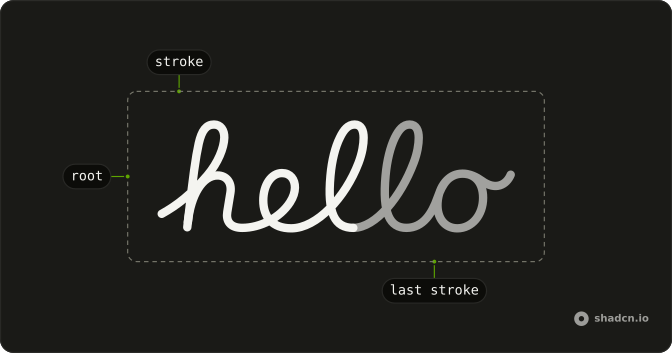
HelloEffect
└── stroke (one per pen stroke, the last one ends the word)
Usage
import { HelloEffect } from "@/components/ui/hello-effect";<HelloEffect class="h-20 text-foreground" />Accessibility
The word is an image named by its text, hello or xin chào, so a screen reader says the word once instead of reading out paths. Pass aria-label to name it something else, such as Welcome. Nothing in it is focusable, and nothing repeats: it draws once and stays. When the reader asked for reduced motion the word is there at once, fully drawn, and onComplete is called straight away.
Demos
Replay
A Replay button under the word writes it again from the first stroke. The demo gives the component a new key on each press, which is the way to restart it: there is no play method to call. Use a replay only where the reader asked for it; the greeting should not loop on its own.
Speed
The same word at speed 2 and at speed 0.5. Speed scales every stroke's delay and length together, so the hand keeps its rhythm: 2 takes half the time of the default 3.5 seconds, 0.5 takes twice as long. Keep it near 1 on a screen people wait on, since a slow greeting in front of a form is a delay.
Complete
A welcome screen: once the last stroke is drawn, onComplete brings in a line of copy and a Get started button. Until then that part is inert, so a keyboard can't reach a button nobody can see yet. Use the callback for what follows the greeting rather than a timer, so a change of speed or reduced motion keeps the two in step.
FAQ
How do I make the Hello Effect faster or slower?
Pass speed, a multiplier with 1 as the default. speed 2 writes the word in half the time and 0.5 in twice the time, since every stroke's delay and duration are divided by it. At 1, hello takes 3.5 seconds and xin chào 7.8. The Speed demo on this page shows both ends side by side.
Can I run something when the word is finished in Solid?
Yes, pass onComplete. It is called when the last stroke's animation ends, and at once when the reader asked for reduced motion, since nothing plays then. The Complete demo on this page uses it to bring in a button. A timer set to the duration would drift as soon as the speed changes, so use the callback instead.
How do I play the animation again?
Render it again with a new key, as the Replay demo does with a counter that a button increases. The new element starts from the first stroke. Changing language also starts the new word from the beginning, which is how the first demo cycles between hello and xin chào.
How do I change its colour, size or weight?
The strokes use the current text colour, so set a text colour class on it or on its parent. Set the size with a height such as h-20 and the width follows the word. The stroke width is the SVG's own attribute, about 15 by default, and passes through like any other. The tone mark of xin chào uses the primary colour as its one accent.
Does the Hello Effect respect reduced motion?
Yes. Under prefers-reduced-motion the keyframes are off and the word is simply there, fully drawn, and onComplete fires straight away so what follows it still appears. The animation also never repeats on its own, so there is no loop to stop.
How does the handwriting animation work with Ark UI?
Each pen stroke is one SVG path with pathLength 1, so its dash is exactly as long as the stroke. CSS keyframes slide that dash home from a whole length back while the stroke fades in, and each path waits its own delay. No animation library is involved, and Ark UI isn't needed for it: the component is plain SVG on every target.
API Reference
HelloEffect
<svg> data-slot="hello-effect"
language?"en" | "vi"
The word it writes: "hello", or "xin chào" in Vietnamese.
- Type
"en" | "vi"- Default
"en"
onComplete?() → void
Called once the last stroke is drawn (at once with reduced motion).
- Returns
void
speed?number
How fast it writes: 2 takes half the time, 0.5 twice as long. At
1, "hello" takes 3.5 seconds and "xin chào" 7.8.
- Default
1
class?string
Merged with the part's classes.
data-accent?stringdata-language?string
Mirrors language.
data-last?string