shadcn.io is an independent project built on shadcn/ui
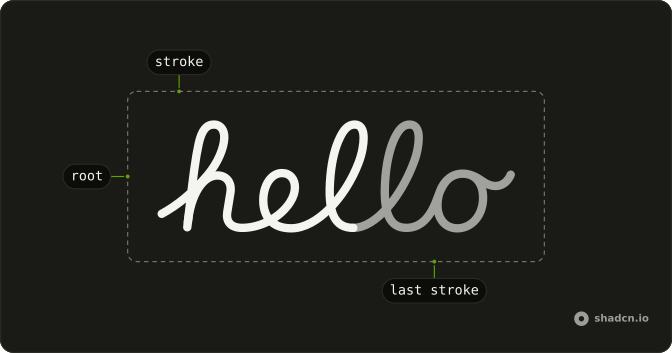
Hello Effect writes the word hello in one cursive line, stroke by stroke, the way a new Mac greets you, and then leaves it on the page. Set language to vi and it writes the Vietnamese xin chào instead. Put it on a welcome screen, the first step of onboarding or an empty dashboard someone opens for the first time.
It plays once and is meant to be watched, so it doesn't belong where people wait for something to load. Use a Spinner there.
Installation
Anatomy
Usage
<script setup lang="ts">
import { HelloEffect } from "@/components/ui/hello-effect";
</script>
The word draws in the current text color at the height you give it, and its width follows from the word.
<template>
  <HelloEffect class="h-20 text-foreground" />
</template>
Accessibility
The SVG has role="img" and a title that holds the word, hello or xin chào, so a screen reader announces the word once instead of the paths it is drawn with. For xin chào the SVG also carries lang="vi", so it's voiced in Vietnamese on a page in another language. Give it an aria-label to name it something else, such as Welcome, or aria-hidden="true" when a heading beside it already says the same. Nothing in it takes focus, and it never loops. Under reduced motion the word appears fully drawn, and the completion callback runs right after it mounts.
Demos
Replay
The word sits above a Replay button, and each press puts a new HelloEffect in place of the old one, which writes the word again from its first stroke. Swapping it out is the way to replay the same word, since the component has no method that restarts it. Offer a replay only where someone asks for one, and let the greeting stay still otherwise.
Speed
The same hello twice, at a speed of 2 and of 0.5, each labeled under the word. The value divides every stroke's delay and duration alike, so the hand keeps its rhythm: 2 finishes in 1.75 seconds instead of 3.5, and 0.5 takes 7. On a screen people wait on, stay near the default of 1.
Complete
A welcome screen where the complete event brings in a line of copy and a Get started button once the last stroke is drawn. Until then that block is inert and transparent, so neither the keyboard nor a screen reader reaches a button nobody can see yet. Tie what follows the greeting to the callback rather than a timer, and the two stay in step at any speed.
FAQ
How do I make the Hello Effect write faster or slower?
Set speed, a multiplier that defaults to 1. Every stroke's delay and duration are divided by it, so 2 writes the word in half the time and 0.5 in twice the time, and the pauses between strokes scale with them. At 1, hello takes 3.5 seconds and xin chào 7.8.
Zero or a negative number falls back to 1. The Speed demo puts 2 and 0.5 one above the other.
How do I show a button after the Hello Effect finishes in Vue?
Listen for its complete event with @complete. It fires when the last stroke's animation ends, or right after the component mounts when the reader has asked for reduced motion, since nothing plays then.
The Complete demo keeps a line of copy and a Get started button inert and transparent until then, and fades them in from the handler. A timer set to the animation's length drifts as soon as the speed changes, so wait for the callback instead.
How do I replay the Hello Effect animation?
Bind :key to a counter a button increases, as the Replay demo does. Vue mounts a fresh component that starts from the first stroke, since there is no method to restart the one on screen.
Changing language restarts it too, with the other word. The first demo on this page cycles between hello and xin chào that way, switching a second after each word is done.
How do I change the Hello Effect's color or stroke width?
The strokes use the current text color, so a text color class on the component or on its parent sets it. The one exception is the tone mark of xin chào, drawn in stroke-primary as the word's accent.
The stroke width is the SVG's stroke-width attribute, 14.89 by default, and a value you pass replaces it. It is measured in the drawing's own units, where the word is 200 tall, so the line thickens and thins with the height you set.
Why does the Hello Effect overflow on a phone screen?
Its width follows its height, and it won't shrink in a flex row. Hello is about 3.2 times as wide as it is tall, 255px at the default h-20, and xin chào about 5 times, 404px at the same height.
Add max-w-full, as every demo here does. The box then stops at its container's width, and the drawing scales down to fit inside it. To draw it smaller on phones and larger on wide screens, set the height per breakpoint, such as h-16 sm:h-24, as the first demo does.
Does the Hello Effect respect reduced motion?
Yes. Its animation runs only under Tailwind's motion-safe variant, so when the reader has asked for reduced motion each stroke shows fully drawn from the first frame. It still reports the end, right after the component mounts, through the complete event, so whatever waits for it appears as well.
The word is written once and never loops, so there is no ongoing motion for anyone to stop.
How does the Hello Effect draw its handwriting without an animation library?
With SVG and CSS alone, the same way on every target, and Ark UI plays no part in it. Each pen stroke is one path with pathLength set to 1, so a dash of length 1 covers it exactly.
The hello-effect-draw keyframes slide that dash from a whole length back to its place while the stroke fades in, so the pen's round tip doesn't show before it moves. Each path sets its own delay, duration and easing through --hello-effect-delay, --hello-effect-duration and --hello-effect-ease, which is where speed does its work.
Can the Hello Effect write a word other than hello?
Only xin chào, with language set to vi. Each word is a set of hand-drawn SVG paths in the component's WORDS table, with a start time, a duration and an easing for every stroke, so a word can't be generated from a string.
To add your own, draw it as single-line strokes in the order a pen would write them, add an entry with its viewBox, its label and those timings, and add its key to the type of language. The label becomes the accessible name.
API Reference
HelloEffect
<svg> data-slot="hello-effect"
language?"en" | "vi"
The word it writes: "hello", or "xin chào" in Vietnamese.
- Type
"en" | "vi"- Default
"en"
speed?number
How fast it writes: 2 takes half the time, 0.5 twice as long. At
1, "hello" takes 3.5 seconds and "xin chào" 7.8.
- Default
1
class?string
Merged with the part's classes.
@complete() → void
Called once the last stroke is drawn (at once with reduced motion).
- Returns
void
data-accent?stringdata-language?string
Mirrors language.
data-last?string