shadcn.io is an independent project built on shadcn/ui
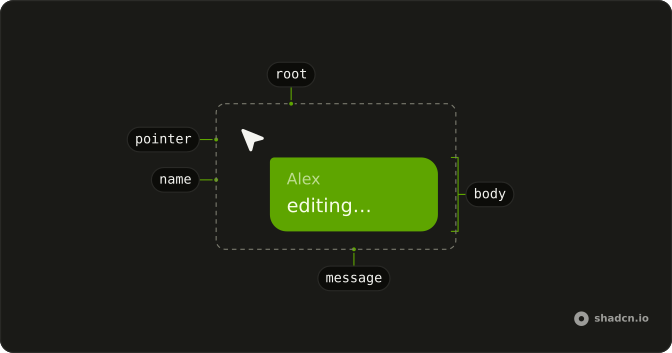
Cursor draws another person's pointer with a name tag, and a short message when there is one, at a position you give it. It's for multiplayer presence: a shared canvas, a document two people edit, a whiteboard, or a mockup of one. It doesn't follow your own mouse, since the system pointer already does that.
When you only need to show who is here, not where they are, use a row of Avatars.
Installation
Anatomy
Usage
<script setup lang="ts">
import {
  Cursor, CursorBody, CursorMessage, CursorName, CursorPointer,
} from "@/components/ui/cursor";
</script>
color takes any CSS color for this person. Leave it out and the cursor uses your theme's primary.
<template>
  <Cursor color="var(--info)">
    <CursorPointer />
    <CursorBody>
      <CursorName>Alex</CursorName>
      <CursorMessage>editing…</CursorMessage>
    </CursorBody>
  </Cursor>
</template>
Accessibility
A Cursor sits over the page without getting in the way: it ignores the pointer, so it never blocks a click on what's under it, and the arrow is hidden from assistive tech. The name and the message are plain text, read wherever the cursor sits in the DOM. When the people present are already listed elsewhere, such as an avatar row, add aria-hidden to each Cursor so screen readers don't read them twice. A changing message isn't announced, so use a live region of your own for anything people need to hear.
Demos
Colours
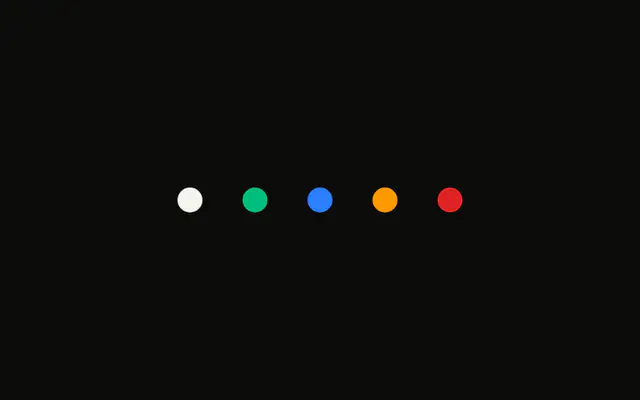
Five people in five colors through color: your theme's primary when it's left out, then info, success, warning and destructive. The tag's text turns dark on a light color and light on a dark one, with no class to set. Give each collaborator a color from a fixed list, so the same person keeps the same color from one session to the next.
Parts
Three stages of one cursor: a pointer alone, a pointer with Priya's name, and a pointer with her name and a question. When CursorBody holds a CursorMessage, the name dims and the corner by the pointer tightens, so the message reads as what she's saying. Use the bare pointer where name tags would crowd the canvas, such as a zoomed-out board.
Canvas
Three people on a sketch of a document, each placed with absolute and logical insets such as start-[62%] and top-[34%]. Sam's cursor sits beside a text selection drawn in Sam's color, and Alex, with no color, is typing in primary. In an app, set the position from each person's coordinates as they arrive, and the cursor moves with no code of its own.
Live positions
Sam and Priya move over a sketch of a page as their positions arrive, one update every second and a half. Each position is a fraction of the canvas set as insetInlineStart and top, so it fits any width and mirrors in right-to-left text. A 700ms transition glides each cursor between updates, and under reduced motion it jumps instead.
FAQ
Why doesn't the Cursor component follow my mouse?
Because it draws other people's pointers, and yours already has the system cursor. The component has no pointer tracking at all: each Cursor stays where you place it, from the coordinates your realtime service sends for that person.
The Canvas demo places three of them at fixed positions, and the Live positions demo moves two as their updates arrive. To draw your own pointer with it anyway, update its position from the pointermove events on the area it covers, and hide the system pointer there with cursor: none.
How do I show a Cursor with only a name, or with a message?
Choose the parts you put inside Cursor. CursorPointer alone is the bare arrow. Add CursorBody with a CursorName for a name tag, and a CursorMessage after the name for a line of text under it.
The body changes with what it holds: with a message, the name dims and the corner nearest the pointer gets tighter. The Parts demo shows all three shapes side by side.
How do I give each collaborator a different Cursor color?
Pass color to Cursor: any CSS color or variable, such as var(--info) or a hex value. It sets --cursor-color, which fills the pointer and the tag, and the tag's text turns dark or light to stay readable on it.
Pick the color from a fixed list by the person's user ID, so they keep it across sessions and in every view. The readable text comes from CSS relative color syntax, and a browser without it keeps the inherited text color. To choose the text color yourself, add a text color class to CursorBody.
How do I place a Cursor at x and y coordinates?
Make the area it moves over relative, give the Cursor absolute, and set its position in its style, as the Live positions demo does with fractions of the canvas. The tip of the pointer is the cursor's top-start corner, so the coordinates you set are where the tip points.
For positions that update many times a second, set a transform with translate instead of left and top, which spares the browser a layout on every update. A short transition on transform smooths the jumps between updates from the network.
Why does a long Cursor message run off the screen?
CursorBody doesn't wrap its text, so a long message makes the tag as wide as the sentence. Cap it with a maximum width and truncate on CursorMessage, which ends the line with an ellipsis.
To show the whole message instead, add a maximum width and whitespace-normal to CursorBody, and the text wraps onto more lines under the name. Keep messages to a few words either way, since a paragraph floating over the canvas covers what people are working on.
What does the Cursor do in right-to-left text?
It mirrors. The pointer flips to tip up and to the right, and the tag sits below it to the left, with the tip still at the cursor's top-start corner.
Each name and message also takes its direction from its own text, so a Latin name on an Arabic page, or an Arabic name on an English one, still reads in the right order. Logical insets such as start-[62%] place it correctly in both directions.
API Reference
Cursor
<span> data-slot="cursor"
color?string
The collaborator's colour, any CSS colour: the pointer and the body's fill. The body's text turns dark or light to stay readable on it.
- Default
"var(--primary)"
class?string
Merged with the part's classes.
--cursor-colorstring
The pointer's and the body's colour (var(--primary)).
CursorPointer
<svg> data-slot="cursor-pointer"
class?string
Merged with the part's classes.
--cursor-colorstring
The pointer's and the body's colour (var(--primary)).
CursorBody
<span> data-slot="cursor-body"
class?string
Merged with the part's classes.
--cursor-colorstring
The pointer's and the body's colour (var(--primary)).
CursorName
<span> data-slot="cursor-name"
class?string
Merged with the part's classes.
--cursor-colorstring
The pointer's and the body's colour (var(--primary)).
CursorMessage
<span> data-slot="cursor-message"
class?string
Merged with the part's classes.
--cursor-colorstring
The pointer's and the body's colour (var(--primary)).