shadcn.io is an independent project built on shadcn/ui
Installation
Overview
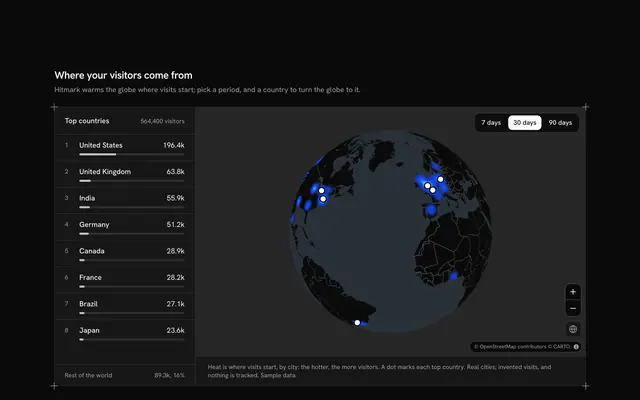
See where your users are and where they pay, with this user distribution map for React with Base UI. Dotfield, a product analytics tool, draws 400 sample users as heat on a live Map in its globe projection, following your theme light or dark, scattered by a seeded stream round sixteen real cities from San Francisco to Sydney. A Toggle Group floating over the globe picks the segment, Signed up, Active this month or Paying, and the heat re-weighs to the same people narrowed down by each city's typed active and paying rates, so the picture shifts from where people sign up to where they pay. A scroll-snap row of cards under the globe ranks the six biggest cities for the segment with their count, their share and a bar, in step with numbered rings on the globe; a card or a ring turns the globe to that city, zooming in further turns the heat into the users themselves, and the globe button turns it back. Built from Map, Toggle Group, Button and Guides. For product analytics, growth teams and SaaS dashboards.
FAQ
How are the segments made?
Each city in LINES has its users and two typed rates: the share active this month and the share of those who pay. cityOf turns them into three counts, and usersOf orders the city's users so that the active ones come first and the paying ones first among those. A segment is then the first so many users of every city, so switching segments never moves a user, it only narrows the crowd.
How is the heat drawn?
The heat is the Map's heatmap layer over each segment's users, in the theme's chart colours and turned round on a dark globe so the busiest place is always the brightest. A smaller segment runs hotter (intensityOf), so the paying users still show a shape rather than a faint haze; zoomed in past a country the heat fades and each user shows as a dot.
How is the ranking worked out?
rankingOf sorts the sixteen cities by their count in the segment, biggest first, and keeps the typed order for a tie. The cards and the rings show the top six; the share is the city's count over the segment's total, rounded to a whole percent, and the bar is its count against the leader's.
Where does the data come from, and what stays local?
The cities are real and at their real coordinates; Dotfield, every user and every rate are invented and typed into the file, and the users are scattered by a fixed seed, so they land in the same places on the server and in every browser. The basemap tiles come from CARTO over OpenStreetMap data. Nothing is fetched besides the tiles, and nothing you choose is sent or saved.
Can I use it without a mouse?
Yes. The segments are a toggle group, every top city is a button in the card row with its pressed state, and the zoom and globe buttons work from the keyboard; the globe takes the arrow keys and plus and minus once focused. The rings on the globe are a pointer shortcut to the same choice. A polite message gives the segment's total, the leading city and the chosen one once the choice settles.
How does it look on a phone?
The globe starts further out so all of it fits the shorter map, keeps the segment toggle over its top, and the card row scrolls sideways with each card snapping into place; pressing a ring scrolls its card into view. Scrolling the page over the globe scrolls the page; use two fingers to turn it.