shadcn.io is an independent project built on shadcn/ui
Six boxes in two groups of three. When the code is complete, the boxes lock and a check appears with Code verified successfully!
Lock the field after a good code so it is not edited again. A Button can take people to the next step once the check has passed. In React, Ark UI does not verify the code.
Installation
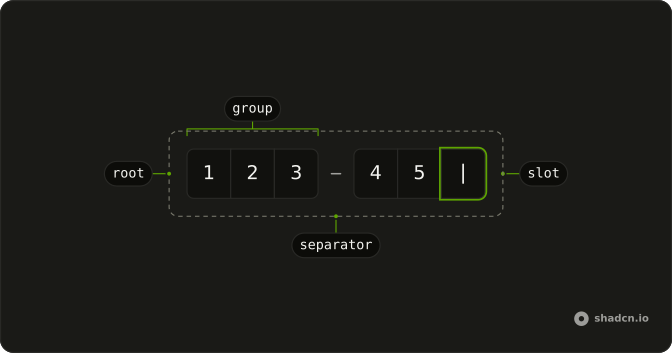
Anatomy
Usage
<div className="flex flex-col gap-2">
  <InputOTP
    disabled={isSuccess}
    onValueChange={handleValueChange}
    onValueComplete={handleComplete}
    value={value}
  >
    <InputOTPGroup>
      <InputOTPSlot className="bg-background" index={0} />
      <InputOTPSlot className="bg-background" index={1} />
      <InputOTPSlot className="bg-background" index={2} />
    </InputOTPGroup>
    <InputOTPSeparator />
    <InputOTPGroup>
      <InputOTPSlot className="bg-background" index={3} />
      <InputOTPSlot className="bg-background" index={4} />
      <InputOTPSlot className="bg-background" index={5} />
    </InputOTPGroup>
  </InputOTP>
  {isSuccess ? (
    <div
      className="flex items-center gap-2 text-sm text-success"
      role="status"
    >
      <CheckIcon aria-hidden="true" className="size-4" />
      <span>Code verified successfully!</span>
    </div>
  ) : null}
</div>
FAQ
When is the code verified?
When every slot is filled; a half-second timer stands in for the request.
onValueComplete fires when every slot is filled.
Why is the field disabled afterwards?
So the accepted code can't be changed. disabled comes from the same success state that shows the message.
How is the confirmation shown?
A row in text-success with a CheckIcon and Code verified successfully!, with role status so it's announced.
What if the code changes before it's verified?
Every change resets the success state, so only a complete code shows the confirmation.
API Reference
Input OTP
Sets disabled={isSuccess}, onValueChange={handleValueChange}, onValueComplete={handleComplete}, value={value}, index={0} and index={1}. The rest is on the Input OTP page.