shadcn.io is an independent project built on shadcn/ui
UI library: Ark UI
Open shows a title that reads Title and the line Content goes here. Cancel and Confirm sit at the end of the panel. Both close it.
Use it for a quick confirm tied to one control. A decision that cannot be undone belongs in an Alert Dialog. In Vue, Ark UI does not perform the confirm.
Installation
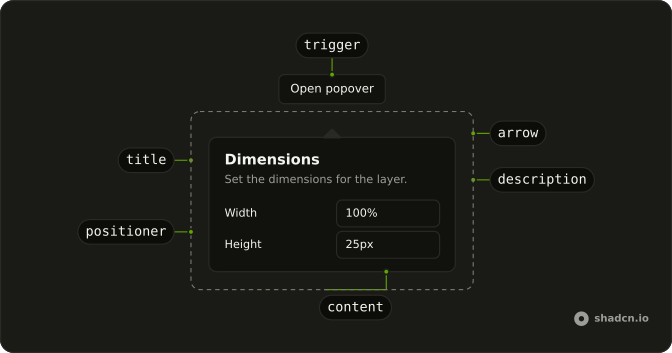
Anatomy
Usage
<Popover>
  <PopoverTrigger :asChild="true">
    <Button variant="outline">Open</Button>
  </PopoverTrigger>
  <PopoverContent>
    <PopoverHeader>
      <PopoverTitle>Title</PopoverTitle>
      <PopoverDescription>Content goes here.</PopoverDescription>
    </PopoverHeader>
    <div class="flex justify-end gap-2">
      <PopoverClose :asChild="true">
        <Button size="sm" variant="outline">Cancel</Button>
      </PopoverClose>
      <PopoverClose :asChild="true"><Button size="sm">Confirm</Button></PopoverClose>
    </div>
  </PopoverContent>
</Popover>
FAQ
API Reference
Popover
Sets asChild. The rest is on the Popover page.
Button
Sets variant="outline" and size="sm". The rest is on the Button page.