shadcn.io is an independent project built on shadcn/ui
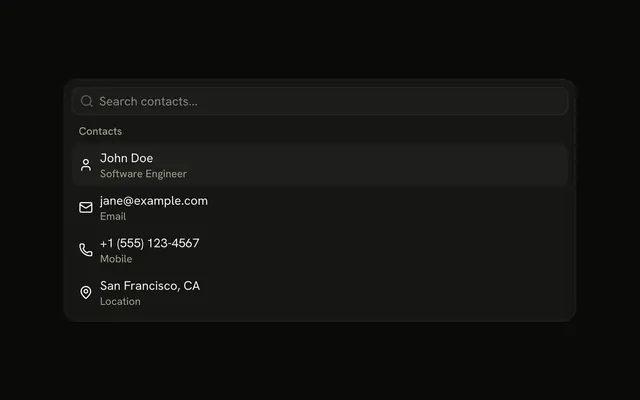
The menu is already open under Contacts. John Doe has the line Software Engineer, then an email marked Email, a phone number marked Mobile, and San Francisco, CA marked Location.
Add the second line when the labels could be mistaken for one another. For a value that stays in a form, use a Combobox. In React, Base UI highlights a row and waits for you.
Installation
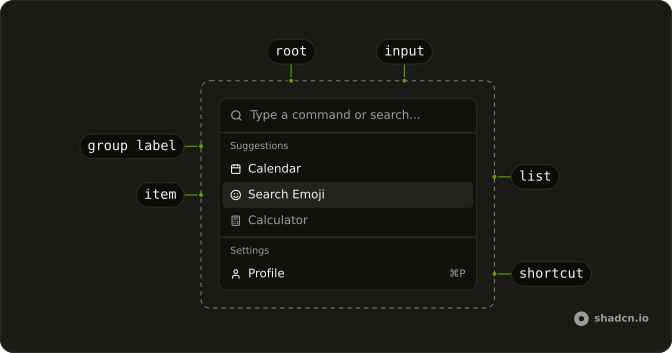
Anatomy
Usage
<CommandItem key={item.value}>
  <Icon aria-hidden="true" />
  <div className="flex flex-col">
    <span>{item.label}</span>
    <span className="text-muted-foreground text-xs">
      {item.description}
    </span>
  </div>
</CommandItem>
FAQ
How is this menu placed on the page?
Command has h-auto w-full max-w-lg rounded-lg border shadow-md: it sits in the page flow, up to a max width, with a border and a shadow. The list is always open and there is no trigger.
How does each contact get a second line?
The name and the detail sit in a div with flex flex-col. The detail is a span with text-muted-foreground text-xs: Software Engineer under John Doe, Email under jane@example.com, Mobile under the phone number, and Location under San Francisco, CA. The search matches the first line only.
What are the icons beside the contacts?
User, Mail, Phone and MapPin, the first child of each CommandItem. They're decorative and hidden from screen readers, and the item centers each one against the two lines.
What appears when nothing matches the search?
CommandEmpty in the list says "No contacts found." It shows only when the search leaves nothing.
API Reference
Command
No extra props in this demo. The rest is on the Command page.