shadcn.io is an independent project built on shadcn/ui
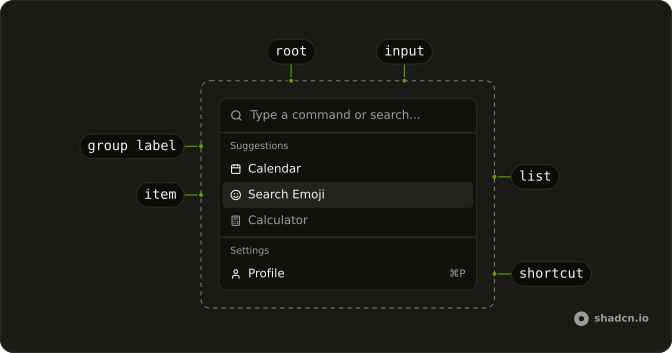
The menu is already open. Suggestions shows Calendar, Search Emoji, and Calculator, each with an icon. Settings shows Profile, Billing, and Settings with hints such as ⌘P.
Use icons so people can scan, and hints so they learn the keys. A Kbd on a button is enough when there is no list to search. In React, Base UI does not run the item.
Installation
Anatomy
Usage
<CommandItem key={item.value}>
  <Icon aria-hidden="true" />
  <span>{item.label}</span>
  {!!item.shortcut && (
    <CommandShortcut>{item.shortcut}</CommandShortcut>
  )}
</CommandItem>
FAQ
How is this menu placed on the page?
Command has h-auto w-full max-w-lg rounded-lg border shadow-md: it sits in the page flow, up to a max width, with a border and a shadow. The list is always open and there is no trigger.
Which items show an icon, and which show a shortcut?
Every item has an icon. The Suggestions group holds Calendar, Search Emoji and Calculator. The Settings group holds Profile, Billing and Settings, each with a shortcut label: ⌘P, ⌘B and ⌘S.
Do those shortcut hints fire the keys?
No. CommandShortcut is a label at the end of the row, and the item's check mark stays hidden while it's there. Listen for those keys yourself if Profile, Billing or Settings should run from the keyboard.
What appears when nothing matches the search?
CommandEmpty in the list says "No results found." It shows only when the search leaves nothing.
API Reference
Command
No extra props in this demo. The rest is on the Command page.


