shadcn.io is an independent project built on shadcn/ui
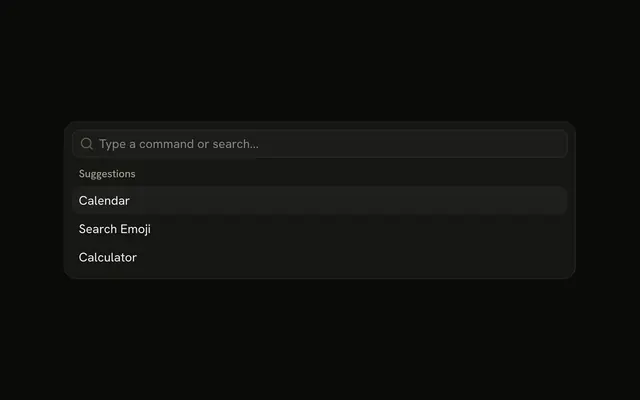
The menu is already open. The field reads Type a command or search..., and Suggestions lists Calendar, Search Emoji, and Calculator as plain text.
Start here for a short list of commands, then add icons or groups as it grows. If the choice is a form value, use a Combobox. In React, Base UI does not run the item.
Installation
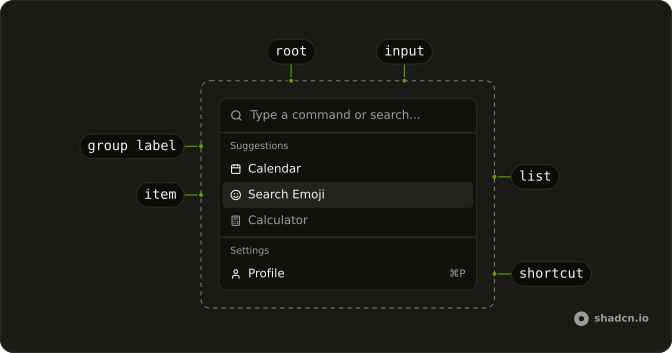
Anatomy
Usage
<Command className="h-auto w-full max-w-lg rounded-lg border shadow-md">
  <CommandInput placeholder="Type a command or search..." />
  <CommandList>
    <CommandEmpty>No results found.</CommandEmpty>
    <CommandGroup heading="Suggestions">
      {items.map((item) => (
        <CommandItem key={item.value}>{item.label}</CommandItem>
      ))}
    </CommandGroup>
  </CommandList>
</Command>
FAQ
How is this menu placed on the page?
Command has h-auto w-full max-w-lg rounded-lg border shadow-md: it sits in the page flow, up to a max width, with a border and a shadow. The list is always open and there is no trigger.
What commands are in this menu?
One CommandGroup with the heading Suggestions holds three CommandItems: Calendar, Search Emoji and Calculator. Each item's text is its only content.
Should this be a Command or a Combobox?
Use a Command to run an action or jump somewhere. Use a Combobox when the choice is a value that stays in a form field.
What appears when nothing matches the search?
CommandEmpty in the list says "No results found." It shows only when the search leaves nothing.
API Reference
Command
Sets placeholder="Type a command or search..." and heading="Suggestions". The rest is on the Command page.