shadcn.io is an independent project built on shadcn/ui
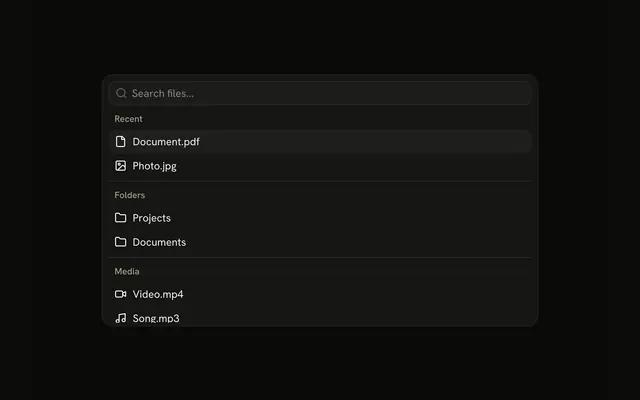
The menu is already open. Recent lists Document.pdf and Photo.jpg, Folders lists Projects and Documents, and Media lists Video.mp4 and Song.mp3. A line sits between the groups.
Add the line when headings alone do not break a long list. If the choice stays in a field, use a Combobox. In React, Base UI highlights a row and waits for you.
Installation
Anatomy
Usage
<CommandItem key={item.value}>
  <Icon aria-hidden="true" />
  <span>{item.label}</span>
</CommandItem>
FAQ
How is this menu placed on the page?
Command has h-auto w-full max-w-lg rounded-lg border shadow-md: it sits in the page flow, up to a max width, with a border and a shadow. The list is always open and there is no trigger.
Where does the line between groups sit?
A CommandSeparator goes before every group but the first, so the lines fall after Recent and after Folders. Each group keeps its own heading: Recent, Folders and Media.
What does each file row contain?
Every CommandItem starts with a decorative icon, then a span for the name: Document.pdf, Photo.jpg, Projects, Documents, Video.mp4 and Song.mp3. The icons are File, Image, Folder (twice), Video and Music.
What appears when nothing matches the search?
CommandEmpty in the list says "No files found." It shows only when the search leaves nothing.
API Reference
Command
No extra props in this demo. The rest is on the Command page.