shadcn.io is an independent project built on shadcn/ui
The button shows a calendar icon and today's date at 12:00. The popover has a month calendar and, under a divider, a field labeled Time.
Use one picker when a date and a time belong together, such as a deadline. A separate Input for the time is clearer if the calendar should close first. On React, Base UI does not store the time on the date.
Installation
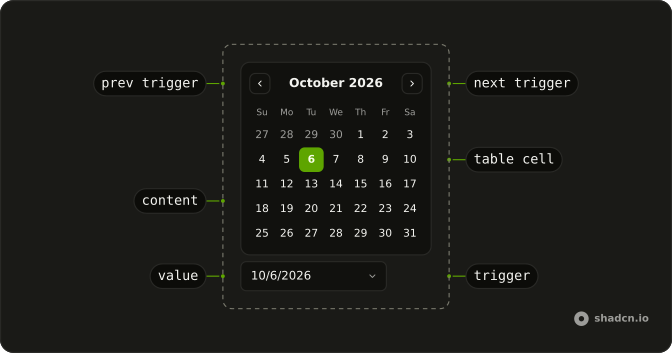
Anatomy
Usage
<DatePicker
  closeOnSelect={false}
  onValueChange={handleValueChange}
  positioning={positioning}
  value={value}
>
  <DatePickerTrigger asChild>
    <Button className="w-70 justify-start font-normal" variant="outline">
      <CalendarIcon aria-hidden="true" data-icon="inline-start" />
      <span>
        {date ? `${formatDate(date)} at ${time}` : "Pick a date and time"}
      </span>
    </Button>
  </DatePickerTrigger>
  <DatePickerContent className="flex flex-col divide-y p-0">
    <div className="p-3">
      <DatePickerViewControl>
        <DatePickerPrevTrigger />
        <DatePickerViewDate />
        <DatePickerNextTrigger />
      </DatePickerViewControl>
      <DatePickerTable>
        <DatePickerWeekDays />
        <DatePickerTableDays />
      </DatePickerTable>
    </div>
    <Field className="p-4">
      <FieldLabel>Time</FieldLabel>
      <Input onChange={handleTimeChange} type="time" value={time} />
    </Field>
  </DatePickerContent>
</DatePicker>
FAQ
Why doesn't the picker close when I pick a day?
closeOnSelect is false on DatePicker, so the time field stays reachable. Escape, a click outside or the button close it.
How does the time field work?
It's an Input with type="time", starting at 12:00 and updating its own value on change. The browser draws the hours and minutes and formats them in the user's locale.
Is the time stored with the date?
No: the date is the picker's value and the time is a string such as 14:30. Combine them when you submit, for example into an ISO date-time.
What does the button say?
The date in long form followed by at and the time, or Pick a date and time when no date is selected. The button prints the value itself, formatted with Intl.DateTimeFormat, so the text needs no date library.
API Reference
Date Picker
Sets closeOnSelect={false}, onValueChange={handleValueChange}, positioning={positioning}, value={value} and asChild. The rest is on the Date Picker page.
Button
Sets variant="outline". The rest is on the Button page.
Field
No extra props in this demo. The rest is on the Field page.
Input
Sets onChange={handleTimeChange}, type="time" and value={time}. The rest is on the Input page.