shadcn.io is an independent project built on shadcn/ui
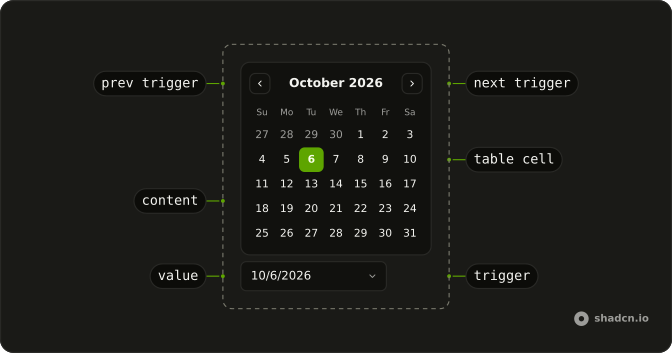
The button shows a calendar icon and today's date. The calendar header is a month dropdown and a year dropdown, not previous and next arrows.
Use month and year dropdowns when people jump far from this month, such as a birthday. Arrows on a Calendar are enough for dates near today. Base UI in React does not know the birth year.
Installation
Anatomy
Usage
<DatePicker
  onValueChange={handleValueChange}
  positioning={positioning}
  value={value}
>
  <DatePickerTrigger asChild>
    <Button className="w-70 justify-start font-normal" variant="outline">
      <CalendarIcon aria-hidden="true" data-icon="inline-start" />
      <span>{date ? formatDate(date) : "Pick a date"}</span>
    </Button>
  </DatePickerTrigger>
  <DatePickerContent>
    <DatePickerViewControl className="gap-2">
      <DatePickerMonthSelect className="flex-1 border" />
      <DatePickerYearSelect className="border" />
    </DatePickerViewControl>
    <DatePickerTable>
      <DatePickerWeekDays />
      <DatePickerTableDays />
    </DatePickerTable>
  </DatePickerContent>
</DatePicker>
FAQ
Which parts make the header?
The month select and the year select, side by side in the view control with gap-2; the month one grows to fill the row. They're native select elements that ship with the date picker.
Do the dropdowns follow the calendar?
Yes. They read and set the month on view, so they always match the month shown. Changing one doesn't change the selected date.
Which years are in the list?
The date picker's default range around today. Set min and max on DatePicker to bound it, such as 1900 to this year for a birth date.
Can I keep the previous and next arrows?
Yes. Put the previous trigger before the selects and the next trigger after them, as the date picker's own default header does.
API Reference
Date Picker
Sets onValueChange={handleValueChange}, positioning={positioning}, value={value} and asChild. The rest is on the Date Picker page.
Button
Sets variant="outline". The rest is on the Button page.