shadcn.io is an independent project built on shadcn/ui
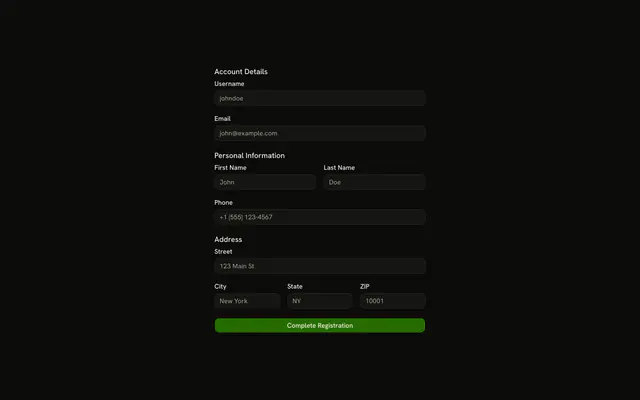
Personal Information puts first and last name on one row. Address puts the street on its own row, then city beside ZIP. ZIP must be a 5-digit or ZIP+4 code.
Use it when a longer form needs headings so people can scan it. One undivided stack is a plain Field group. In React, Base UI does not group the fields. The sections do.
Installation
Usage
<form className="w-full max-w-md" onSubmit={form.handleSubmit(onSubmit)}>
  <FieldGroup>
    <FieldSet>
      <FieldLegend>Personal Information</FieldLegend>
      <FieldGroup>
        <div className="grid grid-cols-2 gap-4">
          <Controller
            control={form.control}
            name="firstName"
            render={({ field, fieldState }) => (
              <Field invalid={fieldState.invalid}>
                <FieldLabel htmlFor="form-with-field-groups-first-name">
                  First Name
                </FieldLabel>
                <Input
                  {...field}
                  id="form-with-field-groups-first-name"
                  placeholder="John"
                />
                <FieldError>{fieldState.error?.message}</FieldError>
              </Field>
            )}
          />
          <Controller
            control={form.control}
            name="lastName"
            render={({ field, fieldState }) => (
              <Field invalid={fieldState.invalid}>
                <FieldLabel htmlFor="form-with-field-groups-last-name">
                  Last Name
                </FieldLabel>
{/* The rest of the file is under Installation. */}
FAQ
How are the two groups separated?
Each group is a FieldSet with a FieldLegend (Personal Information, Address) and its own FieldGroup. The outer FieldGroup spaces the two sets and the button.
Which fields share a row?
First Name and Last Name, then City and ZIP Code, each pair in a div with grid grid-cols-2 gap-4. Street Address spans the full width.
What message does each field use?
First and last name need 2 characters ("First name must be at least 2 characters.", "Last name must be at least 2 characters."). Street and city are .min(2) with "Street address is required." and "City is required." ZIP shows "Please enter a valid ZIP code."
What ZIP does the regex accept?
zipCode matches ^\d{5}(-\d{4})?$: five digits, optionally a hyphen and four more, such as 10001 or 10001-1234. The pattern is a module-level constant.
API Reference
Field
Sets invalid={fieldState.invalid}, htmlFor="form-with-field-groups-first-name", htmlFor="form-with-field-groups-last-name", htmlFor="form-with-field-groups-street", htmlFor="form-with-field-groups-city" and htmlFor="form-with-field-groups-zip-code". The rest is on the Field page.
Input
Sets field, id="form-with-field-groups-first-name", placeholder="John", id="form-with-field-groups-last-name", placeholder="Doe" and id="form-with-field-groups-street". The rest is on the Input page.
Button
Sets type="submit". The rest is on the Button page.