shadcn.io is an independent project built on shadcn/ui
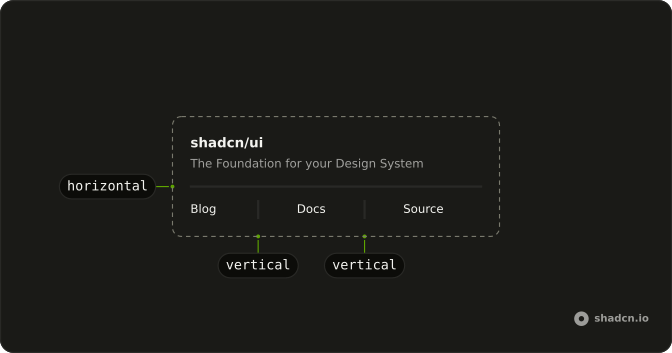
A title and the tagline The Foundation for your Design System sit above a horizontal line, and a short paragraph sits below it.
Use a horizontal line to close one block before the next starts. Stack Card components instead when each block needs its own border. In React, Base UI leaves the gap to the parent.
Installation
Anatomy
Usage
<div className="flex max-w-sm flex-col gap-4 text-sm">
  <div className="flex flex-col gap-1.5">
    <div className="font-medium leading-none">shadcn/ui</div>
    <div className="text-muted-foreground">
      The Foundation for your Design System
    </div>
  </div>
  <Separator />
  <div>
    A set of beautifully designed components that you can customize, extend,
    and build on.
  </div>
</div>
FAQ
When should I use a horizontal separator instead of spacing alone?
When sections are related but distinct and spacing alone is ambiguous. Pair the Separator with a heading, so people who see the line get a visual break and the headings still carry the structure. Skip it between every paragraph, or where cards already draw a boundary.
How much space should surround a horizontal separator?
flex flex-col gap-4 gives a comfortable 16 pixel rhythm, as here. Tighten to gap-2 for dense lists, or open to gap-8 for major breaks. The gap is equal above and below, so the line sits in the middle of the pause.
How do I change color or thickness?
Pass classes in className. The line is painted with a background, so color uses bg-* utilities. Thickness has to use the same orientation variant as the component, such as data-horizontal:h-1, so it replaces the default one-pixel height rather than losing to it.
Is the horizontal Separator announced by screen readers?
Yes. The line has role separator, so screen readers can announce it. When it's only visual, a border on a neighbor is quieter than a Separator.
API Reference
Separator
No extra props in this demo. The rest is on the Separator page.