Skip to content

shadcn.io is an independent project built on shadcn/ui

Menu Separator for React

Vertical lines between Settings, Account, and Help, each with a title and a short description.

Settings and Account sit in a row, each with a title and a muted line: Manage preferences, and Profile & security. A vertical line stands between them. On a wide screen, Help joins the row.

Use this for a compact summary in a toolbar. A Menubar fits when those words should be commands, not labels. In React, Base UI leaves the gap to the parent.

Preview

Preview width

Installation

Sign in to get your install command
Free with an account. It carries your token, so the CLI installs everything in one go.
Use email insteadNo credit card

Anatomy
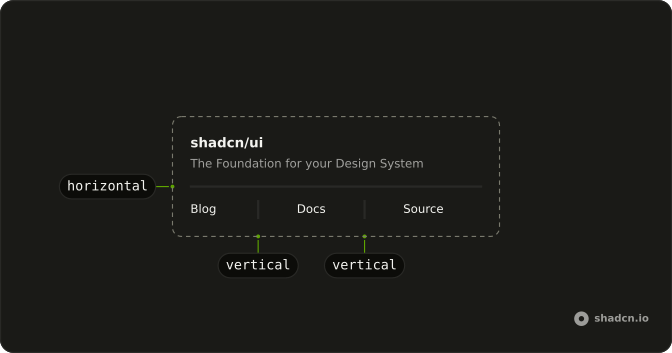
Separator anatomy: horizontal, vertical

Usage

<div className="flex items-center gap-2 text-sm md:gap-4">
  <div className="flex flex-col gap-1">
    <span className="font-medium">Settings</span>
    <span className="text-muted-foreground text-xs">Manage preferences</span>
  </div>
  <Separator orientation="vertical" />
  <div className="flex flex-col gap-1">
    <span className="font-medium">Account</span>
    <span className="text-muted-foreground text-xs">Profile & security</span>
  </div>
  <Separator className="hidden md:block" orientation="vertical" />
  <div className="hidden flex-col gap-1 md:flex">
    <span className="font-medium">Help</span>
    <span className="text-muted-foreground text-xs">Support & docs</span>
  </div>
</div>

FAQ

When should I use this menu row instead of a nav of links?

When each item has a title and a supporting line, such as Settings with Manage preferences. A plain row of links, as in the In Navigation example, is enough when the label says it all.

How does the vertical line get its height?

The row is a flex container with items-center, and a vertical Separator stretches to the row's height, which is set by the two-line items. Don't give the Separator a fixed height; let the content decide.

Why hide the last item on small screens?

Three labeled columns overflow a 320 pixel screen. The Help item and the line before it are hidden below md, so the first two items and their line still read as a split row.

What gap should I use between items?

gap-2 on small screens and md:gap-4 once there's room, as here, so the line never sits against the text.

Do I need orientation vertical on every separator?

Yes. The default is horizontal, which would draw a full-width line between the columns. Set orientation="vertical" on each separator in a row.

Should these menu separators be announced?

The titles carry the meaning; the lines are visual. If the items are destinations, wrap them in a nav; if they're static text, a plain div is enough. The lines are exposed as separators; use a border on the items instead if you don't want them announced.

API Reference

Separator

Sets orientation="vertical". The rest is on the Separator page.