shadcn.io is an independent project built on shadcn/ui
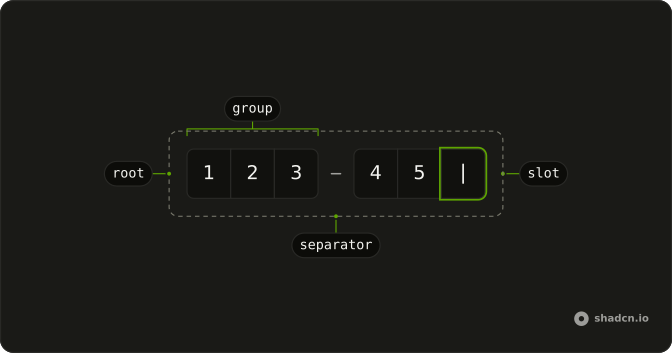
Six boxes in three pairs, with a separator after the second box and another after the fourth. The row reads as 12 34 56.
Use the pairs when the code is printed that way. A single Input is clearer when the code is one long string with no groups. In React, Base UI fills the boxes when a full code is pasted.
Installation
Anatomy
Usage
<InputOTP maxLength={6}>
  <InputOTPGroup>
    <InputOTPSlot className="bg-background" index={0} />
    <InputOTPSlot className="bg-background" index={1} />
  </InputOTPGroup>
  <InputOTPSeparator />
  <InputOTPGroup>
    <InputOTPSlot className="bg-background" index={2} />
    <InputOTPSlot className="bg-background" index={3} />
  </InputOTPGroup>
  <InputOTPSeparator />
  <InputOTPGroup>
    <InputOTPSlot className="bg-background" index={4} />
    <InputOTPSlot className="bg-background" index={5} />
  </InputOTPGroup>
</InputOTP>
FAQ
How are the pairs made?
Three InputOTPGroup parts with two slots each, and an InputOTPSeparator between them. The separators are visual only; the code is still six characters.
How do the slot indexes work across groups?
index counts through the whole code, 0 to 5: 0 and 1 in the first pair, 2 and 3 in the second, 4 and 5 in the third. Don't restart it in each group.
When should I group in pairs?
When your codes are shown in pairs, in an SMS, an email or an authenticator. Matching the field to the printed format makes the code quicker to copy; for codes shown without grouping, one group of six is clearer.
API Reference
Input OTP
Sets maxLength={6}, index={0}, index={1}, index={2}, index={3} and index={4}. The rest is on the Input OTP page.