shadcn.io is an independent project built on shadcn/ui
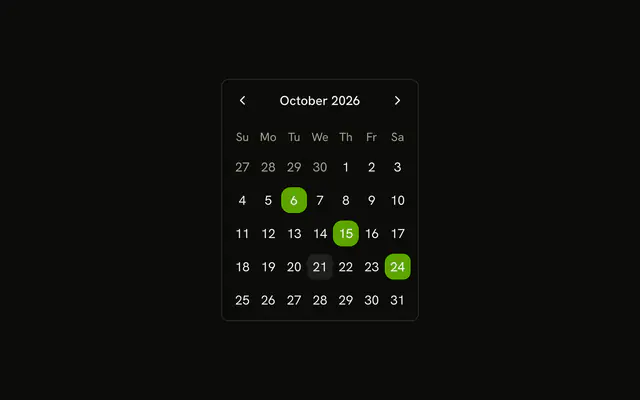
Select Dates opens a dialog titled Select Multiple Dates. The 6th, the 15th, and the 24th of this month start selected. Another click adds a day or drops one.
Use it when several separate days are one step in a flow. Leave the grid on the page if people edit that list often. A Date Picker is the field version. In Solid, Ark UI does not pick the extra days for you.
Installation
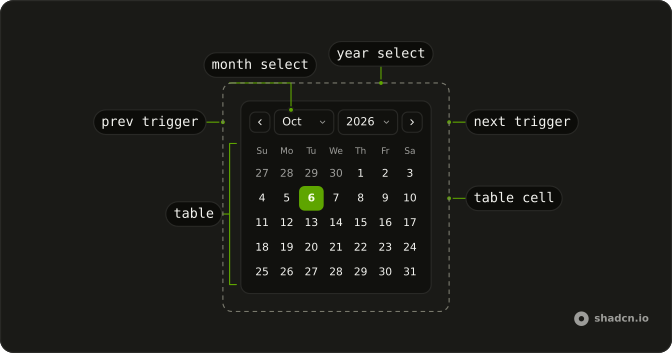
Anatomy
Usage
<Dialog>
      <DialogTrigger asChild={props => <Button {...props()} variant="outline">Select Dates</Button>} />
      <DialogContent class="sm:max-w-fit">
        <DialogHeader>
          <DialogTitle>Select Multiple Dates</DialogTitle>
        </DialogHeader>
        <Calendar class="rounded-md border" onValueChange={handleValueChange} selectionMode="multiple" value={value()}>
          <CalendarViewControl>
            <CalendarPrevTrigger />
            <CalendarViewDate />
            <CalendarNextTrigger />
          </CalendarViewControl>
          <CalendarTable>
            <CalendarWeekDays />
            <CalendarTableDays />
          </CalendarTable>
        </Calendar>
      </DialogContent>
    </Dialog>
FAQ
How do I read the selected days?
selectionMode="multiple" makes value a list of dates, and onValueChange receives { value }. This demo starts with the 6th, the 15th and the 24th of the current month.
Which days start selected?
The 6th, the 15th and the 24th of the current month. State starts as those three dates, before the dialog opens.
How is the dialog opened?
DialogTrigger is a button reading Select Dates. It opens DialogContent with sm:max-w-fit, and DialogTitle reads Select Multiple Dates.
What does the change handler receive?
onValueChange receives { value }, the next list of dates, and this demo stores details.value.
API Reference
Dialog
Sets asChild and props. The rest is on the Dialog page.
Button
Sets props and variant="outline". The rest is on the Button page.
Calendar
Sets onValueChange={handleValueChange}, selectionMode="multiple" and value={value()}. The rest is on the Calendar page.