shadcn.io is an independent project built on shadcn/ui
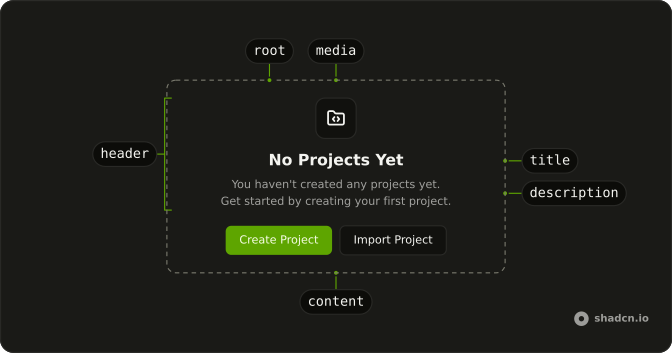
A plus icon, the title No projects yet, and a line about creating the first project. Create Project sits under the text, with a plus.
Use it when the reader fills the list themselves. If the list is still loading, show a Skeleton instead. In Solid, Ark UI does not create the project.
Installation
Anatomy
Usage
<Empty>
    <EmptyHeader>
      <EmptyMedia variant="icon">
        <PlusIcon aria-hidden="true" />
      </EmptyMedia>
      <EmptyTitle>No projects yet</EmptyTitle>
      <EmptyDescription>
        Get started by creating your first project.
      </EmptyDescription>
    </EmptyHeader>
    <EmptyContent>
      <Button>
        <PlusIcon aria-hidden="true" data-icon="inline-start" />
        Create Project
      </Button>
    </EmptyContent>
  </Empty>
FAQ
Why does Plus appear twice?
EmptyMedia with variant="icon" holds one PlusIcon, and the button holds another. The tile marks the empty state. The button icon marks the action.
What do the title and description say?
EmptyTitle is "No projects yet". EmptyDescription is "Get started by creating your first project."
Where does the button sit?
EmptyContent follows EmptyHeader. The content is a centered column, so the button is under the description.
API Reference
Empty
Sets variant="icon". The rest is on the Empty page.
Button
No extra props in this demo. The rest is on the Button page.