shadcn.io is an independent project built on shadcn/ui
UI library: Ark UI
A table icon, the title No data to display, and a line that there are no records yet. Add Entry, with a plus, sits under the text.
Use it in place of an empty table body. Once rows exist, render them in a Table. In Solid, Ark UI does not know the table has no rows.
Installation
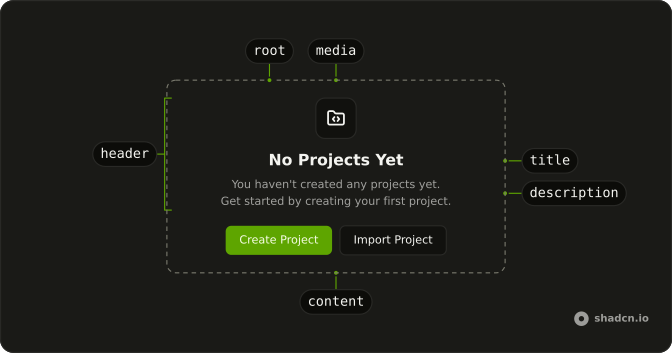
Anatomy
Usage
<Empty>
    <EmptyHeader>
      <EmptyMedia variant="icon">
        <TableIcon aria-hidden="true" />
      </EmptyMedia>
      <EmptyTitle>No data to display</EmptyTitle>
      <EmptyDescription>
        There are no records in this table yet. Add your first entry to get
        started.
      </EmptyDescription>
    </EmptyHeader>
    <EmptyContent>
      <Button>
        <PlusIcon aria-hidden="true" data-icon="inline-start" />
        Add Entry
      </Button>
    </EmptyContent>
  </Empty>
FAQ
Which icon is in the header?
TableIcon is in EmptyMedia with variant="icon". PlusIcon is only on the button.
What does the empty table say?
EmptyTitle is "No data to display". EmptyDescription says there are no records yet and to add the first entry.
Does this render table rows?
No. It is a standalone Empty, with no table headers or cells. Put it where the table body would have been.
API Reference
Empty
Sets variant="icon". The rest is on the Empty page.
Button
No extra props in this demo. The rest is on the Button page.