shadcn.io is an independent project built on shadcn/ui
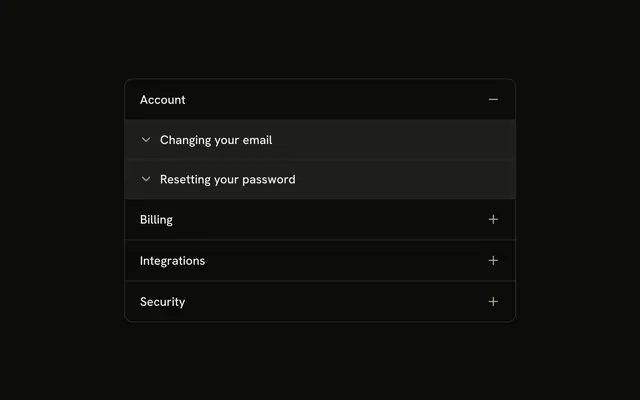
Account, Billing, Integrations, and Security. A plus before each topic turns into a minus, and Account starts open. Articles such as Changing your email open on their own.
Use it for a help center that reads like a tree. If you need selection as well as opening, use a Tree View. In Solid, Ark UI does not open those articles for you.
Installation
Anatomy
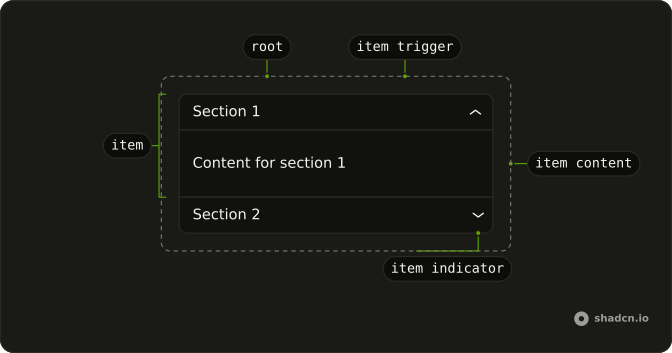
Usage
<Accordion class="w-full max-w-md -space-y-px" defaultValue={["account"]}>
    {topics.map(topic => <AccordionItem class="overflow-hidden border bg-background first:rounded-t-lg last:rounded-b-lg" value={topic.value}>
        <AccordionTrigger class="px-4 py-3 hover:no-underline **:data-[slot=accordion-trigger-icon]:hidden">
          <span class="flex w-full items-center gap-3">
            <span class="relative size-4 shrink-0">
              <PlusIcon aria-hidden="true" class="absolute inset-0 size-4 text-muted-foreground transition-opacity duration-200 group-aria-expanded/accordion-trigger:opacity-0" />
              <MinusIcon aria-hidden="true" class="absolute inset-0 size-4 text-muted-foreground opacity-0 transition-opacity duration-200 group-aria-expanded/accordion-trigger:opacity-100" />
            </span>
            <span class="flex-1 text-start">{topic.title}</span>
          </span>
        </AccordionTrigger>
        <AccordionContent class="p-0">
          {topic.articles.map(article => <Collapsible class="border-t bg-accent px-4 py-3">
              <CollapsibleTrigger class="group flex gap-2 text-start font-medium">
                <ChevronDownIcon aria-hidden="true" class="mt-0.5 size-4 shrink-0 opacity-60 transition-transform duration-200 group-aria-expanded:rotate-180" />
                {article.title}
              </CollapsibleTrigger>
              <CollapsibleContent class="ps-6 pt-1 text-muted-foreground text-sm">
                {article.content}
              </CollapsibleContent>
            </Collapsible>)}
        </AccordionContent>
      </AccordionItem>)}
  </Accordion>
FAQ
How does the plus end up before the parent title?
The plus and minus sit in a relative size-4 box, the first child of a gap-3 row, with the title after it in flex-1 text-start. **:data-[slot=accordion-trigger-icon]:hidden hides the built-in chevron. group-aria-expanded/accordion-trigger fades the plus out and the minus in over duration-200, and both icons are aria-hidden.
What toggles an article?
Each article is a Collapsible inside AccordionContent. Its ChevronDownIcon sits on CollapsibleTrigger and uses group-aria-expanded:rotate-180 with duration-200.
How are the article rows styled?
AccordionContent is p-0. Each Collapsible has border-t and bg-accent, and CollapsibleContent uses ps-6 with text-sm text-muted-foreground.
Why does Account start open?
defaultValue={["account"]} opens Account on first render. The string matches that item's value.
API Reference
Accordion
Sets defaultValue={["account"]} and value={topic.value}. The rest is on the Accordion page.
Collapsible
No extra props in this demo. The rest is on the Collapsible page.