shadcn.io is an independent project built on shadcn/ui
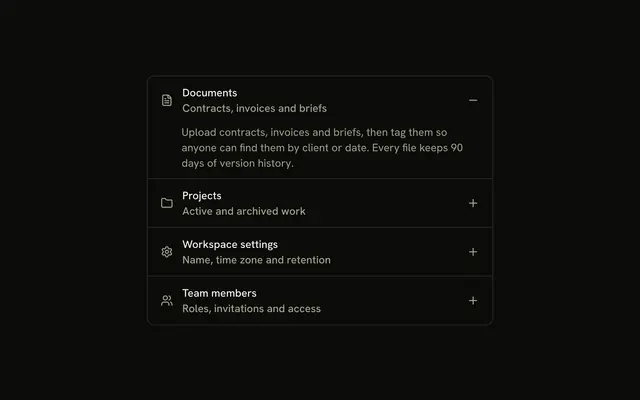
Documents, Projects, Workspace settings, and Team members each have an icon, and a plus on the right that turns into a minus. Documents starts open.
Use it when both the category and the toggle need to be obvious. For one section, use a Collapsible. In Svelte, Ark UI does not supply the category icon.
Installation
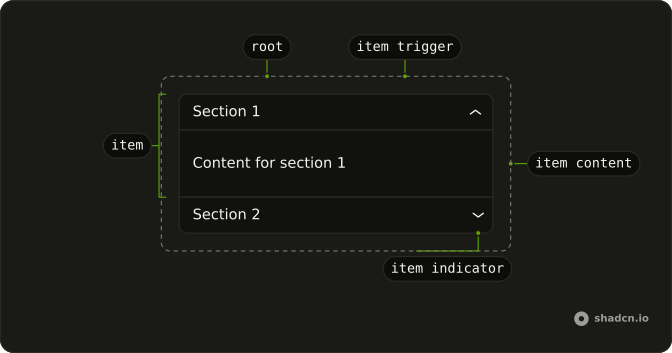
Anatomy
Usage
<Accordion class="w-full max-w-md -space-y-px" defaultValue={["documents"]}>{#each items as item (item.value)}<AccordionItem class="overflow-hidden border bg-background px-4 first:rounded-t-lg last:rounded-b-lg" value={item.value}><AccordionTrigger class="hover:no-underline **:data-[slot=accordion-trigger-icon]:hidden"><span class="flex w-full items-center justify-between gap-3"><span class="flex items-center gap-3"><item.icon aria-hidden="true" class="size-4 shrink-0 text-muted-foreground" /><span class="text-start">{item.title}</span></span><span class="relative size-4 shrink-0"><PlusIcon aria-hidden="true" class="absolute inset-0 size-4 text-muted-foreground transition-opacity duration-200 group-aria-expanded/accordion-trigger:opacity-0" /><MinusIcon aria-hidden="true" class="absolute inset-0 size-4 text-muted-foreground opacity-0 transition-opacity duration-200 group-aria-expanded/accordion-trigger:opacity-100" /></span></span></AccordionTrigger><AccordionContent class="ps-7"><p class="text-muted-foreground">{item.content}</p></AccordionContent></AccordionItem>{/each}</Accordion>FAQ
Where do the category icons come from?
Each item stores FileTextIcon, FolderIcon, SettingsIcon or UsersIcon at size-4, with text-muted-foreground and aria-hidden, in a gap-3 row before the title.
How does the plus turn into a minus?
**:data-[slot=accordion-trigger-icon]:hidden on AccordionTrigger hides the built-in chevron. PlusIcon and MinusIcon share one relative size-4 box, and group-aria-expanded/accordion-trigger fades the plus out and the minus in over duration-200. Both icons are aria-hidden and text-muted-foreground.
Why is the answer indented?
ps-7 on AccordionContent matches the 16px icon plus the 12px gap-3, so the answer lines up under the title.
Why does Documents start open?
defaultValue={["documents"]} opens Documents on first render. The string matches that item's value.
API Reference
Accordion
Sets defaultValue={["documents"]} and value={item.value}. The rest is on the Accordion page.