shadcn.io is an independent project built on shadcn/ui
An outline button says Save. Its tooltip reads Save changes, with ⌘S in a key hint beside the words.
Name the action and its shortcut when the button only says Save. The hint does not press the keys. A Kbd in the button shows the shortcut without a tooltip. In React, Base UI does not listen for ⌘S.
Installation
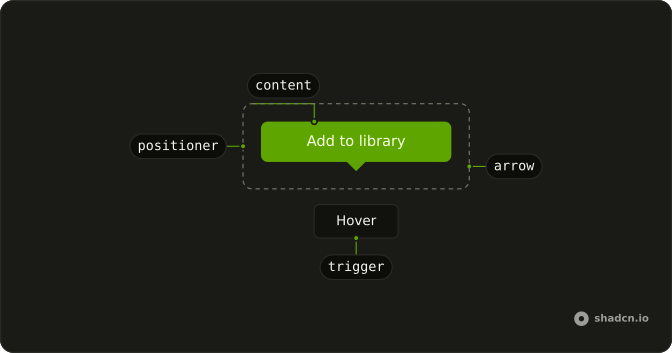
Anatomy
Usage
<TooltipProvider>
  <Tooltip>
    <TooltipTrigger render={<Button variant="outline" />}>
      Save
    </TooltipTrigger>
    <TooltipContent className="gap-2">
      <p>Save changes</p>
      <Kbd>⌘S</Kbd>
    </TooltipContent>
  </Tooltip>
</TooltipProvider>
FAQ
How does the shortcut sit next to the label?
The tooltip is a row. The paragraph Save changes comes first, then a Kbd whose text is ⌘S.
gap-2 is on TooltipContent.
Why doesn't the Kbd need its own classes?
Kbd has no className in this demo. Inside a tooltip, in-data-[slot=tooltip-content] switches it to text-background and a translucent bg-background, so the key stays readable on the inverted fill.
Does this tooltip register the ⌘S shortcut?
No. The Kbd only displays ⌘S. The demo does not listen for the keys, so the Save button still needs its own handler and the shortcut has to be wired up separately.
How do I show a different shortcut?
Change the text inside Kbd. This demo hardcodes ⌘S. A second shortcut is another Kbd in the same row.
API Reference
Tooltip
No extra props in this demo. The rest is on the Tooltip page.
Button
Sets variant="outline". The rest is on the Button page.
Kbd
No extra props in this demo. The rest is on the Kbd page.