shadcn.io is an independent project built on shadcn/ui
An outline button says Hover me. Its tooltip has a bold title, Pro Feature, and under it a smaller line about upgrading to Pro.
Use a title plus a line for a feature people have not met yet. A Hover Card fits if the note should include a link or a picture. On React, Base UI does not bold the title for you.
Installation
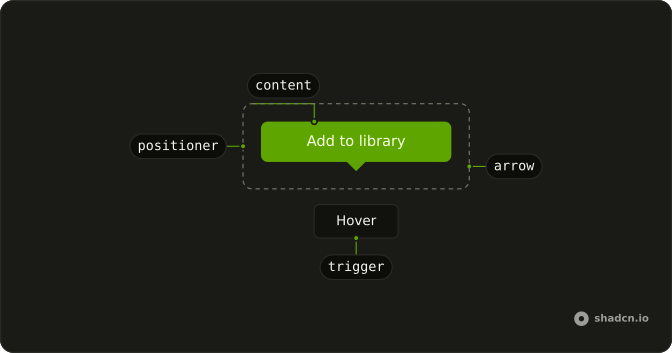
Anatomy
Usage
<TooltipProvider>
  <Tooltip>
    <TooltipTrigger render={<Button variant="outline" />}>
      Hover me
    </TooltipTrigger>
    <TooltipContent>
      <div className="flex flex-col gap-1">
        <p className="font-semibold">Pro Feature</p>
        <p className="text-xs">
          Upgrade to Pro to unlock this feature and many more.
        </p>
      </div>
    </TooltipContent>
  </Tooltip>
</TooltipProvider>
FAQ
When should I use title plus description tooltips?
When the hover text needs a heading and an explanation: what a premium feature is and how to get it, what a control changes, why an action is unavailable. For a plain label, use a single line.
How long should tooltip descriptions be?
A sentence, two at most, like Upgrade to Pro to unlock this feature and many more. Anything longer belongs in a Popover.
Why does the description wrap?
The tooltip content caps its width at max-w-xs (320px), so a longer description wraps into short lines instead of stretching the tooltip. Pass another max-w-* class to change it.
How do I create visual hierarchy in tooltip content?
With weight and size: the title is font-semibold and the description stays at the tooltip's small text size, text-xs, with gap-1 between them. Both use the tooltip's text color, so they keep their contrast in light and dark mode.
API Reference
Tooltip
No extra props in this demo. The rest is on the Tooltip page.
Button
Sets variant="outline". The rest is on the Button page.