shadcn.io is an independent project built on shadcn/ui
View Details opens a panel titled Details, with the line Additional information about this item under it. The title names the panel for screen readers too.
Use it when a control needs a title and one line, and nothing else. A preview on hover belongs in a Hover Card. In React, Base UI does not fetch the details.
Installation
Anatomy
Usage
<Popover>
  <PopoverTrigger render={<Button variant="outline" />}>
    View Details
  </PopoverTrigger>
  <PopoverContent>
    <PopoverHeader>
      <PopoverTitle>Details</PopoverTitle>
      <PopoverDescription>
        Additional information about this item.
      </PopoverDescription>
    </PopoverHeader>
  </PopoverContent>
</Popover>
FAQ
Which parts are the title and the description?
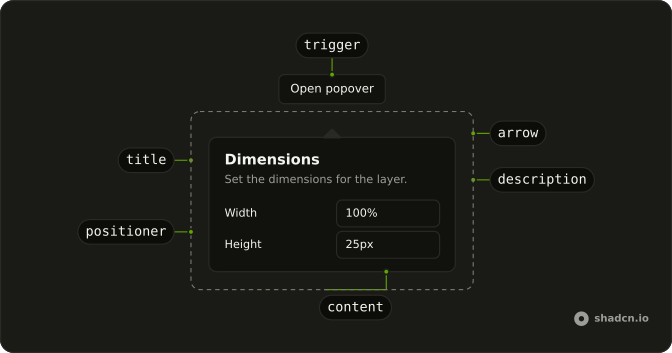
Both live in PopoverHeader. PopoverTitle reads Details. PopoverDescription reads Additional information about this item. The trigger label is View Details.
How does View Details become the trigger?
The trigger is a Button with variant="outline" and the label View Details. Activating it opens the panel.
Pass the button to render on PopoverTrigger, and use PopoverContent as the panel.
What does the description say?
PopoverDescription is the sentence Additional information about this item. It sits under PopoverTitle, which is the word Details. PopoverHeader wraps the two.
How wide is the details panel?
PopoverContent has no width class in this file, so it keeps w-72. The header is the only content: the title, then the description.
API Reference
Popover
No extra props in this demo. The rest is on the Popover page.
Button
Sets variant="outline". The rest is on the Button page.