shadcn.io is an independent project built on shadcn/ui
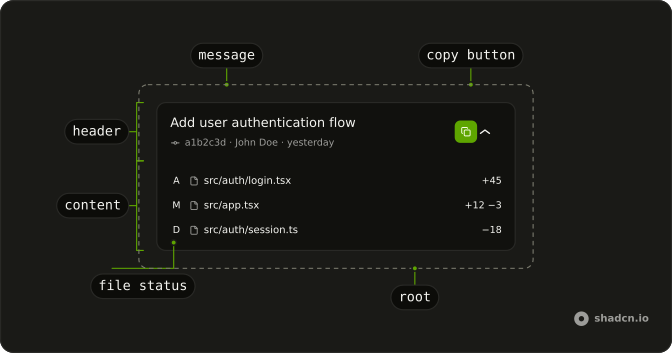
Commit shows a git commit as one card: the message, the short hash, who made it and when, and a button that copies the full hash. The files it changed open below, each with a letter for what happened to it and its line counts.
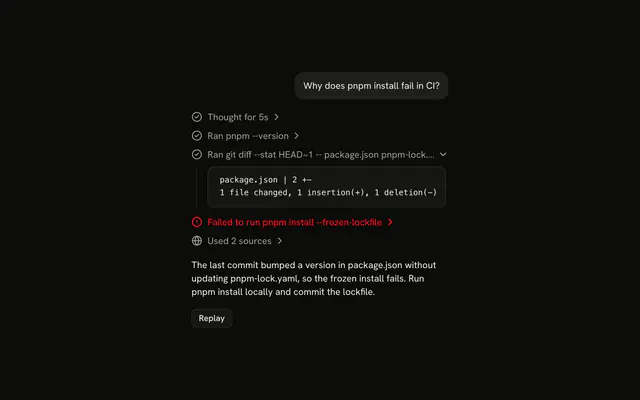
Use it when a coding agent commits during a chat, so the reader sees what changed without opening git. One edited file reads better as a Trace line, and the diff itself belongs in a Code Block.
Installation
Anatomy
Usage
import {
  Commit, CommitActions, CommitContent, CommitCopyButton, CommitFile,
  CommitFileAdditions, CommitFileChanges, CommitFileDeletions,
  CommitFileIcon, CommitFileInfo, CommitFilePath, CommitFiles,
  CommitFileStatus, CommitHash, CommitHeader, CommitInfo, CommitMessage,
  CommitMetadata, CommitSeparator, CommitTimestamp,
} from "@/components/ui/commit";<Commit>
<CommitHeader>
<CommitInfo>
<CommitMessage>Add user authentication flow</CommitMessage>
<CommitMetadata>
<CommitHash>a1b2c3d</CommitHash>
<CommitSeparator />
<CommitTimestamp date={new Date("2026-10-21T14:30:00Z")} />
</CommitMetadata>
</CommitInfo>
<CommitActions>
<CommitCopyButton hash="a1b2c3d4e5f6" />
</CommitActions>
</CommitHeader>
<CommitContent>
<CommitFiles>
<CommitFile>
<CommitFileInfo>
<CommitFileStatus status="added" />
<CommitFileIcon />
<CommitFilePath>src/auth/login.tsx</CommitFilePath>
</CommitFileInfo>
<CommitFileChanges>
<CommitFileAdditions count={45} />
<CommitFileDeletions count={0} />
</CommitFileChanges>
</CommitFile>
</CommitFiles>
</CommitContent>
</Commit>CommitHeader lays one invisible button over the whole row, so a click anywhere on it opens the file list. CommitActions sits above that button, which is why the copy button still takes its own click.
Accessibility
The header's trigger is a native <button> with aria-expanded, named by label on CommitHeader, Changed files unless you set it. The message, hash and time beside it are read as plain text, so on a page with several commits give each header a label that names its commit, as the History demo does. On a card with no CommitContent, set collapsible to false on CommitHeader, which leaves out the button and the chevron. CommitFiles is a list, each status letter is read as its word, and the line counts end in lines added and lines removed. The copy button is named Copy commit hash and announces Copied once the hash is on the clipboard.
- Tab
- Moves focus to the header's trigger, then to the copy button and anything else in
CommitActions. - Shift+Tab
- Moves focus to the previous focusable element.
- Enter
- When focus is on the header's trigger, opens or closes the file list. On the copy button, copies the hash.
- Space
- When focus is on the header's trigger, opens or closes the file list. On the copy button, copies the hash.
Demos
File statuses
Replace the throttle with a rate limiter opens on four files, one for each status of CommitFileStatus: added, modified, deleted and renamed. A, M and R take the success, warning and info colors the install adds for light and dark, D takes the theme's destructive color, and screen readers hear the word. The renamed file shows no line counts, because a count of 0 renders nothing.
Author
Two commits with CommitAuthor at the start of the header: one from shadcn with a picture in src, one from Coding agent with only its initials, AI, and each name in CommitMetadata. Neither card has a file list, so collapsible is set to false and the header has no button or chevron. Show the author when people and agents commit to the same branch.
History
Three commits from one checkout task, newest first, each closed until the reader opens it. The metadata ends in a file count, 1 file or 2 files, so the reader knows how much is inside. Each header's label names its commit, such as Changed files in Drop the legacy charge path, so a screen reader can tell the three buttons apart.
Copy
Cache the model list for an hour shows 3f9e2a1 in its header, and its copy button writes the whole 40-character hash. The demo's onCopy handler writes Copied 3f9e2a1… under the card, its onError handler writes a message when the browser blocks the clipboard, and timeout keeps the check for 1.5 seconds instead of 2.
AI SDK
Give the agent a tool that commits and returns the commit, gitCommit in this example: its hash, message and date, and each changed file with its status from git show --name-status and its line counts from git show --numstat. Render a Commit for each call whose output has arrived.
const commits = message.parts
  .filter((part) => part.type === "tool-gitCommit")
  .filter((part) => part.state === "output-available")
  .map((part) => part.output);
Each output maps onto the parts:
| Output field | Part |
|---|---|
message | CommitMessage |
hash | CommitHash (its first 7 characters) and CommitCopyButton's hash |
date (an ISO string) | CommitTimestamp's date, as new Date(date) |
files[].path | CommitFilePath |
files[].status | CommitFileStatus's status: added, modified, deleted or renamed |
files[].additions, files[].deletions | CommitFileAdditions and CommitFileDeletions' count |
Migrating from AI SDK Elements
If you added Commit from AI SDK Elements (opens in a new tab), your project has a components/ai-elements/commit.tsx. Install ours with the command above and import from @/components/ui/commit instead: every part keeps its name and props, so the code that uses it keeps working. What changes:
CommitHeaderis a row with a trigger button laid over it, so the copy button is no longer a button inside a button.labelnames that trigger for screen readers (Changed files by default), and a chevron at the end shows whether the list is open.CommitActionsno longer stops the click: it sits above the trigger instead.CommitTimestamppicks its unit, from seconds to years, where AI SDK Elements always counted days. It writes the date itself until the page runs, so the server and the browser agree, andlocalesets its language.CommitAuthorAvataralso takessrcandaltfor a picture.CommitFilesis aulandCommitFileanli.
On React Aria, the open state is defaultExpanded, isExpanded and onExpandedChange, where AI SDK Elements had defaultOpen, open and onOpenChange, and CommitCopyButton takes onPress instead of onClick.
FAQ
When should I use a Commit card instead of a Trace line?
Use Commit when the commit itself is the news: the agent finished a piece of work and the reader wants its message, hash and the list of files it touched in one place. It suits the end of a task, or a short history of the commits one task made.
While the agent is still working, its edits read better as Trace lines, Edited app/login/page.tsx with +2 −2 after it, which can open each diff in a sheet. Trace's own Commit demo draws a commit that way, as one line that expands.
What file statuses does the Commit component show?
Four: added, modified, deleted and renamed, set with status on CommitFileStatus. Each shows its letter, A, M, D or R, in its own color, and screen readers hear the whole word instead of the letter.
The File statuses demo has one of each. Git's other states, such as copied or type changed, have no value of their own here, so map each to the nearest of the four.
How do I show the lines added and removed in a Commit?
Put CommitFileAdditions and CommitFileDeletions inside CommitFileChanges and pass each its count. They show +45 in green and −3 in red, and screen readers hear 45 lines added and 3 lines removed.
A count of 0 renders nothing, so a renamed file with no edits stays clean, and a binary file, which git show --numstat reports with a dash instead of a number, can pass 0 to show no counts at all.
How do I show a Commit's changed files open by default?
Set defaultExpanded on Commit, as the File statuses demo does. Every card starts closed without it.
To open and close it from your own code, hold the state yourself, pass it as isExpanded and update it from onExpandedChange, which receives the new boolean.
How does the copy button on a Commit work?
CommitCopyButton writes its hash to the clipboard, swaps its icon for a check for timeout milliseconds, 2000 by default, and announces Copied to screen readers. Pass the full hash, even when CommitHash shows only seven characters.
onCopy runs once the hash is on the clipboard, and onError receives the error when the browser refuses, as on a page served over plain HTTP. The Copy demo writes both to a line under the card.
Why does the Commit timestamp show a date first, then 2 hours ago?
The server can't know the reader's clock, so CommitTimestamp writes the date in UTC until the page runs, and the server's HTML and the browser's first render agree. Then it switches to words such as 2 hours ago or yesterday, and hovering shows the full date and time.
locale sets the language of both, en-US by default. To write your own words instead, put them inside CommitTimestamp, and the time element keeps the exact date in its datetime attribute.
Why can't I click a link or select text in a Commit header?
The header's trigger is an invisible button laid over the whole row, so a click on the message, the hash or the author lands on that button and opens the file list. Dragging across the message or the hash selects nothing, and a link there can't be clicked.
Put anything that needs its own click in CommitActions, which sits above the trigger: a link to the commit on GitHub, for example, next to the copy button. For the hash, the copy button already covers what selecting it was for.
A card with no file list needs no trigger: set collapsible to false on its CommitHeader, as the Author demo does, and the header's text selects and its links work as anywhere else.
Can I open a Commit with the keyboard?
Yes. The header's trigger is a real button: Tab reaches it, and Enter or Space opens and closes the file list. Tab then moves on to the copy button, which sits above the trigger rather than inside it, so each control has its own stop.
On a page with several commits, every trigger is called Changed files unless you pass label to CommitHeader. Name each one after its commit, as the History demo does, so a screen reader's list of buttons says which file list each opens.
API Reference
Commit
defaultExpanded?boolean
Whether the disclosure is expanded by default (uncontrolled).
onExpandedChange?(isExpanded: boolean) → void
Handler that is called when the disclosure expanded state changes.
- Parameters
isExpanded– boolean- Returns
void
isExpanded?boolean
Whether the disclosure is expanded (controlled).
className?string
Merged with the part's classes.
CommitActions
<div> data-slot="commit-actions"
className?string
Merged with the part's classes.
CommitAuthor
<div> data-slot="commit-author"
className?string
Merged with the part's classes.
CommitAuthorAvatar
data-slot="commit-author-avatar"
initialsstring
The letters shown until the picture loads, or without one.
alt?string
The picture's text alternative: empty when the author's name is beside it.
- Default
""
size?"default" | "sm" | "lg"
The size.
- Type
"default" | "sm" | "lg"
src?string
The author's picture.
className?string
Merged with the part's classes.
CommitContent
data-slot="commit-content"
disableAnimation?boolean
Opens and closes it at once, without the height animation.
labelElementType?ElementType
The HTML element used to render the label, e.g. label, or span.
- Default
"label"
role?"group" | "region"
The accessibility role for the disclosure's panel.
- Type
"group" | "region"- Default
"group"
style?object
The inline [style](https://developer.mozilla.org/en-US/docs/Web/API/HTMLElement/style) for the element.
- Type
{ prop?: string]: string | number }
render?DOMRenderFunction<E, T>
Overrides the default DOM element with a custom render function.
This allows rendering existing components with built-in styles and behaviors
such as router links, animation libraries, and pre-styled components.
Requirements:
- You must render the expected element type (e.g. if <button> is expected, you cannot render an
<a>).
- Only a single root DOM element can be rendered (no fragments).
- You must pass through props and ref to the underlying DOM element, merging with your own prop
as appropriate.
- Type
DOMRenderFunction<E, T>
className?string
Merged with the part's classes.
CommitCopyButton
hashstring
The full hash it copies.
children?ReactNode
The content to display in the button.
clickEffect?boolean
Apply a click effect to the button.
- Default
true
download?LinkPrimitiveProps["download"]
With href, downloads the linked file instead of opening it.
href?string
When set, the button renders as a link.
isDisabled?boolean
Whether the button is disabled.
isLoading?boolean
Show a loading indicator.
- Default
false
onCopy?() → void
Called once the hash is on the clipboard.
- Returns
void
onError?(error: Error) → void
Called when the browser refuses the clipboard.
- Parameters
error– Error- Returns
void
pill?boolean
Fully rounded corners.
- Default
false
rel?string
With href, the link's relationship to the page (noreferrer, …).
size?"default" | "icon" | "icon-lg" | "icon-md" | "icon-sm" | "icon-xl" | "icon-xs" | "lg" | "md" | "sm" | "xl" | "xs"
Ark default: md.
- Type
"default" | "icon" | "icon-lg" | "icon-md" | "icon-sm" | "icon-xl" | "icon-xs" | "lg" | "md" | "sm" | "xl" | "xs"- Default
"icon-sm"
target?string
With href, where the linked page opens (_blank, …).
timeout?number
How long the check shows after a copy, in milliseconds. * * @default 2000.
- Default
2000
variant?"default" | "destructive" | "ghost" | "link" | "outline" | "secondary"
Ark default: default.
- Type
"default" | "destructive" | "ghost" | "link" | "outline" | "secondary"- Default
"ghost"
className?string
Merged with the part's classes.
CommitFile
<li> data-slot="commit-file"
className?string
Merged with the part's classes.
CommitFileAdditions
<span> data-slot="commit-file-additions"
countnumber
Lines added. Nothing renders at 0.
className?string
Merged with the part's classes.
CommitFileChanges
<div> data-slot="commit-file-changes"
className?string
Merged with the part's classes.
CommitFileDeletions
<span> data-slot="commit-file-deletions"
countnumber
Lines removed. Nothing renders at 0.
className?string
Merged with the part's classes.
CommitFileIcon
data-slot="commit-file-icon"
className?string
Merged with the part's classes.
CommitFileInfo
<div> data-slot="commit-file-info"
className?string
Merged with the part's classes.
CommitFilePath
<span> data-slot="commit-file-path"
className?string
Merged with the part's classes.
CommitFileStatus
<span> data-slot="commit-file-status"
statusCommitFileStatusValue
What the commit did to the file: its letter and color.
className?string
Merged with the part's classes.
data-status?string
Mirrors status.
CommitFiles
<ul> data-slot="commit-files"
className?string
Merged with the part's classes.
CommitHash
<span> data-slot="commit-hash"
className?string
Merged with the part's classes.
CommitHeader
<div> data-slot="commit-header"
collapsible?boolean
Whether the header opens and closes the card's CommitContent. Set it to * false on a card with no file list, so the header has no button and no * chevron that would open nothing. * * @default true.
- Default
true
label?string
What the button that opens the file list is called by assistive tech.
- Default
"Changed files"
className?string
Merged with the part's classes.
- Default
{cn("flex shrink-0 items-center gap-2"
CommitInfo
<div> data-slot="commit-info"
className?string
Merged with the part's classes.
CommitMessage
<span> data-slot="commit-message"
className?string
Merged with the part's classes.
CommitMetadata
<div> data-slot="commit-metadata"
className?string
Merged with the part's classes.
CommitSeparator
<span> data-slot="commit-separator"
className?string
Merged with the part's classes.
CommitTimestamp
<time>
dateDate
When the commit was made.
locale?string
The locale the words are written in. Fixed by default, so the server * and the browser write the date the same way. * * @default "en-US".
- Default
"en-US"
className?string
Merged with the part's classes.