shadcn.io is an independent project built on shadcn/ui
A button that shows the selected microphone and opens a searchable list of every audio input the browser sees.
Use it before recording, where a person may have a laptop microphone, a headset and a webcam at once and the browser's default isn't the one they speak into. The list follows the hardware: plug a microphone in and it appears, unplug it and it goes. In React, it's a Popover holding a Command, and it hands you the chosen deviceId: recording from it, with getUserMedia, is yours.
Installation
Anatomy
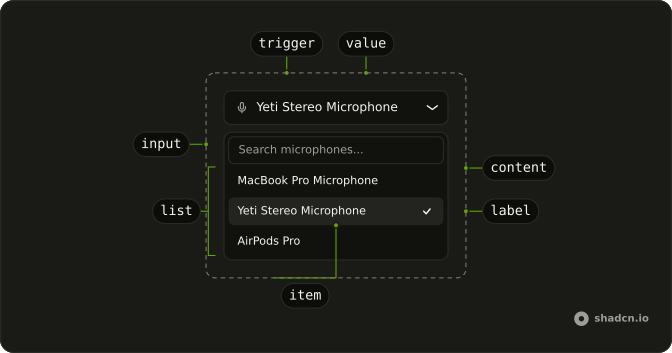
MicSelector
├── MicSelectorTrigger
│   └── MicSelectorValue
└── MicSelectorContent
    ├── MicSelectorInput
    └── MicSelectorList
        ├── MicSelectorEmpty
        └── MicSelectorItem (one per microphone)
            └── MicSelectorLabel
MicSelectorList renders the items itself, one per microphone with its label; its children are what shows when the search matches none.
Usage
import { MicIcon } from "lucide-react";
import { useState } from "react";
import {
  MicSelector, MicSelectorContent, MicSelectorEmpty, MicSelectorInput,
  MicSelectorList, MicSelectorTrigger, MicSelectorValue,
} from "@/components/ui/mic-selector";
export function MicrophonePicker() {
const [deviceId, setDeviceId] = useState<string>();
return (
<MicSelector onValueChange={setDeviceId} value={deviceId}>
<MicSelectorTrigger className="w-full">
<MicIcon aria-hidden="true" />
<MicSelectorValue />
</MicSelectorTrigger>
<MicSelectorContent>
<MicSelectorInput />
<MicSelectorList>
<MicSelectorEmpty />
</MicSelectorList>
</MicSelectorContent>
</MicSelector>
);
}Microphone access
Listing the microphones asks for nothing, but until the page may use the microphone the browser keeps their names to itself, and often the microphones too. So, until then, the list starts with an Allow microphone access row. Picking it shows the browser's prompt; once the person allows it, the list fills with every microphone by name. Opening the list never prompts on its own, and neither does loading the page.
Record from the chosen one by its deviceId:
const stream = await navigator.mediaDevices.getUserMedia({
  audio: { deviceId: { exact: deviceId } },
});
A name that ends with a USB vendor and product id, such as Yeti Stereo Microphone (046d:0ab7), shows the id muted after the name.
Demos
Devices
devices lists microphones of your own instead of the browser's: here five, the Yeti selected, as a page shows them once access is allowed. Pass it to show a list you keep yourself, or in tests and previews where there's no microphone. Each one needs a deviceId and a label, which a browser's MediaDeviceInfo has.
Audio Devices
useAudioDevices reads the browser's microphones from inside a MicSelector, for a part of your own: here a line under the trigger with how many there are, and a button that asks for access. Its loadDevices is what the Allow microphone access row calls.
Labels
Every word it shows can change: placeholder on MicSelectorValue, placeholder on MicSelectorInput, permissionLabel on MicSelectorList, and the children of MicSelectorEmpty. Here they're in French.
useAudioDevices
Called inside a MicSelector, it returns the browser's microphones, whether or not devices replaces them in the list.
| Field | What it is |
|---|---|
devices | The audio inputs as MediaDeviceInfo, kept current on devicechange |
hasPermission | Whether the page may use the microphone, so the devices have names |
loadDevices | Asks for the microphone, then lists the devices again with their names |
loading | Whether they're being listed |
error | Why they couldn't be listed or access was refused, else null |
Migrating from AI SDK Elements
If you added Mic Selector from AI SDK Elements (opens in a new tab), install this one and change the import from @/components/ai-elements/mic-selector to @/components/ui/mic-selector. The parts keep their names, and value, defaultValue, onValueChange, open and onOpenChange work the same. What differs:
MicSelectorListtakes no function: drop{(devices) => …}and keep<MicSelectorEmpty />as its child. It renders aMicSelectorItemandMicSelectorLabelper microphone itself.- Opening the list doesn't ask for the microphone: the Allow microphone access row does.
useAudioDevicesreturns the same fields, but reads theMicSelectoraround it instead of standing alone.MicSelectorContent's props go to the popover, andpopoverOptionsis gone. It matches the trigger's width without aResizeObserver.
On React Aria, MicSelector holds the open state itself rather than a DialogTrigger, and a Button of your own inside it takes onPress.
FAQ
Why does Mic Selector show Allow microphone access instead of my microphones?
Browsers hide microphones' names, and usually the microphones themselves, until the page may use one. Pick the row and allow access in the browser's prompt, and the list fills in. Once access is allowed, for this visit or for good, the row is gone.
How do I record from the microphone picked in Mic Selector?
onValueChange gives you its deviceId. Pass it to getUserMedia as audio: { deviceId: { exact: deviceId } }, as the Microphone access section shows. Keep the id: it usually stays the same for this site in that browser, so the next visit can select it again.
Does Mic Selector update when a microphone is plugged in?
Yes. It lists the devices again on the browser's devicechange event, so a headset plugged in or out appears or goes while the page is open. A selected microphone that's unplugged leaves the trigger showing the placeholder.
How do I show Mic Selector without real microphones?
Pass devices, an array of deviceId and label pairs, as the Devices demo does. The list shows those and skips the access row. It's how to keep a list of your own, or to render it in tests and screenshots where there's no hardware.
Can Mic Selector be used with the keyboard?
Yes. Enter or Space on the trigger opens the list with the search focused; typing filters by name, the arrow keys move, Enter picks, and Escape closes. Focus goes back to the trigger, which reads out the microphone it shows.
Is this the same as AI SDK Elements' Mic Selector?
It has the same parts and props, so most code only changes its import. The list renders its own items instead of taking a function, and it asks for the microphone from a row rather than on open. The Migrating section lists every difference.
API Reference
MicSelector
open?boolean
Whether it's open (controlled).
defaultOpen?boolean
Whether it starts open, when uncontrolled.
- Default
false
onOpenChange?(open: boolean) → void
Called when it opens or closes.
- Parameters
open– boolean- Returns
void
value?string
The selected microphone's deviceId (controlled).
defaultValue?string
The microphone selected at first, when uncontrolled: its deviceId.
onValueChange?(value: string) → void
Called with the deviceId of the microphone picked.
- Parameters
value– string- Returns
void
children?React.ReactNode
The trigger and the content, and any part of your own that reads useAudioDevices.
devices?MicSelectorDevice[]
The microphones to list instead of the browser's: your own list, or a demo's. Without it, it lists the browser's.
MicSelectorTrigger
data-slot="mic-selector-trigger"
isDisabled?boolean
Whether the button is disabled.
className?string
Merged with the part's classes.
MicSelectorContent
defaultOpen?boolean
Whether the overlay is open by default (uncontrolled).
onOpenChange?(isOpen: boolean) → void
Handler that is called when the overlay's open state changes.
- Parameters
isOpen– boolean- Returns
void
arrowBoundaryOffset?number
The minimum distance the arrow's edge should be from the edge of the overlay element.
- Default
0
arrowRef?RefObject<Element | null>
A ref for the popover arrow element.
- Type
RefObject<Element | null>
boundaryElement?Element
Element that that serves as the positioning boundary.
- Default
document.body
containerPadding?number
The placement padding that should be applied between the element and its surrounding container.
- Default
12
crossOffset?number
The additional offset applied along the cross axis between the element and its anchor element.
- Default
0
getTargetRect?(target: Element) → DOMRect | null
Overrides the target element's bounding rectangle. Useful for positioning relative to a specific point such as the mouse cursor (e.g. context menus) or text selection.
- Type
(target: Element) → DOMRect | null- Default
target.getBoundingClientRect()- Parameters
target– Element- Returns
DOMRect | null
isEntering?boolean
Whether the popover is currently performing an entry animation.
isExiting?boolean
Whether the popover is currently performing an exit animation.
isKeyboardDismissDisabled?boolean
Whether pressing the escape key to close the popover should be disabled. Most popovers should not use this option. When set to true, an alternative way to close the popover with a keyboard must be provided.
- Default
false
isNonModal?boolean
Whether the popover is non-modal, i.e. elements outside the popover may be interacted with by assistive technologies. Most popovers should not use this option as it may negatively impact the screen reader experience. Only use with components such as combobox, which are designed to handle this situation carefully.
isOpen?boolean
Whether the overlay is open by default (controlled).
maxHeight?number
The maxHeight specified for the overlay element. By default, it will take all space up to the current viewport height.
offset?number
The additional offset applied along the main axis between the element and its anchor element.
- Default
8
onBlurWithin?(e: FocusEvent) → void
Handler that is called when the target element and all descendants lose focus.
- Parameters
e– { relatedTarget: (EventTarget & RelatedTarget) | null; target: EventTarget & Target }- Returns
void
onFocusWithin?(e: FocusEvent) → void
Handler that is called when the target element or a descendant receives focus.
- Parameters
e– { relatedTarget: (EventTarget & RelatedTarget) | null; target: EventTarget & Target }- Returns
void
onFocusWithinChange?(isFocusWithin: boolean) → void
Handler that is called when the the focus within state changes.
- Parameters
isFocusWithin– boolean- Returns
void
placement?"bottom" | "bottom left" | "bottom right" | "bottom start" | "bottom end" | "top" | "top left" | "top right" | "top start" | "top end" | "left" | "left top" | "left bottom" | "start" | "start top" | "start bottom" | "right" | "right top" | "right bottom" | "end" | "end top" | "end bottom"
The placement of the element with respect to its anchor element. Ark default: bottom.
- Type
"bottom" | "bottom left" | "bottom right" | "bottom start" | "bottom end" | "top" | "top left" | "top right" | "top start" | "top end" | "left" | "left top" | "left bottom" | "start" | "start top" | "start bottom" | "right" | "right top" | "right bottom" | "end" | "end top" | "end bottom"- Default
"bottom start"
scrollRef?RefObject<Element | null>
A ref for the scrollable region within the overlay.
- Type
RefObject<Element | null>- Default
overlayRef
shouldCloseOnInteractOutside?(element: Element) → boolean
When user interacts with the argument element outside of the popover ref, return true if onClose should be called. This gives you a chance to filter out interaction with elements that should not dismiss the popover. By default, onClose will always be called on interaction outside the popover ref.
- Parameters
element– Element- Returns
boolean
shouldFlip?boolean
Whether the element should flip its orientation (e.g. top to bottom or left to right) when there is insufficient room for it to render completely.
- Default
true
shouldSkipAnimation?boolean
Whether the popover should appear and disappear without an entry or exit animation. This is used by components such as PreviewTrigger to skip animations when quickly swapping between overlays.
shouldUpdatePosition?boolean
Whether the overlay should update its position automatically.
- Default
true
slot?string | null
A slot name for the component. Slots allow the component to receive props from a parent
component. An explicit null value indicates that the local props completely override all
props received from a parent.
- Type
string | null
style?StyleOrFunction<T>
The inline [style](https://developer.mozilla.org/en-US/docs/Web/API/HTMLElement/style) for the element. A function may be provided to compute the style based on component state.
- Type
StyleOrFunction<T>
trigger?string
The name of the component that triggered the popover. This is reflected on the element
as the data-trigger attribute, and can be used to provide specific
styles for the popover depending on which element triggered it.
triggerRef?RefObject<Element | null>
The ref for the element which the popover positions itself with respect to. When used within a trigger component such as DialogTrigger, MenuTrigger, Select, etc., this is set automatically. It is only required when used standalone.
- Type
RefObject<Element | null>
UNSTABLE_portalContainer?Element
The container element in which the overlay portal will be placed. This may have unknown behavior depending on where it is portalled to. Deprecated. - Use a parent UNSAFE_PortalProvider to set your portal container instead.
- Default
document.body
render?DOMRenderFunction<E, T>
Overrides the default DOM element with a custom render function.
This allows rendering existing components with built-in styles and behaviors
such as router links, animation libraries, and pre-styled components.
Requirements:
- You must render the expected element type (e.g. if <button> is expected, you cannot render an
<a>).
- Only a single root DOM element can be rendered (no fragments).
- You must pass through props and ref to the underlying DOM element, merging with your own prop
as appropriate.
- Type
DOMRenderFunction<E, T>
className?string
Merged with the part's classes.
--trigger-widthstringMicSelectorInput
data-slot="mic-selector-input"
children?ReactNode
The children of the component.
enterKeyHint?"enter" | "done" | "go" | "next" | "previous" | "search" | "send"
An enumerated attribute that defines what action label or icon to preset for the enter key on virtual keyboards. See [MDN](https://developer.mozilla.org/en-US/docs/Web/HTML/Global_attributes/enterkeyhint).
- Type
"enter" | "done" | "go" | "next" | "previous" | "search" | "send"
style?object
The inline [style](https://developer.mozilla.org/en-US/docs/Web/API/HTMLElement/style) for the element.
- Type
{ prop?: string]: string | number }
className?string
The CSS [className](https://developer.mozilla.org/en-US/docs/Web/API/Element/className) for the element.
MicSelectorList
permissionLabel?string
The row that asks for the microphone, shown until the page may use it. * * @default "Allow microphone access".
- Default
"Allow microphone access"
className?string
Merged with the part's classes.
MicSelectorEmpty
data-slot="mic-selector-empty"
MicSelectorItem
data-slot="mic-selector-item"
valuestring
The microphone's deviceId.
data-checked?stringMicSelectorLabel
<span> data-slot="mic-selector-label"
deviceobject
The microphone to name.
- Type
{ deviceId: string; label: string }
className?string
Merged with the part's classes.
MicSelectorValue
<span> data-slot="mic-selector-value"
placeholder?string
What it says before a microphone is selected.
- Default
"Select microphone..."
className?string
Merged with the part's classes.