shadcn.io is an independent project built on shadcn/ui
A roadmap as bars on a timeline, one row per feature, with a list beside it that names each row and says how long it runs.
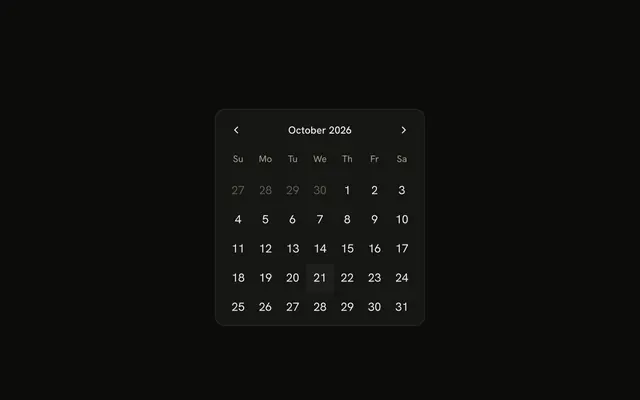
Use it when the dates are the point: what runs when, what overlaps, what slips past a milestone. Drag a bar to move it, pull an edge to change one end, or focus it and use the arrow keys. In React, Radix UI draws the bars, and the dates stay yours: the chart reports a move and draws whatever you keep. For a single day picked from a month, use Calendar.
Installation
Anatomy
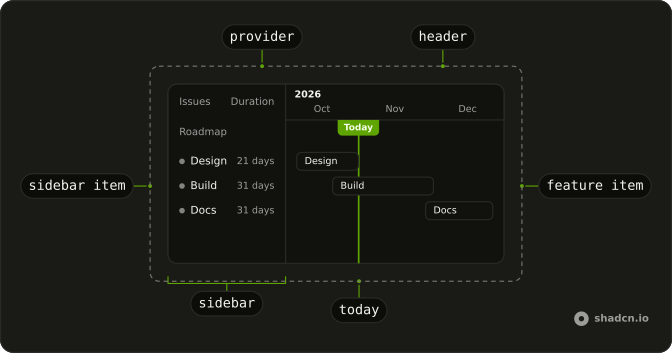
GanttProvider
├── GanttSidebar
│   └── GanttSidebarGroup
│       └── GanttSidebarItem
└── GanttTimeline
    ├── GanttHeader
    ├── GanttFeatureList
    │   └── GanttFeatureListGroup
    │       └── GanttFeatureItem
    ├── GanttMarker
    ├── GanttToday
    └── GanttCreateMarkerTrigger
Usage
import {
  GanttFeatureItem, GanttFeatureList, GanttFeatureListGroup,
  GanttHeader, GanttProvider, GanttSidebar, GanttSidebarGroup,
  GanttSidebarItem, GanttTimeline, GanttToday,
} from "@/components/ui/gantt";<GanttProvider className="h-96" range="monthly">
<GanttSidebar>
<GanttSidebarGroup name="Roadmap">
{features.map((feature) => (
<GanttSidebarItem feature={feature} key={feature.id} />
))}
</GanttSidebarGroup>
</GanttSidebar>
<GanttTimeline>
<GanttHeader />
<GanttFeatureList>
<GanttFeatureListGroup>
{features.map((feature) => (
<GanttFeatureItem
endAt={feature.endAt}
id={feature.id}
key={feature.id}
name={feature.name}
onMove={move}
startAt={feature.startAt}
/>
))}
</GanttFeatureListGroup>
</GanttFeatureList>
<GanttToday />
</GanttTimeline>
</GanttProvider>Demos
Ranges and Zoom
Three buttons switch range between daily, monthly and quarterly, and two change zoom in steps of 25. A daily column is a day with its weekday and weekends shaded, a monthly one is a month under its year, and a quarterly one is a month under its quarter. zoom is a percentage of the column's width, so 150 makes every column half as wide again. The chart scrolls back to today after each change. Pick the range from how long the work runs: days for a sprint, months for a roadmap.
Groups
A sprint in the daily range, in three groups: Design, Build and Ship. Each GanttSidebarGroup has a GanttFeatureListGroup in the same order, and the two line up row for row, the group's name on the row above its items. Keep the same items in both lists, in the same order, or the rows drift apart. A bar's label stays at the visible edge while the rest of the bar is scrolled under the list.
Markers
Two milestones stand on their days, each with a line down the timeline and a label under the header that shows its date on hover. onRemove gives a label a remove button. GanttCreateMarkerTrigger puts a button over the header that follows the pointer with the day under it, and a click calls onCreateMarker with that day. From the keyboard, the button starts on today, the arrow keys change the day and Enter places it. The bars here have no onMove, so they show the plan but can't be dragged.
Add Feature
onAddItem on the provider turns an empty spot of the timeline into a dashed box under the pointer, and a click calls it with that day. The demo adds a two-week feature there. The box is a pointer's shortcut and isn't in the tab order, so the button above the chart adds one today for keyboard users. Give your own chart a button like it.
FAQ
What do the daily, monthly and quarterly ranges change?
range on GanttProvider sets what a column is: a day in daily, a month under its year in monthly, and a month under its quarter in quarterly. Bars still start and end on days in every range, placed inside a month by how far into it they fall. The timeline covers last year, this year and next, and opens scrolled to today. The Ranges and Zoom demo switches between the three.
How do I keep the new dates after someone drags a bar?
Pass onMove to GanttFeatureItem and save what it gets, the feature's id and its new start and end dates, in your state. The bar draws the dates you pass, so without that update it goes back where it was. Without onMove the bar can't be dragged or moved by key. Dates snap to whole days, and the last day is included.
Can people move a Gantt bar without a mouse?
Yes. Every bar can be focused, and with onMove the arrow keys move it a day in the daily range and a week in the other two. Shift with an arrow moves its end, and Alt with Shift moves its start. A polite status line reads out the new dates, and the bar's name includes them. In a right-to-left layout the arrows follow the timeline, so the left arrow is later.
How do I make the Gantt columns wider?
Set zoom on GanttProvider: it is a percentage of each column's width, 100 by default, so 50 halves the columns and 200 doubles them. A daily column is 50 pixels at 100, a monthly one 150 and a quarterly one 100. The sidebar width is separate: set the --gantt-sidebar-width variable on the provider, which is 16rem and never more than 40% of the chart.
How do I add milestones to the timeline?
Render a GanttMarker in GanttTimeline for each one, with an id, a date and a label, and pass onRemove to give it a remove button. GanttCreateMarkerTrigger lets people place new ones from the header, by pointer or by keyboard, and calls onCreateMarker with the day. GanttToday is the same kind of line for today, in the primary color.
Why does the timeline appear after the page loads in React?
The chart reads today's date in the browser, once it has mounted, and draws nothing dated before then. A server and a browser in different time zones can disagree about the day, and drawing after mount keeps them from rendering two different charts. The sidebar renders right away. Give the provider a height, such as h-96, so the page doesn't move when the timeline arrives.
API Reference
GanttProvider
locale?string
The locale the header, the durations and the dates read in.
- Default
"en-US"
onAddItem?(date: Date) → void
Called with the day under the pointer when someone clicks an empty spot of the timeline. Without it, the timeline has no add helper.
- Parameters
date– Date- Returns
void
range?GanttRange
What a column is: a day (daily), a month under its year (monthly)
or a month under its quarter (quarterly).
- Default
"monthly"
zoom?number
The columns' width in percent: 150 makes every column half as wide again.
- Default
100
className?string
Merged with the part's classes.
GanttSidebar
<div> data-slot="gantt-sidebar"
durationHeading?string
The duration column's heading.
- Default
"Duration"
heading?string
The feature column's heading.
- Default
"Issues"
className?string
Merged with the part's classes.
--gantt-header-heightstring--gantt-sidebarstringGanttSidebarGroup
<div> data-slot="gantt-sidebar-group"
namestring
The group's name, on the row above its items.
className?string
Merged with the part's classes.
--gantt-row-heightstringGanttSidebarItem
<button> data-slot="gantt-sidebar-item"
featureobject
The feature this row names: its status, name and length.
- Type
{ endAt: Date; id: string; name: string; startAt: Date; status: GanttStatus }
onSelectItem?(id: string) → void
Called with the feature's id when the row is chosen, after the chart scrolls to it.
- Parameters
id– string- Returns
void
className?string
Merged with the part's classes.
--gantt-row-heightstring--gantt-statusstringGanttTimeline
<div> data-slot="gantt-timeline"
className?string
Merged with the part's classes.
data-weekend?string--gantt-add-xstring--gantt-add-ystring--gantt-column-widthstring--gantt-header-heightstring--gantt-row-heightstringGanttHeader
data-slot="gantt-header"
className?string
Merged with the part's classes.
data-weekend?string--gantt-column-widthstring--gantt-header-heightstring--gantt-sidebarstringGanttFeatureList
<div> data-slot="gantt-feature-list"
className?string
Merged with the part's classes.
GanttFeatureListGroup
<div> data-slot="gantt-feature-list-group"
className?string
Merged with the part's classes.
--gantt-row-heightstringGanttFeatureItem
<div> data-slot="gantt-feature-item"
endAtDate
The feature's last day, included.
idstring
The element's id.
namestring
The bar's label when it has no children, and its name for assistive tech.
startAtDate
The feature's first day.
onMove?(id: string, startAt: Date, endAt: Date) → void
Called with the new dates when a drag or a key moves or resizes the bar. Keep them in state: the bar draws the dates it's given. Without it, the bar stays put.
- Type
(id: string, startAt: Date, endAt: Date) → void- Parameters
id– stringstartAt– DateendAt– Date- Returns
void
className?string
Merged with the part's classes.
data-dragging?stringdata-movable?string
Present when movable is true.
--gantt-feature-startstring--gantt-feature-widthstring--gantt-header-heightstring--gantt-row-heightstring--gantt-sidebarstringGanttMarker
<div> data-slot="gantt-marker"
dateDate
The day the marker stands on.
idstring
The marker's id, passed back to onRemove.
labelstring
The milestone's name, shown on its flag under the header.
onRemove?(id: string) → void
Called with the marker's id from its remove button; without it, there is none.
- Parameters
id– string- Returns
void
className?string
Merged with the part's classes.
--gantt-header-heightstring--gantt-marker-xstringGanttToday
<div> data-slot="gantt-today"
label?string
The label over today's line.
- Default
"Today"
className?string
Merged with the part's classes.
--gantt-header-heightstring--gantt-marker-xstringGanttCreateMarkerTrigger
<div> data-slot="gantt-create-marker-trigger"
onCreateMarker(date: Date) → void
Called with the chosen day.
- Parameters
date– Date- Returns
void
className?string
Merged with the part's classes.
--gantt-header-heightstring--gantt-pick-xstring