shadcn.io is an independent project built on shadcn/ui
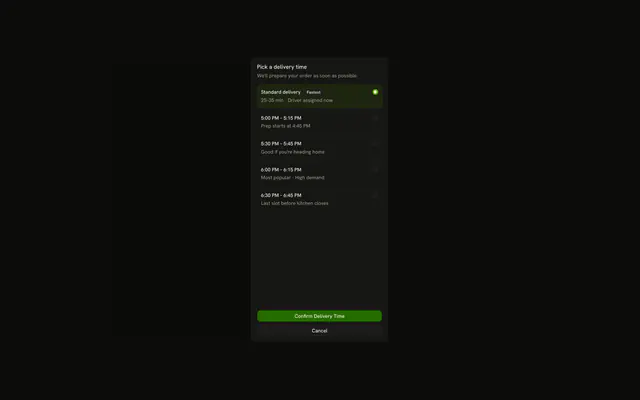
Focus stays in a window over the page until the short task is done. Escape or Cancel puts it back on the button that opened the window.
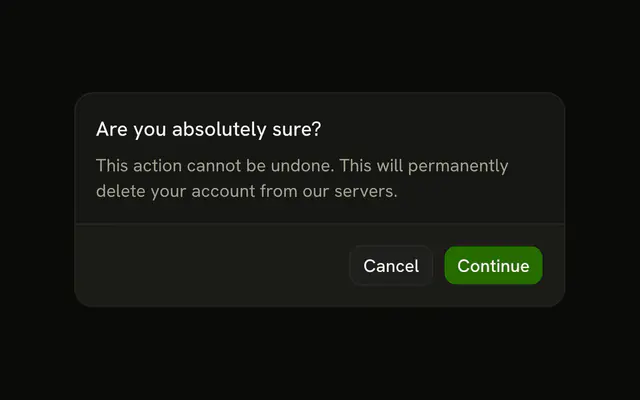
Use it for a task with a start and a finish, like a profile edit or a share link. A destructive confirm that must not close on an outside click belongs in an Alert Dialog. In React, Radix UI traps focus and restores it when the window closes.
Installation
Anatomy
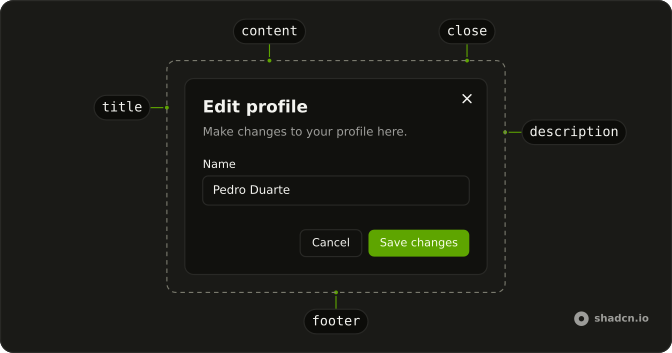
DialogTrigger
DialogOverlay
DialogPositioner
DialogContent
DialogTitle
DialogDescription
DialogClose
Usage
import { Button } from "@/components/ui/button";
import {
  Dialog, DialogClose, DialogContent, DialogDescription, DialogFooter,
  DialogHeader, DialogTitle, DialogTrigger,
} from "@/components/ui/dialog";
import { Field, FieldGroup, FieldLabel } from "@/components/ui/field";
import { Input } from "@/components/ui/input";<Dialog>
<form>
<DialogTrigger asChild>
<Button variant="outline">Open Dialog</Button>
</DialogTrigger>
<DialogContent className="sm:max-w-sm">
<DialogHeader>
<DialogTitle>Edit profile</DialogTitle>
<DialogDescription>
Make changes to your profile here. Click save when you're done.
</DialogDescription>
</DialogHeader>
<FieldGroup>
<Field>
<FieldLabel>Name</FieldLabel>
<Input defaultValue="Pedro Duarte" name="name" type="text" />
</Field>
<Field>
<FieldLabel>Username</FieldLabel>
<Input defaultValue="@peduarte" name="username" type="text" />
</Field>
</FieldGroup>
<DialogFooter>
<DialogClose asChild>
<Button variant="outline">Cancel</Button>
</DialogClose>
<Button type="submit">Save changes</Button>
</DialogFooter>
</DialogContent>
</form>
</Dialog>Accessibility
- Enter
- When focus is on the trigger, opens the dialog.
- Tab
- Moves focus to the next focusable element within the content. Focus is trapped within the dialog.
- Shift+Tab
- Moves focus to the previous focusable element. Focus is trapped within the dialog.
- Escape
- Closes the dialog and moves focus to trigger or the defined final focus element.
- Space
- Activate the focused control.
Demos
Close Button
A share dialog shows a read-only link and a Close button in the footer, wired with DialogClose. The corner icon is still there, and the labeled button is a second dismiss, aligned with the link. Use a labeled close when Close should read as an action, not only as an X. A plain footer button does not dismiss unless it is a DialogClose or you close the dialog yourself.
No Close Button
showCloseButton set to false removes the corner icon. This window has no other buttons, so Escape and an outside click are the way out. Hide the icon when it crowds a short title, not to force a choice. With Escape off too, a dialog that has no action is a trap, so a question people must answer belongs in an Alert Dialog with a real button.
Controlled
open lives in state. Save writes the name shown under the trigger, then closes, while Cancel still goes through DialogClose. Hold the open state when closing depends on a successful save, so a failed request can leave the window up with the error in it. Do not hang the save handler on DialogClose, because that dismisses before you know the request worked.
Sticky Footer
The paragraphs scroll inside a capped region, and the footer sits outside that scroller, so Close stays on screen. Use a sticky footer for terms, a long form, or any window where the action would otherwise scroll away. The header stays put for the same reason: it is not inside the scroller. Give that region a max height, or a dialog that grows with the page stops behaving like one.
Scrollable Content
The same scroll region, without a footer. The title and description stay visible while the paragraphs move. Use it for a note people read and then dismiss with the corner icon or Escape. If there is an action they must reach, pin it in a footer instead of leaving it under the prose, and keep a cap on the scroller so the window stays on screen.
Rtl
The content sets dir to rtl, and the copy is Arabic: title, fields, Cancel, and save. The close icon and the footer follow the inline end. Set dir on DialogContent when the window can be Arabic or Hebrew even if the trigger was drawn left to right. Do not shove the footer with a physical left margin, because logical alignment already moves the actions.
FAQ
Should I use a Dialog or an Alert Dialog?
Use a Dialog for a task: a form, a share link, a settings panel. When the only question is to confirm or cancel, like deleting a file, use an Alert Dialog, which doesn't close on an outside click. For content beside the page, a Sheet fits better.
How do I open and close a Dialog from code in React?
Hold the open state yourself, which also lets you close the dialog after an action, as in the Controlled demo.
Pass open and update it in onOpenChange, which receives the new boolean.
How do I close a Dialog after a form is saved?
Control the open state, disable the submit button while the request runs, and set the state to closed once it succeeds, so the dialog stays open if the save fails. Don't put the save on DialogClose, which closes before the request finishes.
How do I stop a Dialog from closing on an outside click or Escape?
Call event.preventDefault() in onPointerDownOutside and onEscapeKeyDown on DialogContent.
Keep a visible way out, like a Cancel button.
Does a Dialog need a title for accessibility?
Yes. Every dialog needs a DialogTitle, which screen readers announce when it opens. When the design has no visible title, keep it and add the sr-only class. Focus moves into the dialog on open, stays inside while it's open, and goes back to the trigger when it closes.
How do I make a long Dialog scroll with a sticky footer?
Keep the header and footer outside the scrolling part and let the content between them scroll, as in the Sticky Footer and Scrollable Content demos.
How do I change the Dialog size or its layout on mobile?
Set size on DialogContent, from sm to 6xl or fullscreen. Sizes apply from the sm breakpoint up, so for a width of your own pass sm:max-w-* in className, as in shadcn/ui: it beats the size, where a bare max-w-* only applies below that breakpoint. On small screens the dialog sticks to the bottom of the screen like a sheet; set bottomStickOnMobile to false to keep it centered.
API Reference
Dialog
data-slot="dialog"
open?boolean
Whether it's open. Pair with onOpenChange to control it.
defaultOpen?boolean
Whether it starts open, when you don't control open.
- Default
false
onOpenChange?{ bivarianceHack(open: boolean): void; }["bivarianceHack"]
Called when it opens or closes.
- Type
{ bivarianceHack(open: boolean): void; }["bivarianceHack"]
modal?boolean
Whether it's modal: the rest of the page can't be reached and focus stays inside while it's open.
- Default
true
DialogTrigger
<button> data-slot="dialog-trigger"
asChild?boolean
Merge props onto the child element instead of rendering a host.
DialogTitle
<h2> data-slot="dialog-title"
asChild?boolean
Merge props onto the child element instead of rendering a host.
className?string
Merged with the part's classes.
DialogDescription
<div> data-slot="dialog-description"
asChild?boolean
Merge props onto the child element instead of rendering a host.
className?string
Merged with the part's classes.
DialogPortal
data-slot="dialog-portal"
container?Element | DocumentFragment | null
Specify a container element to portal the content into.
- Type
Element | DocumentFragment | null- Default
preview ?? undefined
forceMount?true
Used to force mounting when more control is needed. Useful when controlling animation with React animation libraries.
DialogClose
data-slot="dialog-close"
asChild?boolean
Merge props onto the child element instead of rendering a host.
DialogOverlay
data-slot="dialog-overlay"
forceMount?true
Used to force mounting when more control is needed. Useful when controlling animation with React animation libraries.
asChild?boolean
Merge props onto the child element instead of rendering a host.
className?string
Merged with the part's classes.
DialogContent
bottomStickOnMobile?boolean
Stick the dialog to the bottom of the screen on mobile.
- Default
true
deferPointerDownOutside?boolean
When true, a pointerdown event outside of the layered element will
wait for the interaction's click event before dispatching, allowing
third-party code to stop propagation of later events and cancel dismissal.
forceMount?true
Used to force mounting when more control is needed. Useful when controlling animation with React animation libraries.
onCloseAutoFocus?{ bivarianceHack(event: Event): void; }["bivarianceHack"]
Event handler called when auto-focusing on close. Can be prevented.
- Type
{ bivarianceHack(event: Event): void; }["bivarianceHack"]
onEscapeKeyDown?{ bivarianceHack(event: KeyboardEvent): void; }["bivarianceHack"]
Event handler called when the escape key is down. Can be prevented.
- Type
{ bivarianceHack(event: KeyboardEvent): void; }["bivarianceHack"]
onFocusOutside?{ bivarianceHack(event: FocusOutsideEvent): void; }["bivarianceHack"]
Event handler called when the focus moves outside of the DismissableLayer.
Can be prevented.
- Type
{ bivarianceHack(event: FocusOutsideEvent): void; }["bivarianceHack"]
onInteractOutside?{ bivarianceHack(event: PointerDownOutsideEvent | FocusOutsideEvent): void; }["bivarianceHack"]
Event handler called when an interaction happens outside the DismissableLayer.
Specifically, when a pointerdown event happens outside or focus moves outside of it.
Can be prevented.
- Type
{ bivarianceHack(event: PointerDownOutsideEvent | FocusOutsideEvent): void; }["bivarianceHack"]
onOpenAutoFocus?{ bivarianceHack(event: Event): void; }["bivarianceHack"]
Event handler called when auto-focusing on open. Can be prevented.
- Type
{ bivarianceHack(event: Event): void; }["bivarianceHack"]
onPointerDownOutside?{ bivarianceHack(event: PointerDownOutsideEvent): void; }["bivarianceHack"]
Event handler called when the a pointerdown event happens outside of the DismissableLayer.
Can be prevented.
- Type
{ bivarianceHack(event: PointerDownOutsideEvent): void; }["bivarianceHack"]
showCloseButton?boolean
Show close button at the top right corner.
- Default
true
size?"2xl" | "3xl" | "4xl" | "5xl" | "6xl" | "fullscreen" | "lg" | "md" | "sm" | "xl"
The size.
- Type
"2xl" | "3xl" | "4xl" | "5xl" | "6xl" | "fullscreen" | "lg" | "md" | "sm" | "xl"- Default
"md"
asChild?boolean
Merge props onto the child element instead of rendering a host.
className?string
Merged with the part's classes.
DialogHeader
<div> data-slot="dialog-header"
description?string
The description of the dialog.
title?string
The title of the dialog.
className?string
Merged with the part's classes.
DialogFooter
<div> data-slot="dialog-footer"
showCloseButton?boolean
Show a close button in the footer.
- Default
false
className?string
Merged with the part's classes.