shadcn.io is an independent project built on shadcn/ui
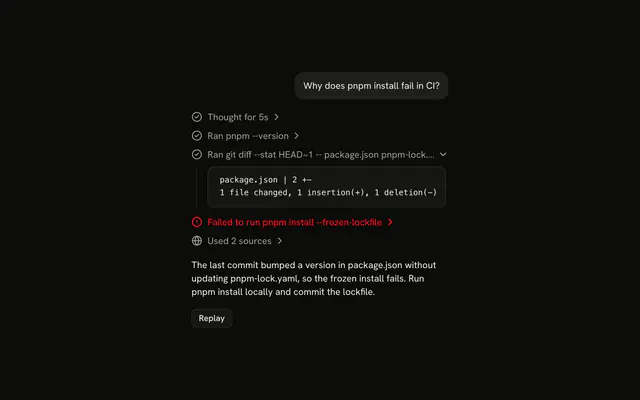
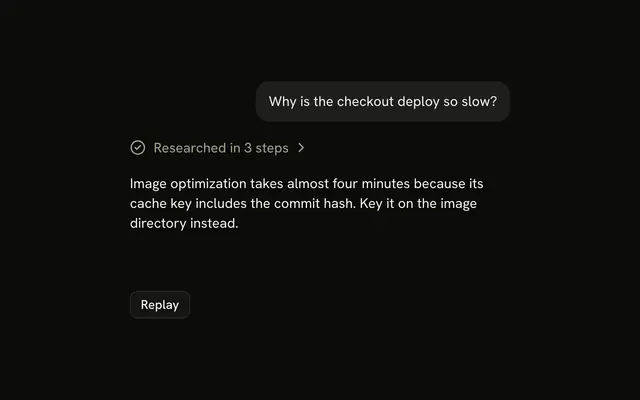
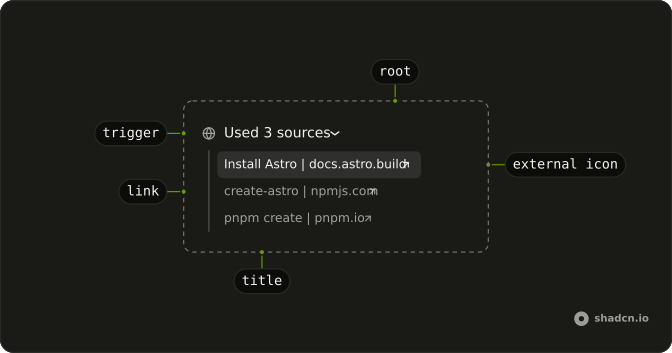
Sources is the line under an AI reply that counts the pages the agent drew on, Used 3 sources, and opens into a link to each one. Reach for it when the agent searched the web or read documentation to answer, so people can check where the answer came from.
It is a pattern built from Trace, so the code is yours to change. To tie one sentence of the answer to the page behind it, use an Inline Citation.
Installation
Sources is a pattern. The command adds the part it's built from, Trace, and the code to copy is the demo's.
Anatomy
Usage
import { ArrowUpRightIcon, GlobeIcon } from "lucide-solid";
import {
  Trace, TraceCollapsible, TraceCollapsibleContent,
  TraceCollapsibleTrigger, TraceIcon, TraceLine, TraceTitle,
} from "@/components/ui/trace";
export function Sources(props: { sources: { title?: string; url: string }[] }) {
return (
<Trace>
<TraceCollapsible>
<TraceCollapsibleTrigger>
<TraceLine>
<TraceIcon>
<GlobeIcon aria-hidden="true" />
</TraceIcon>
<TraceTitle>
Used {props.sources.length}{" "}
{props.sources.length === 1 ? "source" : "sources"}
</TraceTitle>
</TraceLine>
</TraceCollapsibleTrigger>
<TraceCollapsibleContent>
<Trace>
{props.sources.map((source) => (
<a
href={source.url}
key={source.url}
rel="noreferrer"
target="_blank"
>
<TraceLine>
<TraceTitle>
{source.title ?? new URL(source.url).hostname}
<span class="sr-only"> (opens in a new tab)</span>
</TraceTitle>
<TraceIcon>
<ArrowUpRightIcon
aria-hidden="true"
class="rtl:-scale-x-100"
/>
</TraceIcon>
</TraceLine>
</a>
))}
</Trace>
</TraceCollapsibleContent>
</TraceCollapsible>
</Trace>
);
}
Pass each page once. The title counts sources.length, so a page listed twice is counted twice, and it says source rather than sources when there is only one.
Accessibility
The line is the trigger of a collapsible, a <button> with aria-expanded, so a screen reader reads Used 3 sources and whether the list is showing. Each source is a plain link named by its title. The globe, the chevron and the arrow sit in TraceIcon, which is hidden from screen readers, so the new tab has to be said in words: each title ends in an sr-only span that reads (opens in a new tab). While the list is closed, its links are out of the tab order.
- Tab
- Moves focus to the Used 3 sources line, then to each source while the list is open.
- Shift+Tab
- Moves focus back through the same stops.
- Enter
- On the line, opens or closes the list. On a source, opens its page in a new tab.
- Space
- On the line, opens or closes the list.
AI SDK
With the AI SDK, each page the model drew on reaches the client as a source-url part of the message, with a url and an optional title. The route sends those parts only when you pass sendSources: true to toUIMessageStreamResponse. Show them under the reply's text, and drop repeats by url first, since the agent can cite one page several times.
AI SDK UI has no Solid package, so read the source-url parts from your chat route's stream yourself, and keep the first part for each url before you count them.
When a part has no title, show the hostname of its url, as the Usage snippet does.
Migrating from AI SDK Elements
AI SDK Elements is for React. In Solid, start from the demo above: its line and links are all there is to Sources.
FAQ
Why does my Sources list show the same page twice?
Because the agent cited that page more than once in the reply, and each citation arrives as its own source-url part. The demo's agent cites the Astro install docs twice. Filter the parts so each url appears once, keeping the first, before you render the list.
Count after you filter, too. The title reads Used 3 sources from sources.length, so a list built from the raw parts would say 4 for three pages.
What should a Sources link show when the page has no title?
Show the hostname of its URL, such as pnpm.io. The AI SDK's source-url part makes title optional, so the snippet in Usage falls back to new URL(source.url).hostname, which is short and still tells people which site will open.
Avoid the full URL. TraceTitle keeps to one line and truncates, so a long path ends in an ellipsis before it says anything useful.
When should the Sources line appear under an AI reply?
After the reply's text, once the reply has at least one source. Placed there, the line never pushes the answer down while it streams, and the demo renders it only after the last word arrives. Press Replay in the demo to watch the order.
A reply with no sources gets no line at all. Used 0 sources tells the reader nothing they need, and it adds a line under every answer the agent wrote from what it already knew.
Why does my AI SDK chat never show any Sources?
The route isn't sending them. toUIMessageStreamResponse leaves source parts out of the stream unless you pass sendSources: true, so the messages that reach the client have text and no source-url parts.
The model also has to report sources in the first place. Providers do that when the answer comes from a search they ran, such as a web search tool or search grounding. Once both are in place, the filter in the AI SDK section finds them.
How do I make the Sources list start closed?
Leave out defaultOpen on TraceCollapsible, which the demo sets so the links show at once. Without it, the list starts closed and only the Used 3 sources line is in view until someone presses it.
Closed is the calmer choice in a long conversation where most replies cite pages, since an open list adds a line per source under every answer. Keep it open when the sources are the point, as in a research tool.
Should Sources links open in a new tab?
They should in a chat, where opening a page in place would take people out of the conversation they were reading. Each link in the demo has target="_blank" and rel="noreferrer", and ends in an arrow pointing up and out.
The arrow is hidden from screen readers, so tell them in words: each title ends in an sr-only span that reads (opens in a new tab). In a right-to-left page the arrow flips, through the rtl:-scale-x-100 class on the icon.
Should I use Sources or Inline Citation for AI answers?
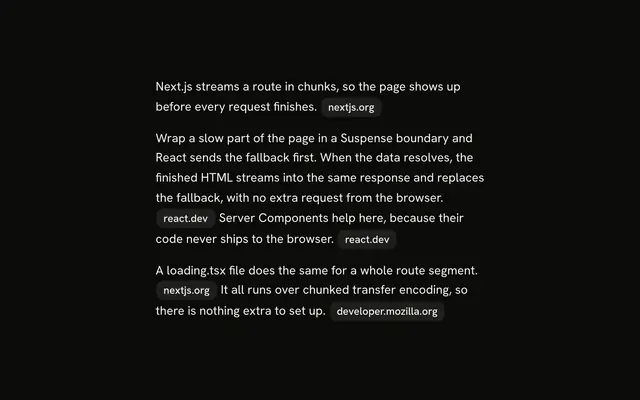
Use both when you can, since they answer different questions. Sources lists every page under the reply, so people see where the answer as a whole came from. An Inline Citation sits in the text beside the sentence a page supports, so people can check one claim at a time.
If you pick one, Sources suits a short answer drawn from a few pages. Inline citations earn their place in a long answer where each paragraph rests on a different page.
Is this the same as AI SDK Elements' Sources component?
It does the same job without a wrapper of its own. AI SDK Elements ships Sources, SourcesTrigger, SourcesContent and Source as four components, and here they are a Trace line that opens and a link around each line, in code you own.
AI SDK Elements is for React, so there is nothing to migrate in Solid. Start from the demo above and pass it the reply's sources.
API Reference
Sources has no props of its own. The list is a TraceCollapsible whose title counts the pages, and each source is a link around a TraceLine: see Trace.