shadcn.io is an independent project built on shadcn/ui
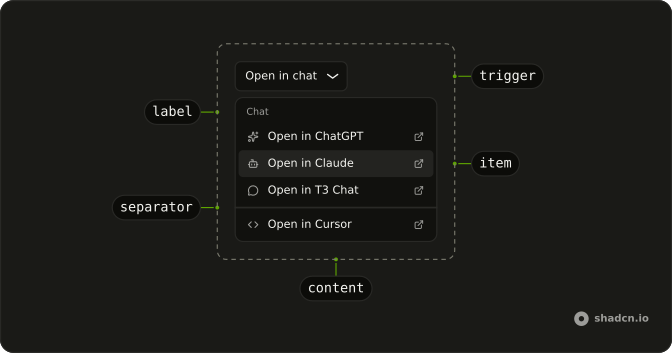
Open in Chat is a button that drops down a list of AI apps, each a link that starts a new chat in a new tab with your question already typed in. Put it under a docs page, beside a search result or at the end of an answer, where a reader may want to carry on with their own assistant.
It is a Dropdown Menu of links, so nothing is sent until someone picks an app, and the conversation happens there, not on your page.
Installation
Anatomy
Usage
import {
  OpenIn, OpenInChatGPT, OpenInClaude, OpenInContent, OpenInCursor,
  OpenInTrigger,
} from "@/components/ui/open-in-chat";<OpenIn query="How can I implement authentication in Next.js?">
<OpenInTrigger />
<OpenInContent>
<OpenInChatGPT />
<OpenInClaude />
<OpenInCursor />
</OpenInContent>
</OpenIn>query is the text every app opens with. With no children, OpenInTrigger draws an outline Open in chat button with a chevron.
Accessibility
The trigger is a button with aria-haspopup="menu" and aria-expanded, and the list is a role="menu" labelled by the trigger, whose items are links with the menu item role. The app marks and the arrow are hidden from screen readers, so each item is named by its text and a visually hidden note, such as Open in Claude (opens in a new tab). Typing a letter moves to the next app whose name starts with it, so pressing C again and again cycles through ChatGPT, Claude and Cursor. Escape closes the menu and returns focus to the trigger. A trigger of your own that shows only an icon needs an aria-label.
- Enter
- When focus is on the trigger, opens the menu on its first item. On an item, opens that app in a new tab and closes the menu.
- Space
- When focus is on the trigger, opens the menu on its first item. On an item, opens that app in a new tab and closes the menu.
- Arrow Down
- When focus is on the trigger, opens the menu on its first item. In the menu, highlights the next item and stops at the last one.
- Arrow Up
- When focus is on the trigger, opens the menu on its last item. In the menu, highlights the previous item and stops at the first one.
- Home
- Highlights the first item.
- End
- Highlights the last item.
- Escape
- Closes the menu and moves focus to the trigger.
Providers
Each item is a link to its app with the query in the URL, opened in a new tab with rel="noopener noreferrer", so the app can't reach back into your page or see where the reader came from.
| Part | Opens | Query in |
|---|---|---|
OpenInChatGPT | https://chatgpt.com/ with search on | prompt |
OpenInClaude | https://claude.ai/new | q |
OpenInT3 | https://t3.chat/new | q |
OpenInScira | https://scira.ai/ | q |
OpenInv0 | https://v0.app | q |
OpenInCursor | https://cursor.com/link/prompt | text |
label replaces an item's text, Open in and the app's name, and becomes what typing in the open menu matches, which is otherwise the app's name alone. Each app reads its own parameter, and an app can change it, so when one stops filling in the question, compare its current address with this table before you look at the component.
Demos
Labels
The six apps in two groups, Chat and Code, each an OpenInGroup with an OpenInLabel on top and an OpenInSeparator between them. label shortens every item to the app's name, Claude rather than Open in Claude, since the heading already says what the menu does. Use groups when the list mixes chat apps with tools that write code.
Custom
Two items of your own under ChatGPT and Claude: an OpenInItem that links to Perplexity, its URL built from the same query, and a Copy prompt item that copies the query and reads Copied for a moment. The copy item keeps the menu open through closeOnSelect set to false. Use OpenInItem for an app the component doesn't know.
Trigger
An Ask AI button with a sparkle icon under an answer about useEffect running twice, with that question as the query. The button goes inside OpenInTrigger as its child. Use a small ghost button where the menu is a side path, and the default outline button where opening a chat is the point.
Migrating from AI SDK Elements
AI SDK Elements is for React. In Solid, Open in Chat has the same parts and props, and the demos above show them in Solid's syntax.
FAQ
Which AI apps can Open in Chat open?
ChatGPT, Claude, T3 Chat, Scira, v0 and Cursor, one part each, and every one a link with the query in its URL. The Providers table lists each address and the parameter it reads, and ChatGPT opens with search turned on.
Put in only the apps your readers use, since six rows is already a long menu for a side path. For an app that isn't on the list, add an OpenInItem of your own.
How does Open in Chat pass the question to each app?
Through the URL. Set query on OpenIn, and each item reads it and builds its link with URLSearchParams, so spaces, question marks and quotes arrive intact in the app's text field.
Keep it to a question or a short prompt, because the whole query travels in the address. To ask about a long page, put the page's URL in the query rather than its text.
How do I make Open in Chat ask about the current page?
Put the page in the query. A prompt such as Read this page and answer my questions about it, followed by the page's URL, lets an app that can browse fetch it and start from your content rather than what it already knows.
Point it at the plainest version of the page you have. A Markdown copy, if your site serves one, is quicker for the model to read than the rendered HTML, and the query stays short either way.
How do I add another app to Open in Chat?
Add an OpenInItem with a value, a valueText with the app's name for typing in the open menu to match, and an asChild function that returns the link, with what its props accessor returns spread onto it, as the Custom demo does for Perplexity.
Build its address from the same query with URLSearchParams, open it in a new tab with rel="noopener noreferrer", and give it an icon, a name and the arrow so it matches the built-in items, with "(opens in a new tab)" in a visually hidden span after the name. Inside OpenIn, a component of your own reads the query from useOpenInContext.
Why does Open in Chat open a new tab?
So the reader keeps your page while the chat starts beside it. Each item is a link with target="_blank" and rel="noopener noreferrer", so the app gets the query in its URL and nothing else, neither a handle on your window nor the address the reader came from.
The arrow after each name shows the new tab to sighted users and is hidden from screen readers, so each item also ends in a visually hidden note, and a screen reader reads Open in Claude (opens in a new tab). An OpenInItem of your own needs the same note in its text.
Can Open in Chat be used with the keyboard?
Yes. Enter, Space or ArrowDown on the trigger opens the menu on its first app, and ArrowUp opens it on the last. The arrow keys then move between apps and stop at either end, Home and End jump to the ends, and Enter or Space opens the highlighted app in a new tab.
Escape closes the menu without opening anything and puts focus back on the trigger. The Accessibility section lists every key.
How do I keep the Open in Chat menu open after an item is chosen?
Set closeOnSelect to false on that OpenInItem and run your code when it is selected.
The Custom demo's Copy prompt item works this way: it copies the query and reads Copied for a second and a half, with the menu still open so people can see it worked. Leave the app links closing it, since the new tab takes the reader away anyway.
Is this the same as AI SDK Elements' Open in Chat?
It has the same parts and props as that React component, and here the links also hide your page's address from the apps, Scira takes a label like the rest, and OpenInGroup holds a labelled group. AI SDK Elements is for React only, so there is nothing to migrate in Solid, and the demos above show every part in its syntax.
API Reference
OpenIn
querystring
The text to open each chat with: a question, a prompt or a page.
OpenInTrigger
data-slot="open-in-trigger"
OpenInContent
data-slot="open-in-content"
class?string
Merged with the part's classes.
OpenInItem
data-slot="open-in-item"
OpenInGroup
data-slot="open-in-group"
OpenInLabel
data-slot="open-in-label"
OpenInSeparator
data-slot="open-in-separator"
OpenInChatGPT
label?string
The item's text, in place of Open in and the app's name.
value?string
The item's value in the menu.
- Default
chatgpt
class?string
Merged with the part's classes.
OpenInClaude
label?string
The item's text, in place of Open in and the app's name.
value?string
The item's value in the menu.
- Default
claude
class?string
Merged with the part's classes.
OpenInT3
label?string
The item's text, in place of Open in and the app's name.
value?string
The item's value in the menu.
- Default
t3
class?string
Merged with the part's classes.
OpenInScira
label?string
The item's text, in place of Open in and the app's name.
value?string
The item's value in the menu.
- Default
scira
class?string
Merged with the part's classes.
OpenInv0
label?string
The item's text, in place of Open in and the app's name.
value?string
The item's value in the menu.
- Default
v0
class?string
Merged with the part's classes.
OpenInCursor
label?string
The item's text, in place of Open in and the app's name.
value?string
The item's value in the menu.
- Default
cursor
class?string
Merged with the part's classes.