shadcn.io is an independent project built on shadcn/ui
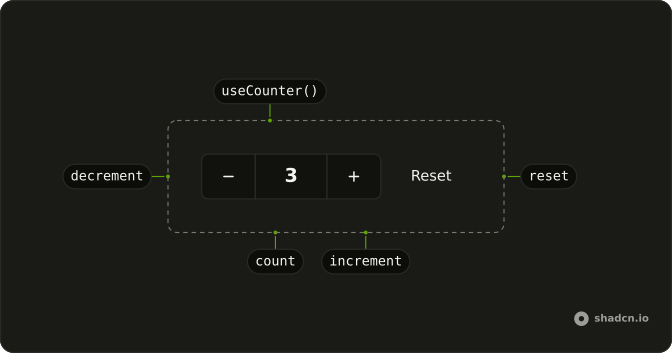
useCounter keeps a number, plus increment, decrement, reset, and setCount.
Use it for a quantity stepper, a score, or a page index. When the value is only on or off, use useBoolean. In React increment and decrement keep the same identity, so a child button can take them without a new function each render.
Installation
Anatomy
Usage
import { useCounter } from "@/hooks/use-counter";const { count, increment, decrement, reset, setCount } = useCounter();With no argument the count starts at 0, and reset returns to that same initial value.
FAQ
When should I use useCounter instead of useState?
Use it when you want increment, decrement, and reset without writing them. increment and decrement are memoized with an empty dependency list, so they are safe to pass to a child. useState is enough when you only set the number in one place. setCount is still there for any other update.
How do I step by more than one?
Call setCount with a function. increment and decrement always change the number by one, and they take no argument. setCount is the raw state setter, so setCount with a function receives the current number and can add five, multiply, or jump to a value. There is no step option on the hook.
Can I set a minimum or a maximum?
Not in the hook. Nothing clamps the number, so decrement from 0 goes negative and increment never stops. Do the bound inside setCount, for example by taking the smaller of your max and the next number. reset goes back to the initial value even if that value sits outside a bound you apply elsewhere.
What does reset go back to?
The initial value from the call, or 0 when that argument was missing. reset reads the latest initial value, because it is in the dependency list. Changing the argument does not change count by itself. It changes only what the next reset writes. A missing argument and an explicit 0 behave the same way.
Can the count go negative?
Yes. decrement subtracts one with no floor, and increment adds one with no ceiling. The hook never checks the sign. If you need to stay at zero or above, do that in setCount instead of calling decrement. The displayed number is whatever state currently holds.
Is useCounter safe to render on the server?
Yes. It uses useState and useCallback only. It never reads window or document, so the server and the client both start from the same initial number. That number is the argument you passed, or 0 when you left it out. A bad argument is not checked at runtime.
API Reference
Parameters
initialValue?number
The count it starts with, and resets to. 0 when left out.
Returns
countnumber
The current count.
decrement() => void
Subtracts 1. Stable across renders.
- Type
() => void
increment() => void
Adds 1. Stable across renders.
- Type
() => void
reset() => void
Puts the count back to initialValue (or 0).
- Type
() => void
setCountReact.Dispatch<React.SetStateAction<number>>
Sets the count directly, or from the current one: useState's setter.
- Type
React.Dispatch<React.SetStateAction<number>>