Clerk Design System
Clerk's white canvas and black ink with brand purple #6c47ff on headings and CTAs, Geist Numbers type and light gray hairlines. For React and AI tools.
- Primary color
- #6c47ff
- Typeface
- geistNumbers
- Shape
- Sharp
- Base radius
- 6px
- Colors
- 23
- Type tokens
- 11
- Components
- 18
- Spacing values
- 7
About Clerk DESIGN.md
Curated by Dov Azencot, updated May 14, 2026. Source clerk.com (opens in a new tab).
Clerk’s homepage opens on a pure white canvas (#ffffff) that frames a headline rendered in 64 px Geist‑Numbers with a weight of 700, colored in the brand purple #6c47ff. Below the hero, body copy rests on dark ink #000000, while interactive elements such as primary buttons inherit the same purple accent and a 4 px border rendered in #d9d9de. The layout interleaves neutral surfaces – #e3e3e7 for card backgrounds and #eeeef0 for input fields – establishing a rhythm of contrast and relief that guides the eye without relying on gradients or illustrations.
Inside this DESIGN.md file you will find 23 colors tokens grouped into primary, ink, canvas, hairline, muted, surface‑1/2/3, link, error, warning, and several brand‑specific shades; 12 typography tokens covering display, heading, body, caption, code, and button roles; 6 rounded values ranging from 0 px to a full 9999 px radius; a spacing scale from 4 px to 24 px; and a component catalog of 20 primitives that span navigation, forms, cards, alerts, and modals. The token set follows the Google Labs design‑token specification, exposing each value as a CSS custom property ready for consumption by Tailwind, CSS‑in‑JS, or native stylesheet imports.
To use the system, import the generated token file into your project and reference tokens via the {colors.x}, {typography.x}, {rounded.x}, and {spacing.x} placeholders. In Tailwind you can map the custom properties to theme extensions, while in CSS‑in‑JS you can read the variables directly from the :root. This approach guarantees visual consistency across React components and downstream applications, and it demonstrates why Clerk’s visual language merits close study for teams building authentication‑heavy products.
What makes it distinct
4 highlights
- Primary accentThe brand purple #6c47ff appears on headings, CTA buttons, and interactive icons, establishing a consistent visual hook across the site.
- Ink dominanceBlack #000000 powers all body copy and navigation links, delivering maximum contrast against the white canvas.
- Hairline definitionThe light gray #d9d9de is used for 1 px borders on tables, inputs, and card outlines, subtly separating content without visual noise.
- Surface layeringNeutral grays #e3e3e7 and #eeeef0 provide background bands for cards and modal dialogs, creating depth while preserving a flat aesthetic.
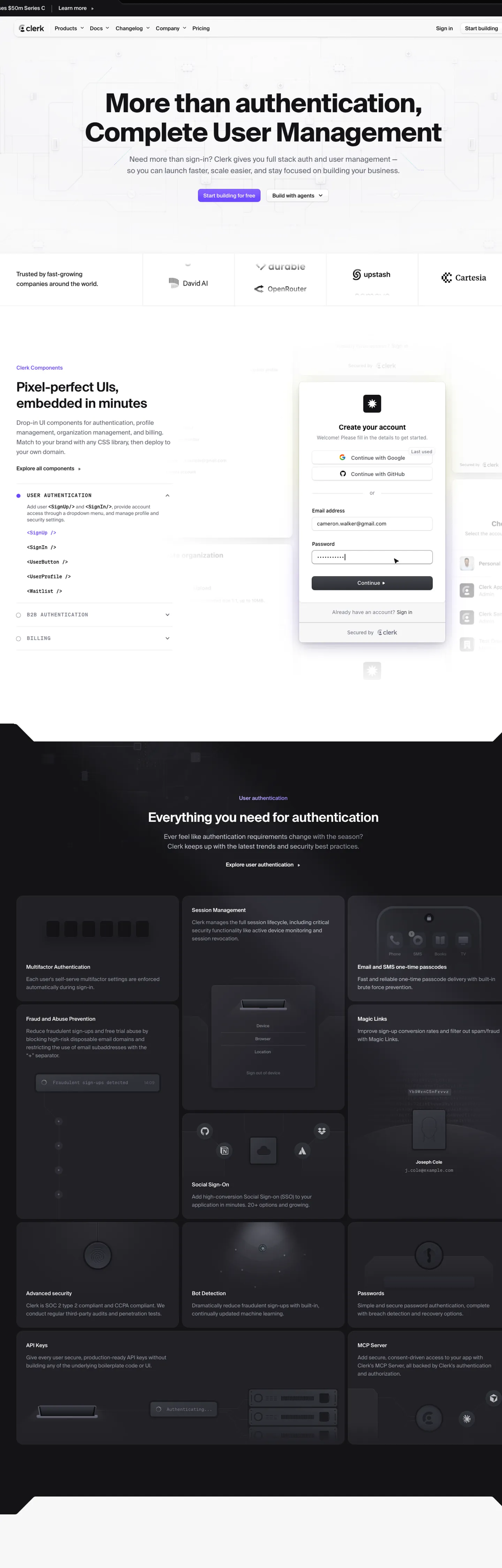
Live at clerk.com
Clerk in production, as captured. Scroll the window to see the whole page.
23 colors
Clerk's system runs on #6c47ff as its primary voltage, used in 3 of 18 components. Type is set in geistNumbers across 11 tokens from 10px to 32px, weights 400–700. Shape language is sharp — components average 0px corner radius, favoring crisp rectangles.
Brand & Accent
Sparing, CTA-only voltage · 4
Surface
Page and card backgrounds · 4
Text
Headlines, body, captions · 3
Borders & Hairlines
Dividers, outlines, rules · 1
Semantic
Status, errors, success, links · 2
Other
Specialty colors · 9
11 type tokens
Set in geistNumbers across 11 tokens, from 10px to 32px, weights 400–700. Shown in its own stack: where the font isn't installed, the fallback the file names stands in.
- display-xl32px · weight 600 · lh 40px · tracking -0.48pxThe quick brown fox jumps over the lazy dog
- heading-lg13px · weight 700 · lh 72px · tracking -1.6pxThe quick brown fox jumps over the lazy dog
- body-md13px · weight 400 · lh 20pxThe quick brown fox jumps over the lazy dog
- body-sm11px · weight 400 · lh 18pxThe quick brown fox jumps over the lazy dog
- caption-sm10px · weight 400 · lh 16pxThe quick brown fox jumps over the lazy dog
- code-sm12px · weight 600 · lh 24pxThe quick brown fox jumps over the lazy dog
- button-lg15px · weight 400 · lh 24pxThe quick brown fox jumps over the lazy dog
- label-sm12px · weight 500 · lh 18pxThe quick brown fox jumps over the lazy dog
- overline11px · weight 400 · lh 18pxThe quick brown fox jumps over the lazy dog
- small10px · weight 400 · lh 16pxThe quick brown fox jumps over the lazy dog
- tiny13px · weight 500 · lh 19.89pxThe quick brown fox jumps over the lazy dog
Radii and spacing
6 corner radii and 7 spacing values. Shape language: sharp, on a 6px base radius.
Radii6
- none0px
- sm4px
- md6px
- lg8px
- xl12px
- full9999px
Spacing7
- xxs4px
- xs8px
- sm12px
- md16px
- base20px
- lg24px
- xl32px
18 components
Each rendered from its tokens (color, type, radius, padding) on Clerk's own canvas.
- Primary ButtonPrimary Buttonprimary-button
- Secondary ButtonSecondary Buttonsecondary-button
- CardCardcard
- ModalModalmodal
- Alert SuccessAlert Successalert-success
- Alert ErrorAlert Erroralert-error
- Nav BarNav Barnav-bar
- Nav LinkNav Linknav-link
- Input FieldInput Fieldinput-field
- DropdownDropdowndropdown
- TooltipTooltiptooltip
- Badge PrimaryBadge Primarybadge-primary
- Badge NeutralBadge Neutralbadge-neutral
- FooterFooterfooter
- SidebarSidebarsidebar
- Form LabelForm Labelform-label
- Form ButtonForm Buttonform-button
- Icon Buttonicon-button
The system, in use
Clerk's tokens on the kind of product it builds.
Plan, build and ship in one place
Bring your team's work together, from the first idea to the final release.
Clerk design system FAQ
Clerk's tokens, its components and how to use this DESIGN.md in your project.
What are the color tokens in the Clerk DESIGN.md?
What is Clerk's primary color hex code?
How do I use Clerk's colors in Tailwind CSS?
What is the role of the primary color in Clerk’s UI?
What fonts does Clerk use?
What is Clerk's type scale?
What can I use if I don't have Clerk's font?
How does the typography system differentiate headings from body text in the Clerk design system?
Which components does the Clerk DESIGN.md define?
What corner radius and spacing does Clerk use?
What spacing conventions are applied to form elements in the Clerk design system?
How are error states visualized in the component library in the Clerk design system?
What is the recommended method for integrating the rounded tokens into custom components in the Clerk design system?
How do I apply the Clerk design system to a shadcn/ui project?
How do I use the Clerk DESIGN.md with Claude Code or Cursor?
Is the Clerk DESIGN.md free to download?
How was the Clerk DESIGN.md made?
Is the Clerk DESIGN.md official?
Related reading
Specs, directories and component libraries that pair with this design system.
- Browse all design systemsThe full directory of DESIGN.md files on shadcn.io, with live mockups for each.shadcn.io
- Clerk — official siteClerk's public marketing site — the source of truth for the live tokens captured in this file.clerk.com (opens in a new tab)
- The DESIGN.md specificationGoogle Labs' open spec for machine-readable design system files — the format this page is built on.github.com (opens in a new tab)
Use Clerk in your project
One machine-readable file. Drop it into Claude Code, Cursor, VS Code or any AI tool that reads DESIGN.md.
Download the DESIGN.md
One machine-readable file: every color, type, radius, spacing, and component token of Clerk.
Feed it to your AI tool
Drop it into Claude, Cursor, or GitHub Copilot. The agent writes React components and Tailwind classes that match Clerk's visual language.
Reference the tokens directly
Or paste the values into your Tailwind config, CSS variables, or component library: every color, size and radius is a quoted, ready-to-copy value.
Read the full DESIGN.md overview, rationale, do’s and don’ts
Overview
Clerk’s visual language rests on a single, deliberate move: Purple‑as‑action. The system treats the brand purple #6c47ff as the exclusive signal for interactive elements, while all surrounding UI remains in neutral grays or stark white. Where most SaaS dashboards scatter multiple accent hues across headers, buttons, and alerts, Clerk confines color to one purposeful hue, letting structure and typography carry the remaining hierarchy. This restraint yields a clean, data‑focused experience that scales across documentation, dashboards, and embedded widgets.
Key Characteristics:
- Primary accent #6c47ff applied to headings, CTA buttons, and interactive icons.
- Dark ink #000000 provides maximum legibility on the white canvas.
- Neutral surface layers (#e3e3e7, #eeeef0) create depth without additional colors.
- Hairline borders #d9d9de delineate tables and cards with minimal visual weight.
- Rounded tokens range from 4 px to full circles, offering consistent curvature.
- Spacing tokens from 4 px to 24 px enforce a predictable rhythm.
- Typography hierarchy uses Geist‑Numbers for headings and body, with a mono‑stack for code.
- Component library includes 20 primitives covering navigation, forms, alerts, and modals.
- CSS custom properties expose every token for Tailwind or CSS‑in‑JS consumption.
- The design system aligns with Google Labs token spec, ensuring interoperability.
Known Gaps
- The token set lacks explicit dark‑mode variants; designers must manually invert canvas and ink for night‑time experiences, which adds overhead for teams targeting both themes.
- No dedicated success color appears in the extracted palette, forcing reuse of the brand purple for positive feedback and potentially confusing users.
- The spacing scale includes compound values (e.g., "4px 8px") that are not directly usable as single‑dimension tokens, requiring developers to split them manually.
- Rounded values contain an extreme radius (6.71089e+07px) that does not map cleanly to typical UI patterns, so the full‑radius token is approximated with 9999px.
- Component documentation is limited to structural properties; interaction states such as hover, focus, and disabled are not enumerated, leaving implementation details ambiguous.
- Font‑size tokens are expressed in pixels rather than rem units, which can hinder responsive scaling across varied viewport sizes.
- The brand yellow #fff963 appears only in the color list but is not referenced by any component, suggesting an unused accent that could be repurposed for warnings or highlights.
More systems like this
Adobe, Boursorama, Bun and 23 more in Design & Creative Tools: each brand's colors, type and components in one file your AI agent builds from.
Build it with Pro
The DESIGN.md files are free. Pro adds 6,000+ blocks, premium templates and the MCP server, so your AI editor builds in your system for you.
4.9/5 out of 5 · 150+ reviewsfrom 150+ founders and developers.
- Secure checkout via Stripe
- Code lives in your repo
- Keep what you've shipped if you cancel
- License terms
4.9 out of 5 from 150+ developers


Your system, built for you
Every block, template and icon, installed by your AI agent in your design system. The DESIGN.md files stay free.
- Cancel anytime
- Keep what you've shipped