Dub Design System
Dub's link-analytics look: a white canvas, #171717 text, a #2563eb blue accent and Inter throughout, with Tailwind-ready tokens and components for React.
- Primary color
- #2563eb
- Typeface
- Inter
- Shape
- Sharp
- Base radius
- 4px
- Colors
- 17
- Type tokens
- 10
- Components
- 15
- Spacing values
- 9
About Dub DESIGN.md
Curated by Dov Azencot, updated May 14, 2026. Source dub.co (opens in a new tab).
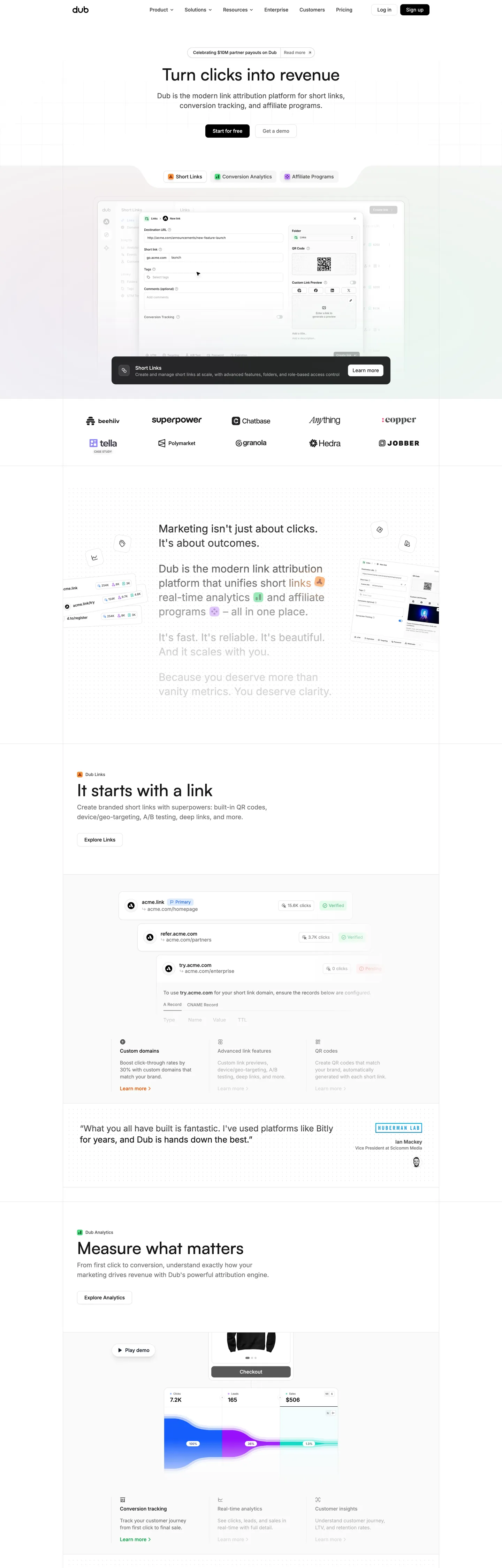
The Dub homepage opens on a pure white canvas (#ffffff) framed by dark #171717 body copy and a #2563eb blue link accent that threads through navigation, buttons, and focus rings. The hero heading uses a large satoshi typeface at 48px, while the body text settles into Inter 14px‑20px line‑height, establishing a clear hierarchy without decorative flourishes. A distinctive 1‑pixel #e5e5e5 hairline border runs around cards, tables, and input fields, acting as the system’s sole elevation mechanism and reinforcing visual consistency across the interface.
Inside this DESIGN.md file live a total of 60 raw color samples collapsed into 50 clustered tokens, organized into primary, neutral, and status groups. The token set includes 17 named colors, 15 typography roles, 7 rounded radii, and 9 spacing steps. The component library covers navigation, forms, data display, and feedback patterns, totaling 22 distinct components. All values follow the Google Labs design‑system spec, exposing CSS variables and Tailwind‑compatible tokens for seamless integration.
Developers can import this JSON into Claude, Cursor, or Copilot to generate component scaffolding, or reference the tokens directly in Tailwind config or CSS‑var declarations such as var(--colors-primary) and var(--font-inter). Because the system is grounded in real‑world usage data, it offers a pragmatic case study of how a data‑driven token strategy can reduce visual noise while preserving brand identity.
What makes it distinct
4 highlights
- Primary accent#2563eb blue appears on interactive links, focus rings, and button backgrounds, providing a consistent visual hook across the product.
- Hairline elevation#e5e5e5 1‑pixel borders replace heavy shadows, creating a subtle depth cue that scales across cards, tables, and input fields.
- Neutral palette#171717 ink and #404040 body text deliver strong contrast on the #ffffff canvas while preserving a low‑key aesthetic.
- Status colors#dcfce7 success, #fb923c warning, and #d32f2f error tokens give immediate feedback without relying on additional graphics.
Live at dub.co
Dub in production, as captured. Scroll the window to see the whole page.
17 colors
Dub's system runs on #2563eb as its primary voltage, used in 1 of 15 components. Type is set in Inter across 10 tokens from 10px to 14px, weights 400–600. Shape language is sharp — components average 0px corner radius, favoring crisp rectangles.
Brand & Accent
Sparing, CTA-only voltage · 2
Surface
Page and card backgrounds · 3
Text
Headlines, body, captions · 4
Borders & Hairlines
Dividers, outlines, rules · 1
Semantic
Status, errors, success, links · 4
Other
Specialty colors · 3
10 type tokens
Set in Inter across 10 tokens, from 10px to 14px, weights 400–600. Shown in its own stack: where the font isn't installed, the fallback the file names stands in.
- heading-lg14px · weight 500 · lh 20The quick brown fox jumps over the lazy dog
- heading-md12px · weight 500 · lh 16The quick brown fox jumps over the lazy dog
- body-lg14px · weight 400 · lh 20The quick brown fox jumps over the lazy dog
- body-md12px · weight 400 · lh 16The quick brown fox jumps over the lazy dog
- body-sm10px · weight 400 · lh 10The quick brown fox jumps over the lazy dog
- caption10px · weight 600 · lh 15The quick brown fox jumps over the lazy dog
- code14px · weight 400 · lh 20The quick brown fox jumps over the lazy dog
- label11px · weight 500 · lh 16.5The quick brown fox jumps over the lazy dog
- overline10px · weight 500 · lh 15The quick brown fox jumps over the lazy dog
- button14px · weight 500 · lh 20The quick brown fox jumps over the lazy dog
Radii and spacing
6 corner radii and 9 spacing values. Shape language: sharp, on a 4px base radius.
Radii6
- none0px
- sm2px
- md4px
- lg6px
- xl8px
- full9999px
Spacing9
- xxs1px
- xs2px
- sm4px
- md6px
- base8px
- lg10px
- xl16px
- 2xl16px
- 3xl16px
15 components
Each rendered from its tokens (color, type, radius, padding) on Dub's own canvas.
- Button PrimaryButton Primarybutton-primary
- Button SecondaryButton Secondarybutton-secondary
- Input TextInput Textinput-text
- Card SurfaceCard Surfacecard-surface
- Badge SuccessBadge Successbadge-success
- Badge WarningBadge Warningbadge-warning
- Badge ErrorBadge Errorbadge-error
- Nav LinkNav Linknav-link
- Footer LinkFooter Linkfooter-link
- Modal OverlayModal Overlaymodal-overlay
- TooltipTooltiptooltip
- AvatarAvataravatar
- Table HeaderTable Headertable-header
- Pagination ItemPagination Itempagination-item
- Alert InfoAlert Infoalert-info
The system, in use
Dub's tokens on the kind of product it builds.
Plan, build and ship in one place
Bring your team's work together, from the first idea to the final release.
Dub design system FAQ
Dub's tokens, its components and how to use this DESIGN.md in your project.
What are the color tokens in the Dub DESIGN.md?
What is Dub's primary color hex code?
How do I use Dub's colors in Tailwind CSS?
What is Dub’s primary brand color and where does it appear?
What status colors does Dub provide and how are they applied?
What fonts does Dub use?
What is Dub's type scale?
What can I use if I don't have Dub's font?
Which typefaces are used for code snippets versus body copy in the Dub design system?
Which components does the Dub DESIGN.md define?
What corner radius and spacing does Dub use?
How does Dub achieve visual hierarchy without heavy shadows?
How are spacing and radii tokens structured for consistency in the Dub design system?
How do I apply the Dub design system to a shadcn/ui project?
How do I use the Dub DESIGN.md with Claude Code or Cursor?
Is the Dub DESIGN.md free to download?
How was the Dub DESIGN.md made?
Is the Dub DESIGN.md official?
Related reading
Specs, directories and component libraries that pair with this design system.
- Browse all design systemsThe full directory of DESIGN.md files on shadcn.io, with live mockups for each.shadcn.io
- Dub — official siteDub's public marketing site — the source of truth for the live tokens captured in this file.dub.co (opens in a new tab)
- The DESIGN.md specificationGoogle Labs' open spec for machine-readable design system files — the format this page is built on.github.com (opens in a new tab)
Use Dub in your project
One machine-readable file. Drop it into Claude Code, Cursor, VS Code or any AI tool that reads DESIGN.md.
Download the DESIGN.md
One machine-readable file: every color, type, radius, spacing, and component token of Dub.
Feed it to your AI tool
Drop it into Claude, Cursor, or GitHub Copilot. The agent writes React components and Tailwind classes that match Dub's visual language.
Reference the tokens directly
Or paste the values into your Tailwind config, CSS variables, or component library: every color, size and radius is a quoted, ready-to-copy value.
Read the full DESIGN.md overview, rationale, do’s and don’ts
Overview
Hairline-as-elevation.
Dub’s visual language rests on a disciplined token hierarchy that treats the 1‑pixel #e5e5e5 border as the sole elevation primitive. Where most SaaS dashboards rely on heavy drop shadows to convey depth, Dub substitutes that weight with a crisp hairline that scales across cards, tables, and input fields, preserving a lightweight aesthetic while still signaling hierarchy. The system also enforces a strict separation between primary accent (#2563eb), neutral ink (#171717), and background (#ffffff), ensuring that each layer communicates its purpose without visual clutter. Typography follows a modular scale anchored in Inter, with size‑weight pairs that map directly to component needs, while the limited radius set (2‑8px) creates a consistent curvature across UI elements. Spacing tokens are linear, mirroring the most common margins observed on the live site, and color tokens are grouped into primary, neutral, and status families for rapid composition. This disciplined approach yields a UI that feels cohesive, performant, and instantly recognizable.
Key Characteristics:
- Hairline border (#e5e5e5) replaces shadow for elevation.
- Primary accent #2563eb applied to links, focus rings, and CTA backgrounds.
- Ink #171717 provides maximum contrast on a white canvas.
- Status palette includes success #dcfce7, warning #fb923c, error #d32f2f.
- Typography scale uses Inter for UI text and GeistMono for code.
- Radii range from 2px to 8px, with full rounding for avatars.
- Spacing steps from 1px to 16px follow a linear progression.
- Component library covers navigation, forms, data display, and feedback patterns.
- Tokens are exposed as CSS variables and Tailwind config entries for developer ergonomics.
- Design decisions are data‑driven, reflecting actual usage frequencies on dub.co.
Known Gaps
- The token set lacks explicit dark‑mode variants, requiring developers to duplicate colors for high‑contrast themes.
- No dedicated typography token for large display headings (48px+), forcing manual overrides for hero sections.
- The spacing scale stops at 16px, limiting designers who need larger gutters for complex dashboards.
- Border radius options omit a 10px step, which appears in a few custom components on the live site.
- Status colors are defined only for success, warning, and error; an informational blue token exists but is not consistently applied across alerts.
- The current component list does not include a toast notification pattern, a common UI element for real‑time feedback.
- Accessibility contrast checks for the primary accent on colored backgrounds are not documented, leaving potential WCAG compliance gaps.
More systems like this
Adobe, Boursorama, Bun and 23 more in Design & Creative Tools: each brand's colors, type and components in one file your AI agent builds from.
Build it with Pro
The DESIGN.md files are free. Pro adds 6,000+ blocks, premium templates and the MCP server, so your AI editor builds in your system for you.
4.9/5 out of 5 · 150+ reviewsfrom 150+ founders and developers.
Billing
Billed once a year in USD. Cancel anytime.
- How many people can use the license.
- Client work, SaaS products and anything you charge for.
- Page sections in 56 categories, from heroes and pricing tables to dashboards and settings, on every framework and UI library, in your theme.
- Complete Next.js sites for startups, SaaS, agencies and portfolios, every page designed, ready to ship.
- Your AI agent searches, previews and installs any component, block, icon or DESIGN.md from a prompt: 22 tools in Claude Code, Cursor, VS Code and 35 more clients.
- Buttons with motion and states of their own, from an arrow that slides in to a burst of confetti.
- Typewriters, scrambles, counters and more, for headlines, labels and numbers.
- Animated backgrounds for heroes, sections and cards, from a soft aurora to a flock that flees the cursor. Most are pure CSS.
- WebGPU shaders, from a slow aurora to a black hole, each drawing only while it's on screen.
- One design and one theme on all four: the components, blocks and effects are built for each framework.
- React on Base UI, Radix UI, React Aria or Ark UI: install the version for the library your project already uses. Vue, Svelte and Solid run on Ark UI.
- From a button to a date picker, a color picker or a guided tour: accessible, typed in TypeScript, each with live demos.
- Real-world patterns built from the components, in 53 galleries: forms, tables, menus, dialogs and more.
- Area, bar, line, pie, radar and radial charts on TanStack Charts, on every framework. React also gets the Recharts originals.
- Debounce, local storage, media queries and more: each hook is one typed file you own.
- From 222 libraries, Lucide, Heroicons, Tabler and Material Symbols among them, as SVG or a React component in one command.
- Stripe, Linear, Apple and 497 more: a brand's colors, typography and components in one file your AI agent builds from.
- Restyle every component and block at once: 8 styles, 7 grays, 18 colors and 5 radii, shared as a shadcn preset code.
- Priority requests are answered first.
Individual
For personal projects & open source
$32instead of $49/mo
$389 billed yearly
- Seats: 1 seat
- Commercial use: Personal & open source only
- Blocks: All 6,181 blocks
- Templates: All 14 templates
- MCP server: 38 AI clients
- Animated buttons: All 35 buttons
- Text effects: All 97 effects
- Backgrounds: All 100 backgrounds
- Shaders: All 100 shaders
- Frameworks: React, Vue, Svelte, Solid
- UI libraries: Base UI, Radix, Aria, Ark
- Components: All 174 components
- Examples: All 1,103 examples
- Charts: All 70 charts
- React hooks: All 35 hooks
- Icons: 294k+ icons
- DESIGN.md files: All 500 brands
- Theme builder: 8 styles × 18 colors
- Support: Standard
Team
Most popularFor freelancers, agencies & startups
$66instead of $99/mo
$789 billed yearly · ≈ $13/dev/mo
- Seats: Up to 5 seats
- Commercial use: Included
- Blocks: All 6,181 blocks
- Templates: All 14 templates
- MCP server: 38 AI clients
- Animated buttons: All 35 buttons
- Text effects: All 97 effects
- Backgrounds: All 100 backgrounds
- Shaders: All 100 shaders
- Frameworks: React, Vue, Svelte, Solid
- UI libraries: Base UI, Radix, Aria, Ark
- Components: All 174 components
- Examples: All 1,103 examples
- Charts: All 70 charts
- React hooks: All 35 hooks
- Icons: 294k+ icons
- DESIGN.md files: All 500 brands
- Theme builder: 8 styles × 18 colors
- Support: Priority
Organization
For companies with larger teams
$132instead of $199/mo
$1,589 billed yearly
- Seats: Unlimited seats
- Commercial use: Included
- Blocks: All 6,181 blocks
- Templates: All 14 templates
- MCP server: 38 AI clients
- Animated buttons: All 35 buttons
- Text effects: All 97 effects
- Backgrounds: All 100 backgrounds
- Shaders: All 100 shaders
- Frameworks: React, Vue, Svelte, Solid
- UI libraries: Base UI, Radix, Aria, Ark
- Components: All 174 components
- Examples: All 1,103 examples
- Charts: All 70 charts
- React hooks: All 35 hooks
- Icons: 294k+ icons
- DESIGN.md files: All 500 brands
- Theme builder: 8 styles × 18 colors
- Support: Priority
Billed once a year in USD. Cancel anytime.
Individual
For personal projects & open source
$32instead of $49/mo
$389 billed yearly
- How many people can use the license.Seats: 1 seat
- Client work, SaaS products and anything you charge for.Commercial use: Personal & open source only
- Page sections in 56 categories, from heroes and pricing tables to dashboards and settings, on every framework and UI library, in your theme.Blocks: All 6,181 blocks
- Complete Next.js sites for startups, SaaS, agencies and portfolios, every page designed, ready to ship.Templates: All 14 templates
- Your AI agent searches, previews and installs any component, block, icon or DESIGN.md from a prompt: 22 tools in Claude Code, Cursor, VS Code and 35 more clients.MCP server: 38 AI clients
- Buttons with motion and states of their own, from an arrow that slides in to a burst of confetti.Animated buttons: All 35 buttons
- Typewriters, scrambles, counters and more, for headlines, labels and numbers.Text effects: All 97 effects
- Animated backgrounds for heroes, sections and cards, from a soft aurora to a flock that flees the cursor. Most are pure CSS.Backgrounds: All 100 backgrounds
- WebGPU shaders, from a slow aurora to a black hole, each drawing only while it's on screen.Shaders: All 100 shaders
- One design and one theme on all four: the components, blocks and effects are built for each framework.Frameworks: React, Vue, Svelte, Solid
- React on Base UI, Radix UI, React Aria or Ark UI: install the version for the library your project already uses. Vue, Svelte and Solid run on Ark UI.UI libraries: Base UI, Radix, Aria, Ark
- From a button to a date picker, a color picker or a guided tour: accessible, typed in TypeScript, each with live demos.Components: All 174 components
- Real-world patterns built from the components, in 53 galleries: forms, tables, menus, dialogs and more.Examples: All 1,103 examples
- Area, bar, line, pie, radar and radial charts on TanStack Charts, on every framework. React also gets the Recharts originals.Charts: All 70 charts
- Debounce, local storage, media queries and more: each hook is one typed file you own.React hooks: All 35 hooks
- From 222 libraries, Lucide, Heroicons, Tabler and Material Symbols among them, as SVG or a React component in one command.Icons: 294k+ icons
- Stripe, Linear, Apple and 497 more: a brand's colors, typography and components in one file your AI agent builds from.DESIGN.md files: All 500 brands
- Restyle every component and block at once: 8 styles, 7 grays, 18 colors and 5 radii, shared as a shadcn preset code.Theme builder: 8 styles × 18 colors
- Priority requests are answered first.Support: Standard
Team
Most popularFor freelancers, agencies & startups
$66instead of $99/mo
$789 billed yearly · ≈ $13/dev/mo
Everything in Individual, plus
- How many people can use the license.Seats: Up to 5 seats
- Client work, SaaS products and anything you charge for.Commercial use: Included
- Priority requests are answered first.Support: Priority
Organization
For companies with larger teams
$132instead of $199/mo
$1,589 billed yearly
Everything in Team, plus
- How many people can use the license.Seats: Unlimited seats
- Secure checkout via Stripe
- Code lives in your repo
- Keep what you've shipped if you cancel
- License terms
4.9 out of 5 from 150+ developers


Your system, built for you
Every block, template and icon, installed by your AI agent in your design system. The DESIGN.md files stay free.
- Cancel anytime
- Keep what you've shipped