shadcn.io is an independent project built on shadcn/ui
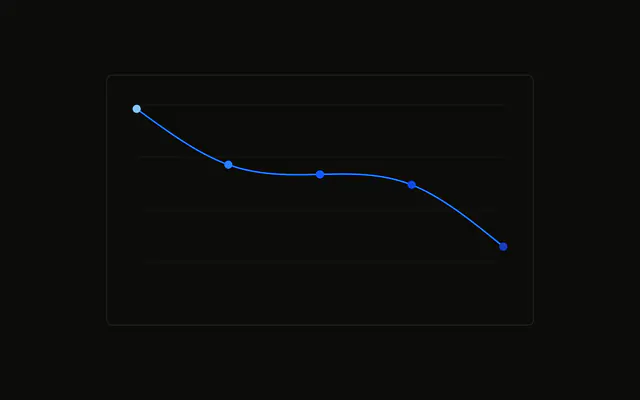
One line through the browsers, with a dot on each point. The label above the dot is the browser name from the chart config, not the visitor count.
Use it when each point is a named category, not a date. Long names read more easily in a Table. In React, Ark UI does not look up Chrome and the other names. The demo's formatter reads the config.
Installation
Anatomy

Usage
<div className="w-full max-w-xl rounded-md border bg-background p-4">
  <ChartContainer config={chartConfig}>
    <LineChart
      accessibilityLayer
      data={chartData}
      margin={{
        left: 24,
        right: 24,
        top: 24,
      }}
    >
      <CartesianGrid vertical={false} />
      <ChartTooltip content={renderTooltipContent} cursor={false} />
      <Line
        activeDot={{
          r: 6,
        }}
        dataKey="visitors"
        dot={{
          fill: "var(--color-visitors)",
        }}
        stroke="var(--color-visitors)"
        strokeWidth={2}
        type="natural"
      >
        <LabelList
          className="fill-foreground"
          dataKey="browser"
          fontSize={12}
          formatter={formatBrowser}
          offset={12}
{/* The rest of the file is under Installation. */}
FAQ
How do the points say Chrome above them?
LabelList sets dataKey to browser and formatter to formatBrowser. That function looks the key up in chartConfig and returns label, so chrome prints as Chrome. position is top, offset is 12, and fontSize is 12.
How is that label text styled?
LabelList uses className fill-foreground. LineChart sets margin to 24 on the top, left, and right so the names fit. This chart has no XAxis. The browser name is the label above the point.
What is drawn on each point?
Line sets dot to an object whose fill is var(--color-visitors), and activeDot to { r: 6 }. dataKey is visitors, type is natural, stroke is var(--color-visitors), and strokeWidth is 2.
Where does the line color come from?
config gives visitors color var(--chart-2) and the label Visitors. The keys chrome through other have their own colors and labels. formatBrowser uses those labels for the text.
API Reference
Chart
Sets config={chartConfig}, content={renderTooltipContent} and cursor={false}. The rest is on the Chart page.