shadcn.io is an independent project built on shadcn/ui
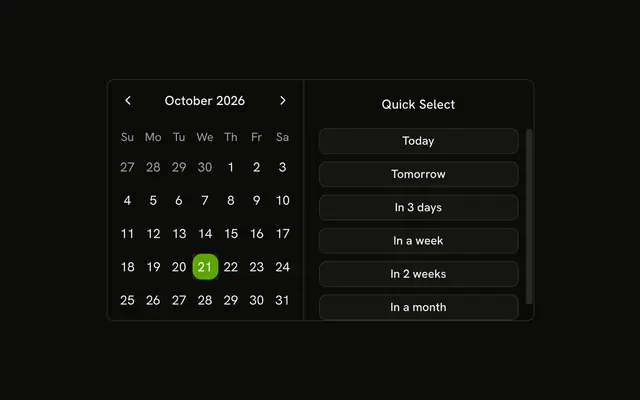
Select Date opens a dialog with that title. A month grid sits beside Quick Select: Today, Tomorrow, In 3 days, In a week, In 2 weeks, and In a month. The buttons pick a day. They do not parse typed text.
Use it when a shortcut list should stay out of the page until needed. Show the list inline if people pick dates all day. A Date Picker is the field version. In React, Base UI does not understand a written date.
Installation
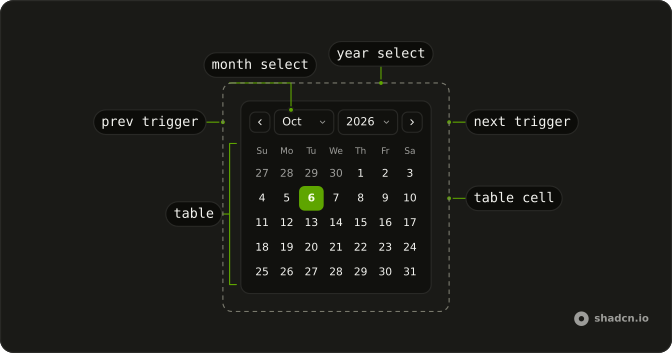
Anatomy
Usage
<Dialog>
  <DialogTrigger render={<Button variant="outline" />}>
    Select Date
  </DialogTrigger>
  <DialogContent className="sm:max-w-fit">
    <DialogHeader>
      <DialogTitle>Select Date</DialogTitle>
    </DialogHeader>
    <div className="flex divide-x overflow-hidden rounded-md border bg-background">
      <Calendar
        mode="single"
        month={month}
        onMonthChange={setMonth}
        onSelect={setDate}
        selected={date}
      />
      <div className="relative w-62 overflow-hidden">
        <div className="absolute inset-0 flex flex-col gap-4">
          <p className="px-4 pt-4 text-center font-medium text-sm">
            Quick Select
          </p>
          <ScrollArea className="min-h-0 flex-1">
            <div className="flex flex-col gap-2 px-4 pb-4">
              {shortcuts.map((shortcut) => (
                <Button
                  key={shortcut.label}
                  onClick={handleShortcutClick}
                  size="sm"
                  value={shortcut.label}
                  variant="outline"
                >
{/* The rest of the file is under Installation. */}
FAQ
Which shortcuts are in the list?
Today, Tomorrow, In 3 days, In a week, In 2 weeks and In a month.
fromToday adds the days or months onto today's year, month and date.
What happens when a shortcut is chosen?
Each shortcut is a Button whose value is its label. The click finds that shortcut, then sets selected and month so the grid shows the date.
How do I read the selected date?
mode="single" makes selected one date and onSelect the setter. This demo stores that date in state, starting from new Date().
API Reference
Dialog
No extra props in this demo. The rest is on the Dialog page.
Button
Sets variant="outline", onClick={handleShortcutClick}, size="sm" and value={shortcut.label}. The rest is on the Button page.
Calendar
Sets mode="single", month={month}, onMonthChange={setMonth}, onSelect={setDate} and selected={date}. The rest is on the Calendar page.
Scroll Area
No extra props in this demo. The rest is on the Scroll Area page.