shadcn.io is an independent project built on shadcn/ui
Book Appointment opens a dialog with the same title. A month grid sits beside Available Times, fourteen slots from 9:00 AM to 4:30 PM. None is filled until a slot is clicked.
Use it when booking should stay hidden until someone asks. On a booking page, show the same grid without a Dialog. In React, Base UI does not hold the appointment.
Installation
Anatomy
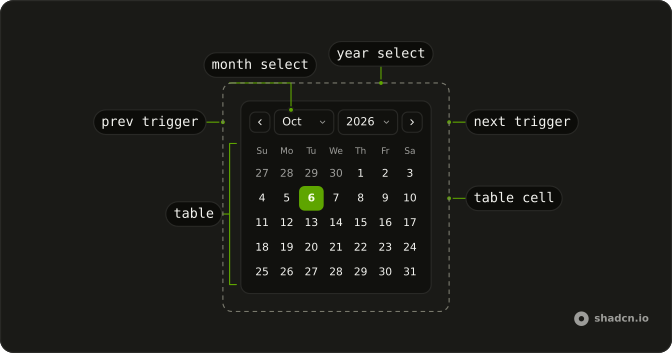
Usage
<Dialog>
  <DialogTrigger render={<Button variant="outline" />}>
    Book Appointment
  </DialogTrigger>
  <DialogContent className="sm:max-w-fit">
    <DialogHeader>
      <DialogTitle>Book Appointment</DialogTitle>
    </DialogHeader>
    <div className="flex divide-x overflow-hidden rounded-md border bg-background">
      <Calendar mode="single" onSelect={setDate} selected={date} />
      <div className="relative w-62 overflow-hidden">
        <div className="absolute inset-0 flex flex-col gap-4">
          <p className="px-4 pt-4 text-center font-medium text-sm">
            Available Times
          </p>
          <ScrollArea className="min-h-0 flex-1">
            <div className="flex flex-col gap-2 px-4 pb-4">
              {availableTimes.map((time) => (
                <Button
                  key={time}
                  onClick={handleTimeClick}
                  size="sm"
                  value={time}
                  variant={selectedTime === time ? "default" : "outline"}
                >
                  {time}
                </Button>
              ))}
            </div>
          </ScrollArea>
        </div>
{/* The rest of the file is under Installation. */}
FAQ
How do I read the date the person picked?
mode="single" makes selected one date and onSelect the setter. This demo stores that date in state, starting from new Date().
How does a time slot get selected?
Each time is a Button with that string as value. The click handler stores event.currentTarget.value in selectedTime, and that button uses variant="default" while the others stay outline.
Where does the list of times come from?
The times are a fixed availableTimes array: 9:00 AM through 11:30 AM, then 1:00 PM through 4:30 PM, in 30 minute steps. The date handler only updates the date, so the highlighted time stays until a time button is clicked.
How does the time list scroll?
The times column is w-62, filled by an absolute inset-0 wrapper. ScrollArea has min-h-0 flex-1 under the heading Available Times, so the buttons scroll inside the row.
API Reference
Dialog
No extra props in this demo. The rest is on the Dialog page.
Button
Sets variant="outline", onClick={handleTimeClick}, size="sm", value={time} and variant={selectedTime === time ? "default" : "outline"}. The rest is on the Button page.
Calendar
Sets mode="single", onSelect={setDate} and selected={date}. The rest is on the Calendar page.
Scroll Area
No extra props in this demo. The rest is on the Scroll Area page.