shadcn.io is an independent project built on shadcn/ui
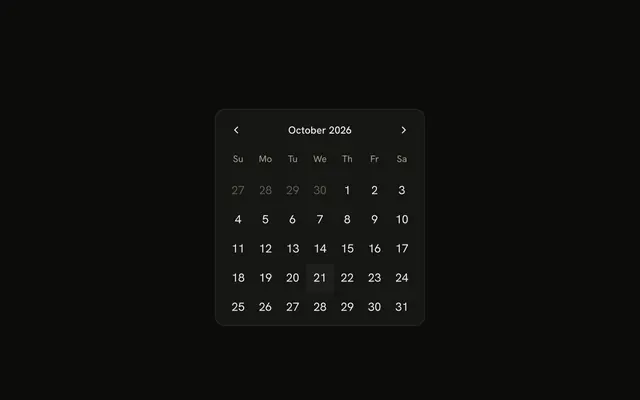
Month view for one day, several days, or a range. It stays on the page.
Use it when choosing the date is the task. When the date is one field among many, a Date Picker opens this grid in a popover. In React, React Aria moves between days with the arrow keys, and Enter selects.
Installation
Anatomy
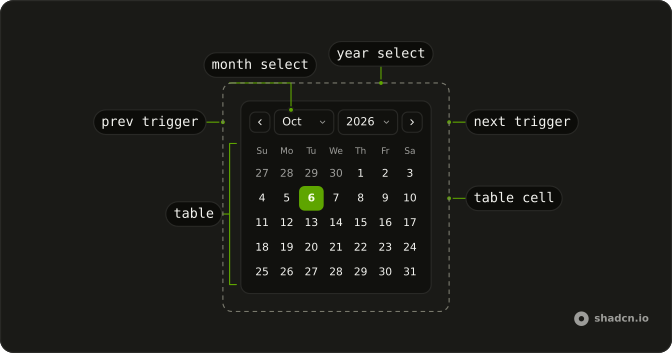
Calendar
├── CalendarClearTrigger
├── CalendarContent
├── CalendarControl
├── CalendarInput
├── CalendarLabel
├── CalendarMonthSelect
├── CalendarNextTrigger
├── CalendarPositioner
├── CalendarPresetTrigger
├── CalendarPrevTrigger
├── CalendarViewDate
├── CalendarTable
│   ├── CalendarTableBody
│   ├── CalendarTableCell
│   │   └── CalendarTableCellTrigger
│   ├── CalendarTableHead
│   ├── CalendarTableHeader
│   └── CalendarTableRow
├── CalendarTrigger
├── CalendarView
│   ├── CalendarViewControl
│   └── CalendarViewTrigger
└── CalendarYearSelect
Usage
import {
  type CalendarDate, getLocalTimeZone, today,
} from "@internationalized/date";
import { useState } from "react";
import { Calendar } from "@/components/ui/calendar";
const frame = "w-72 rounded-xl border shadow-xs/5";
const CalendarDemo = () => {
const [date, setDate] = useState<CalendarDate | undefined>(
today(getLocalTimeZone())
);
return (
<Calendar
captionLayout="dropdown"
className={frame}
onChange={setDate}
value={date}
weeksInMonth={6}
/>
);
};Accessibility
- Arrow Left
- Moves focus to the previous day within the current week.
- Arrow Right
- Moves focus to the next day within the current week.
- Arrow Up
- Moves focus to the same day of the week in the previous week.
- Arrow Down
- Moves focus to the same day of the week in the next week.
- Home
- Moves focus to the first day of the current month.
- End
- Moves focus to the last day of the current month.
- Page Up
- Moves focus to the same day of the month in the previous month.
- Page Down
- Moves focus to the same day of the month in the next month.
- Enter
- Selects the focused date.
- Space
- Activate the focused control.
Demos
Hijri
This month follows a Persian calendar, not a Gregorian grid with translated labels. The selected day starts at 12 June 2025 so there is a stable date to look at. Reach for it when the product's dates are Jalali or Hijri. A locale on an ordinary calendar only renames months and weekdays, so the calendar system has to change as well.
Basic
Previous and next sit around the month title, with no year menu. fixedWeeks keeps every month six rows tall so the block does not jump. Use the plain title when dates are near today and paging by month is fine. A birthday decades back needs year menus, not that walk.
Range
Two months sit side by side, and the selection runs eighteen days from the 20th. Use a range for a stay, a report window, or a filter with a from and a to. A single day is the wrong mode, because a second click should extend the first, not replace it.
Caption
The control row replaces the plain month title with month and year menus. That is the layout for a birthday, a document date, or any value far from the current month. People should not hammer next through twenty years. Keep the plain title when the range is the next few weeks and the menus would only add chrome.
Presets
Today, Tomorrow, and Next week sit under the grid and write the selection themselves. Add shortcuts when most people want a relative date and the grid is the fallback. The button should also move the visible month, or Next week looks like it did nothing while last month stays on screen. Skip shortcuts when the dates have nothing in common.
Time
From and To sit under the days, defaulting to 10:30 and 12:30. The grid still only picks a date, and the clocks are separate inputs, so a meeting can have hours without the calendar storing them. Keep the month visible this way when a popover would hide it. Label both fields, because an unlabeled time is easy to misread as part of the date.
Booked Dates
A run of days is unavailable and drawn with a line through the number. Those days stay visible so the month looks full, but they cannot be selected. Use that for reservations, blackout dates, or a cutoff in the past. Hiding the days makes the grid look broken, so if the strike is unclear, say nearby why those dates are blocked.
Custom Days
Each in-month day shows its number and a price, 100 on weekdays and 120 on weekends. The selection is a range that starts on the 8th. Render the cell when a day carries a fare, a capacity, or a marker, and keep the extra to a few characters. The price sits under the number and should not replace it.
Week Numbers
A column of week numbers sits beside the days. Turn that on for scheduling or payroll, where people already name weeks, and leave it off a birthday picker, where it is noise. Those numbers follow the locale's week rules, so do not label a Monday start and let the column count from Sunday. fixedWeeks still keeps the month a constant height.
Multiple
Several days can be selected at once, starting here with the 4th, the 12th, and the 18th. Use that for shifts or exceptions, dates that are not one continuous stay. A range fits better when the value is a start and an end. Selecting a day toggles it, so the set can change without a separate clear control.
Rtl
dir is rtl and the locale is Arabic, so the week runs from the inline start and the month controls follow the text. Set direction on the calendar when the page is Arabic or Hebrew, not only on a wrapper the grid never sees. The previous and next controls already follow the inline direction. Mirroring the icons yourself can aim them backward.
FAQ
When should I use a Calendar instead of a Date Picker?
Use the Calendar when the month should stay visible on the page, such as a booking screen or a dashboard filter. When the date belongs in a form field, use the Date Picker: an input that opens this calendar in a popover.
How do I select a date range with the Calendar in React?
Use RangeCalendar, exported from the same file: its value is a start and end pair, as in the Range demo.
How do I let users pick several dates in the Calendar?
Set selectionMode to multiple: the value becomes a list of dates, as in the Multiple demo.
How do I disable booked or past dates in the Calendar?
Pass isDateUnavailable, a function that returns true for days that can't be picked, and minValue or maxValue to limit the range.
The Booked Dates demo keeps booked days visible with a line through them.
How do I let users jump to a year, such as a birth year, in the React Aria Calendar?
Set captionLayout="dropdown" to replace the month title with month and year selects, as the Caption demo does, so nobody clicks back month by month.
Why does the Calendar select the day before the date I set?
Its values are calendar dates without a time, so they don't shift with time zones. Create them with parseDate from a string such as 2025-06-01, rather than converting a Date that carries a time.
Can the Calendar show a Persian or Hijri calendar?
Yes. The Hijri demo shows a Persian calendar. A locale on its own only translates the month and weekday names; the calendar system has to change too, as that demo does.
API Reference
Calendar
data-slot="calendar"
autoFocus?boolean
Whether to automatically focus the calendar when it mounts.
- Default
false
buttonVariant?"default" | "destructive" | "ghost" | "link" | "outline" | "secondary"
The variant of the previous and next month buttons.
- Type
"default" | "destructive" | "ghost" | "link" | "outline" | "secondary"
captionLayout?"label" | "dropdown"
The month's caption: its name as a label, or month and year dropdowns.
- Type
"label" | "dropdown"
defaultFocusedValue?DateValue | null
The date that is focused when the calendar first mounts (uncontrolled).
- Type
DateValue | null
errorMessage?ReactNode
An error message to display when the selected value is invalid.
firstDayOfWeek?"sun" | "mon" | "tue" | "wed" | "thu" | "fri" | "sat"
The day that starts the week.
- Type
"sun" | "mon" | "tue" | "wed" | "thu" | "fri" | "sat"
focusedValue?DateValue | null
Controls the currently focused date within the calendar.
- Type
DateValue | null
headerFormat?Intl.DateTimeFormatOptions
How the caption writes the month, such as { month: "long", year: "numeric" }.
isDateUnavailable?(date: DateValue) → boolean
Callback that is called for each date of the calendar. If it returns true, then the date is unavailable.
- Parameters
date– DateValue- Returns
boolean
isDisabled?boolean
Whether the calendar is disabled.
- Default
false
isInvalid?boolean
Whether the current selection is invalid according to application logic.
isReadOnly?boolean
Whether the calendar value is immutable.
- Default
false
maxValue?DateValue | null
The maximum allowed date that a user may select.
- Type
DateValue | null
minValue?DateValue | null
The minimum allowed date that a user may select.
- Type
DateValue | null
numberOfMonths?number
How many months it shows side by side.
onFocusChange?(date: CalendarDate) → void
Handler that is called when the focused date changes.
- Parameters
date– CalendarDate- Returns
void
pageBehavior?"single" | "visible"
Controls the behavior of paging. Pagination either works by advancing the visible page by visibleDuration (default) or one unit of visibleDuration.
- Type
"single" | "visible"- Default
visible
renderCell?( renderProps: CalendarCellRenderProps & { defaultChildren: React.ReactNode; } ) → React.ReactNode
Renders each day cell: gets the cell's state and its defaultChildren
(the day's number) and returns the content.
- Type
( renderProps: CalendarCellRenderProps & { defaultChildren: React.ReactNode; } ) → React.ReactNode- Parameters
renderProps– CalendarCellRenderProps & { defaultChildren: React.ReactNode; }- Returns
React.ReactNode
selectionAlignment?"start" | "center" | "end"
Determines the alignment of the visible months on initial render based on the current selection or current date if there is no selection.
- Type
"start" | "center" | "end"- Default
"center"
selectionMode?M
Whether single or multiple selection is enabled.
- Default
"single"
showWeekNumber?boolean
Adds a column numbering each week of the year.
validationState?ValidationState
Whether the current selection is valid or invalid according to application logic.
Deprecated. Use isInvalid instead.
weeksInMonth?number
The number of weeks in a month. This overrides the default set by the locale.
className?string
Merged with the part's classes.
RangeCalendar
<div> data-slot="calendar"
allowsNonContiguousRanges?boolean
When combined with isDateUnavailable, determines whether non-contiguous ranges,
i.e. ranges containing unavailable dates, may be selected.
autoFocus?boolean
Whether to automatically focus the calendar when it mounts.
- Default
false
buttonVariant?"default" | "destructive" | "ghost" | "link" | "outline" | "secondary"
The variant of the previous and next month buttons.
- Type
"default" | "destructive" | "ghost" | "link" | "outline" | "secondary"
captionLayout?"label" | "dropdown"
The month's caption: its name as a label, or month and year dropdowns.
- Type
"label" | "dropdown"
defaultFocusedValue?DateValue | null
The date that is focused when the calendar first mounts (uncontrolled).
- Type
DateValue | null
errorMessage?ReactNode
An error message to display when the selected value is invalid.
firstDayOfWeek?"sun" | "mon" | "tue" | "wed" | "thu" | "fri" | "sat"
The day that starts the week.
- Type
"sun" | "mon" | "tue" | "wed" | "thu" | "fri" | "sat"
focusedValue?DateValue | null
Controls the currently focused date within the calendar.
- Type
DateValue | null
headerFormat?Intl.DateTimeFormatOptions
How the caption writes the month, such as { month: "long", year: "numeric" }.
isDateUnavailable?(date: DateValue, anchorDate: CalendarDate | null) → boolean
Callback that is called for each date of the calendar. If it returns true, then the date is unavailable. The second argument provides the current selection anchor date, if any. This can be used to adjust the available dates based on the user's first selected date.
- Type
(date: DateValue, anchorDate: CalendarDate | null) → boolean- Parameters
date– DateValueanchorDate– CalendarDate | null- Returns
boolean
isDisabled?boolean
Whether the calendar is disabled.
- Default
false
isInvalid?boolean
Whether the current selection is invalid according to application logic.
isReadOnly?boolean
Whether the calendar value is immutable.
- Default
false
maxValue?DateValue | null
The maximum allowed date that a user may select.
- Type
DateValue | null
minValue?DateValue | null
The minimum allowed date that a user may select.
- Type
DateValue | null
numberOfMonths?number
How many months it shows side by side.
onFocusChange?(date: CalendarDate) → void
Handler that is called when the focused date changes.
- Parameters
date– CalendarDate- Returns
void
pageBehavior?"single" | "visible"
Controls the behavior of paging. Pagination either works by advancing the visible page by visibleDuration (default) or one unit of visibleDuration.
- Type
"single" | "visible"- Default
visible
renderCell?( renderProps: CalendarCellRenderProps & { defaultChildren: React.ReactNode; } ) → React.ReactNode
Renders each day cell: gets the cell's state and its defaultChildren
(the day's number) and returns the content.
- Type
( renderProps: CalendarCellRenderProps & { defaultChildren: React.ReactNode; } ) → React.ReactNode- Parameters
renderProps– CalendarCellRenderProps & { defaultChildren: React.ReactNode; }- Returns
React.ReactNode
selectionAlignment?"start" | "center" | "end"
Determines the alignment of the visible months on initial render based on the current selection or current date if there is no selection.
- Type
"start" | "center" | "end"- Default
"center"
showWeekNumber?boolean
Adds a column numbering each week of the year.
validationState?ValidationState
Whether the current selection is valid or invalid according to application logic.
Deprecated. Use isInvalid instead.
weeksInMonth?number
The number of weeks in a month. This overrides the default set by the locale.
className?string
Merged with the part's classes.
data-range-end?stringdata-range-middle?stringdata-range-start?stringdata-selected-single?string--cell-radiusstring--cell-sizestring