shadcn.io is an independent project built on shadcn/ui
Rows and columns for data people compare, like invoices or payments. The header looks clickable, but sorting is not built in.
Use a table when people scan values down a column. A handful of labeled fields, not a grid, is a Data List. In React, React Aria supplies the table styles, and you render the rows yourself.
Installation
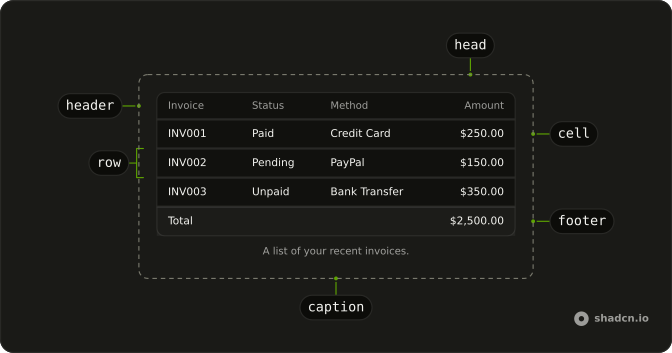
Anatomy
Usage
import {
  Table, TableBody, TableCaption, TableCell, TableFooter, TableHead,
  TableHeader, TableRow,
} from "@/components/ui/table";
const invoices = [
{
invoice: "INV001",
paymentMethod: "Credit Card",
paymentStatus: "Paid",
totalAmount: "$250.00",
},
{
invoice: "INV002",
paymentMethod: "PayPal",
paymentStatus: "Pending",
totalAmount: "$150.00",
},
{
invoice: "INV003",
paymentMethod: "Bank Transfer",
paymentStatus: "Unpaid",
totalAmount: "$350.00",
},
{
invoice: "INV004",
paymentMethod: "Credit Card",
paymentStatus: "Paid",
totalAmount: "$450.00",
},
{
invoice: "INV005",
paymentMethod: "PayPal",
paymentStatus: "Paid",
totalAmount: "$550.00",
},
{
invoice: "INV006",
paymentMethod: "Bank Transfer",
paymentStatus: "Pending",
totalAmount: "$200.00",
},
{
invoice: "INV007",
paymentMethod: "Credit Card",
paymentStatus: "Unpaid",
totalAmount: "$300.00",
},
];
const TableDemo = () => (
<Table>
<TableCaption>A list of your recent invoices.</TableCaption>
<TableHeader>
<TableRow>
<TableHead className="w-[100px]">Invoice</TableHead>
<TableHead>Status</TableHead>
<TableHead>Method</TableHead>
<TableHead className="text-right">Amount</TableHead>
</TableRow>
</TableHeader>
<TableBody>
{invoices.map((invoice) => (
<TableRow key={invoice.invoice}>
<TableCell className="font-medium">{invoice.invoice}</TableCell>
<TableCell>{invoice.paymentStatus}</TableCell>
<TableCell>{invoice.paymentMethod}</TableCell>
<TableCell className="text-right">{invoice.totalAmount}</TableCell>
</TableRow>
))}
</TableBody>
<TableFooter>
<TableRow>
<TableCell colSpan={3}>Total</TableCell>
<TableCell className="text-right">$2,500.00</TableCell>
</TableRow>
</TableFooter>
</Table>
);
Demos
Footer
TableFooter holds a summary row, a Total label spanning the first columns and the amount in the last cell. The body above it is a few invoices, so the total is not another record in disguise. Use a footer for a sum, a count, or a balance that should look different from the data, and keep real records in TableBody. A footer that repeats the column headers does not help.
Actions
Each product row ends in a menu: Edit, Duplicate, and a destructive Delete. The trigger is an icon button named Open menu, so it is not an unlabeled ellipsis. Use a per-row menu when the actions belong to that one record and would not fit as buttons in the cell. Actions on many selected rows belong in an Action Bar, and this column should stay narrow.
Data Table
The same cells, with TanStack Table behind them: filter the email column, sort it, hide columns, select rows, and page five at a time. The grid is still just the cells, and the table library owns the state. Use this shape for an admin list that needs those behaviors, not for three static invoices. The footer and the row menu above are the smaller patterns.
Rtl
dir is rtl on the table, with an Arabic caption, headers, and statuses, and the amount stays in the last column. Use it when the table's language is right-to-left. Setting dir here does not flip the rest of the page. Set direction on the document when every region should follow, and on the table when only this grid is right-to-left.
FAQ
How do I add sorting, filtering and pagination to the Table in React?
The Table only styles rows and cells, so sort, filter and page your data before you render it. For a full data table, see the Data Table demo: it pairs the Table with TanStack Table for sorting, filtering, column visibility, row selection and pagination.
How do I make the Table responsive on mobile?
The Table sits in a container that scrolls sideways when the columns do not fit, so wide tables stay readable on small screens. Keep the first column short, and hide less important columns with classes like hidden md:table-cell.
To let a keyboard scroll it, give the Table tabIndex={0} and a name (aria-label or aria-labelledby): the container takes the tab stop and becomes a region with the table's name.
How do I make a striped Table with React Aria?
Add a class to the body rows, for example even:bg-muted/30 on TableRow. Rows highlight on hover; edit the Table file in your ui folder to change that.
How do I add an actions menu to each Table row?
Put a button in the last TableCell of each row that opens a Dropdown Menu, as the Actions demo does. Give the button an aria-label that names the row, like "Actions for Ada".
API Reference
Table
<div> data-slot="table-container"
children[ReactElement<TableHeaderProps<T>>, ReactElement<TableBodyProps<T>>]
The elements that make up the table. Includes the TableHeader, TableBody, Columns, and Rows.
- Type
[ReactElement<TableHeaderProps<T>>, ReactElement<TableBodyProps<T>>]
disabledKeys?Iterable<Key>
A list of row keys to disable.
- Type
Iterable<Key>
escapeKeyBehavior?"clearSelection" | "none"
Whether pressing the escape key should clear selection in the table or not. Most experiences should not modify this option as it eliminates a keyboard user's ability to easily clear selection. Only use if the escape key is being handled externally or should not trigger selection clearing contextually.
- Type
"clearSelection" | "none"- Default
"clearSelection"
keyboardNavigationBehavior?"arrow" | "tab"
Whether keyboard navigation to focusable elements within the cells is via the left/right arrow keys or the tab key.
- Type
"arrow" | "tab"- Default
"arrow"
shouldSelectOnPressUp?boolean
Whether selection should occur on press up instead of press down.
tabIndex?number
The scroll container's: 0 lets a keyboard scroll a table wider than
it, and makes it a region named as the table is.
treeColumn?Key
The id of the column that displays hierarchical data.
className?string
Merged with the part's classes.
TableHeader
data-slot="table-header"
childrenColumnElement<T> | ColumnElement<T>[] | ColumnRenderer<T>
A list of Column(s) or a function. If the latter, a list of columns must be provided using
the columns prop.
- Type
ColumnElement<T> | ColumnElement<T>[] | ColumnRenderer<T>
columns?readonly T[]
A list of table columns.
className?string
Merged with the part's classes.
TableBody
data-slot="table-body"
childrenRowElement<T> | RowElement<T>[] | ((item: T) → RowElement<T>)
The contents of the table body. Supports static items or a function for dynamic rendering.
- Type
RowElement<T> | RowElement<T>[] | ((item: T) → RowElement<T>)
items?Iterable<T>
A list of row objects in the table body used when dynamically rendering rows.
- Type
Iterable<T>
loadingState?LoadingState
The current loading state of the table.
className?string
Merged with the part's classes.
TableFooter
data-slot="table-footer"
addIdAndValue?boolean
Whether to add id and value props to all child items.
children?ReactNode | ((item: T) → ReactNode)
The contents of the collection.
- Type
ReactNode | ((item: T) → ReactNode)
dependencies?ReadonlyArray<any>
Values that should invalidate the item cache when using dynamic collections.
- Type
ReadonlyArray<any>
idScope?Key
A scope to prepend to all child item ids to ensure they are unique.
items?Iterable<T>
Item objects in the collection.
- Type
Iterable<T>
style?CSSProperties
The inline [style](https://developer.mozilla.org/en-US/docs/Web/API/HTMLElement/style) for the element.
className?string
Merged with the part's classes.
TableRow
data-slot="table-row"
className?string
Merged with the part's classes.
TableHead
data-slot="table-head"
childrenReactNode | ColumnElement<T> | ColumnElement<T>[]
Static child columns or content to render as the column header.
- Type
ReactNode | ColumnElement<T> | ColumnElement<T>[]
allowsResizing?boolean
Whether the column allows resizing.
allowsSorting?boolean
Whether the column allows sorting.
childColumns?T[]
A list of child columns used when dynamically rendering nested child columns.
defaultWidth?ColumnSize | null
The default width of the column.
- Type
ColumnSize | null
isRowHeader?boolean
Whether a column is a [row header](https://www.w3.org/TR/wai-aria-1.1/#rowheader) and should be announced by assistive technology during row navigation.
maxWidth?ColumnStaticSize | null
The maximum width of the column.
- Type
ColumnStaticSize | null
minWidth?ColumnStaticSize | null
The minimum width of the column.
- Type
ColumnStaticSize | null
textValue?string
A string representation of the column's contents, used for accessibility announcements.
title?ReactNode
Rendered contents of the column if children contains child columns.
width?ColumnSize | null
The width of the column.
- Type
ColumnSize | null
className?string
Merged with the part's classes.
TableCell
data-slot="table-cell"
childrenReactNode
The contents of the cell.
colSpan?number
Indicates how many columns the data cell spans.
textValue?string
A string representation of the cell's contents, used for features like typeahead.
className?string
Merged with the part's classes.
TableCaption
<figcaption> data-slot="table-caption"
className?string
Merged with the part's classes.