shadcn.io is an independent project built on shadcn/ui
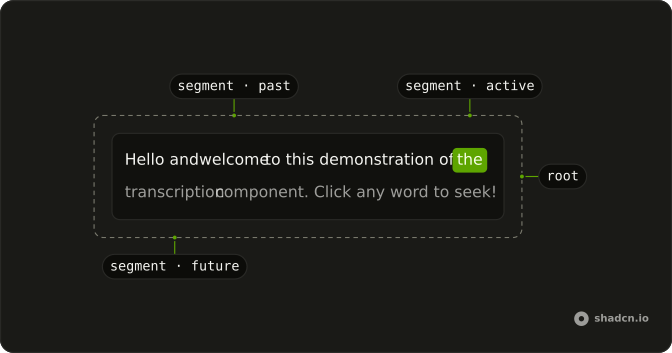
Transcription shows a transcript that follows audio as it plays. The segment playing takes the primary color, those already heard turn muted and the rest stay fainter still, and with onSeek a click on any segment moves the audio there. It takes the segments the AI SDK's transcribe returns, as they come.
Put it under a voice reply, a recorded call or a meeting clip. It plays nothing itself, so pair it with Audio Player or any player that reports its time. For dictating into a field, use Speech Input.
Installation
Anatomy
Usage
import { useState } from "react";
import { Transcription } from "@/components/ui/transcription";
const segments = [
{ endSecond: 0.5, startSecond: 0, text: "Hello" },
{ endSecond: 0.8, startSecond: 0.5, text: "and" },
{ endSecond: 1.4, startSecond: 0.8, text: "welcome." },
];
const Transcript = () => {
const [time, setTime] = useState(0);
return (
<Transcription currentTime={time} onSeek={setTime} segments={segments} />
);
};Without children, Transcription renders a TranscriptionSegment for each segment that has words in it. Give it children to render them yourself, as the Timestamps demo does.
Accessibility
With onSeek, each segment is an inline element with the button role, named by its text, and the one playing reports aria-current. The transcript is a single tab stop, on the segment playing or else the last one started, so Tab doesn't walk every word, and the left and right arrow keys move between segments in reading order. Without onSeek the segments are plain text and none takes focus. Nothing is announced as playback moves, so a screen reader doesn't talk over the audio.
- Tab
- Moves focus to the segment playing, or the last one started. From whichever segment has focus, the next press leaves the transcript, and Shift + Tab leaves it backwards.
- Arrow Right
- Moves focus to the next segment, or to the previous one in right-to-left text.
- Arrow Left
- Moves focus to the previous segment, or to the next one in right-to-left text.
- Home
- Moves focus to the first segment.
- End
- Moves focus to the last segment.
- Enter
- Seeks to the start of the focused segment.
- Space
- Seeks to the start of the focused segment.
Demos
Player
An Audio Player with a short film clip and a transcript of its five lines share one time in state. The player reports its position through onCurrentTimeChange, and a click on a line calls onSeek, which sets that state and moves the player. Start here for a voice message or a recorded call.
Timestamps
The same clip, with each line rendered by hand on a row of its own after a stamp of the second it starts. The transcript scrolls in a box capped at max-h-28, and while it plays it brings the current line into view inside that box, never scrolling the page. Render children like this for timestamps, speaker names or any markup around the segments.
Read only
Four lines from a short call, with no onSeek, so the segments are plain text with no buttons, no tab stop and no hover. defaultCurrentTime at 4.2 seconds marks the first line as heard and the second as playing. Use it to show how far a message has been played when there's no player beside it.
AI SDK
transcribe returns the transcript's segments already in the shape Transcription takes, with text, startSecond and endSecond. Run it on the server and send the segments to the page.
import { openai } from "@ai-sdk/openai";
import { transcribe } from "ai";

export async function transcript(audio: URL) {
  const result = await transcribe({
    model: openai.transcription("whisper-1"),
    audio,
  });

  return result.segments;
}
Some models return the text without timings, and segments comes back empty. Show result.text as a paragraph then, since there's nothing to follow.
Migrating from AI SDK Elements
If you added Transcription from AI SDK Elements (opens in a new tab), your project has a components/ai-elements/transcription.tsx. Install this one, import from @/components/ui/transcription instead, and delete the old file. segments, currentTime, onSeek and the two part names stay. What differs:
- Transcription takes no function as its child. Drop the child to render every segment, or map the segments yourself:
{segments.map((segment, index) => <TranscriptionSegment index={index} key={index} segment={segment} />)}. - TranscriptionSegment renders a
spanwith the button role, not abutton, so a sentence can wrap across lines. Its props are a span's. - Without
onSeek, segments are text instead of buttons, anddefaultCurrentTimesets the position whencurrentTimeisn't given.
FAQ
How do I keep Transcription in step with the audio?
Pass the player's position in seconds as currentTime, and update it as the audio plays. With Audio Player, keep the time in state and hand the setter to its onCurrentTimeChange, as the Player demo does. With a plain audio element, read its currentTime on each timeupdate event.
A segment is current from its startSecond until its endSecond, so in a gap between two segments nothing is highlighted.
Why does the Transcription highlight lag behind the words?
The time arrives on the audio's timeupdate event, which Audio Player listens to as well, and browsers fire it only about every 250 milliseconds while audio plays. With a segment per sentence nobody notices, but with a segment per word the highlight trails the voice.
For word-level segments, read the audio element's currentTime in a requestAnimationFrame loop while it plays and pass that to Transcription, then stop the loop when it pauses.
Can people click a Transcription segment to seek the audio?
Yes, once you pass onSeek. A click, or Enter or Space on a focused segment, calls it with that segment's startSecond, and you set your player's time there.
Without it the segments are plain text, so a transcript that can't seek doesn't look or act clickable. The Read only demo shows that.
What shape does Transcription expect for its segments?
An array of objects with text, startSecond and endSecond, the shape of segments from the AI SDK's transcribe, so its result goes in as it is. A segment can be a word, a phrase or a sentence, and one whose text is empty or only spaces is skipped.
From another service, map its timings into those three fields. Times are in seconds from the start of the audio.
Can people use Transcription from the keyboard?
Yes, when it can seek. The transcript is a single tab stop, on the segment playing or the last one heard, so a long transcript doesn't cost a Tab per word. The left and right arrow keys move between segments in reading order, Home and End go to the first and last, and Enter or Space seeks to the focused one.
The Accessibility section lists each key. A transcript without seeking takes no focus at all.
How do I keep a long transcript scrolled to the current segment?
Give Transcription a height and a scroll of its own, max-h-40 overflow-y-auto for instance. When the current segment changes and sits outside the box, Transcription scrolls the box to bring it a third of the way down, smoothly unless the reader asks for reduced motion.
It only scrolls its own box, never the page, and only when the box actually overflows. The Timestamps demo shows it.
How do I style Transcription segments or add timestamps?
Render the segments yourself as children, a TranscriptionSegment per segment with anything around it, as the Timestamps demo does with a time on each row.
Each segment carries data-state set to past, active or future, so a class keyed on it can restyle one state, such as a background on the active segment, beside any class you pass to the segment.
API Reference
Transcription
segmentsTranscriptionSegmentData[]
The transcript, as the AI SDK's transcribe returns it.
currentTime?number
The playback position in seconds: the segment it falls in is current.
defaultCurrentTime?number
The position to start from when currentTime isn't given.
- Default
0
onSeek?(seconds: number) → void
Called with a segment's start, in seconds, when the reader picks it. Without it, the segments are text, not buttons.
- Parameters
seconds– number- Returns
void
className?string
Merged with the part's classes.
TranscriptionSegment
data-slot="transcription-segment"
segmentobject
The segment to show.
- Type
{ endSecond: number; startSecond: number; text: string }
index?number
Its place in the transcript, set as data-index.
className?string
Merged with the part's classes.
data-active?stringdata-index?string
Mirrors index.
data-state?string
Mirrors state.