shadcn.io is an independent project built on shadcn/ui
A button that opens a menu of chat apps, each a link that starts a new chat with your query already typed in.
Use it where a reader may want to keep going with their own assistant: under a docs page, beside a search result, at the end of an answer. Pass the question once as query and every item builds its app's link from it, with the encoding done. In React, it's a Dropdown Menu of links that open in a new tab: nothing is sent until the reader picks an app, and the chat itself happens there, not on your page.
Installation
Anatomy
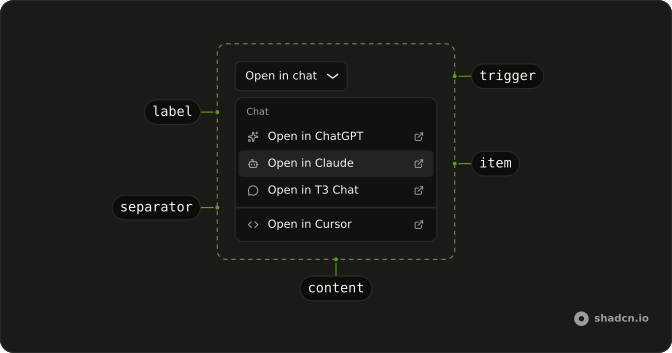
OpenIn
├── OpenInTrigger
└── OpenInContent
    ├── OpenInGroup
    │   ├── OpenInLabel
    │   ├── OpenInChatGPT
    │   ├── OpenInClaude
    │   ├── OpenInT3
    │   └── OpenInScira
    ├── OpenInSeparator
    ├── OpenInv0
    ├── OpenInCursor
    └── OpenInItem (one of your own)
OpenInTrigger draws an Open in chat button when it has no child. useOpenInContext reads the query from inside OpenIn, for an item of your own.
Usage
import {
  OpenIn, OpenInChatGPT, OpenInClaude, OpenInContent, OpenInCursor,
  OpenInTrigger,
} from "@/components/ui/open-in-chat";<OpenIn query="How can I implement authentication in Next.js?">
<OpenInTrigger />
<OpenInContent>
<OpenInChatGPT />
<OpenInClaude />
<OpenInCursor />
</OpenInContent>
</OpenIn>Providers
Each item is a link to its app with the query in the URL, opened in a new tab with rel="noopener noreferrer", so the app can't reach back into your page or see where the reader came from.
| Part | Opens | Query in |
|---|---|---|
OpenInChatGPT | https://chatgpt.com/ with search on | prompt |
OpenInClaude | https://claude.ai/new | q |
OpenInT3 | https://t3.chat/new | q |
OpenInScira | https://scira.ai/ | q |
OpenInv0 | https://v0.app | q |
OpenInCursor | https://cursor.com/link/prompt | text |
label replaces an item's text, Open in and the app's name. Each app reads its own parameter, so if one stops prefilling, check its URL before the component.
Demos
Labels
The six apps in two groups, Chat and Code, each an OpenInGroup with an OpenInLabel on top and an OpenInSeparator between them. label shortens each item to the app's name, since the heading already says what the menu does. Use groups when the list mixes chat apps with tools that build code, so the reader finds theirs at a glance.
Custom
Two items of your own beside the built-in ones: OpenInItem as a link to Perplexity, its URL built from the same query, and a Copy prompt item that copies the query and stays open to say it did. Use OpenInItem for an app the component doesn't know, and keep its link opening in a new tab like the rest.
Trigger
An Ask AI button of your own under an answer, with the question it answers as the query. Give OpenInTrigger your button and the menu opens from it, lined up with its start. Use a small ghost button where the menu is a side path, and the default outline button where opening the chat is the point.
Migrating from AI SDK Elements
If you added Open in Chat from AI SDK Elements (opens in a new tab), install this one and change the import from @/components/ai-elements/open-in-chat to @/components/ui/open-in-chat. Every part keeps its name and props, and each app's link is built the same way. What differs:
- The links open with
rel="noopener noreferrer", notnoopeneralone, so the apps don't see your page's address. OpenInSciratakes alabellike the others,OpenInGroupis new for labelled groups, anduseOpenInContextis exported for items of your own.- The menu opens lined up with the trigger's start, as
align="start"did.
On Base UI, OpenInTrigger takes your button through render instead of a child, and an OpenInItem link through render too.
FAQ
How do I install Open in Chat in React?
Run the command in the Installation section on this page. It adds open-in-chat to your ui folder with the Dropdown Menu and Button it's built from. The app marks are inline SVGs in the file, so there's no icon package beyond lucide.
The command uses the shadcn CLI.
Which apps can Open in Chat open?
ChatGPT, Claude, T3 Chat, Scira, v0 and Cursor, one part each, every one a link with the query in its URL. The Providers table lists each address and the parameter it reads. Use only the ones your readers have; an empty menu item is worse than a short menu.
How does Open in Chat pass the question to each app?
Set query on OpenIn: each item reads it and builds its link with URLSearchParams, so spaces, question marks and quotes arrive intact. Keep it to a question or a short prompt; a URL holds a few thousand characters, so link to a long page rather than pasting it.
How do I add another app to Open in Chat?
Add an OpenInItem with a link to it, as the Custom demo does for Perplexity: build its URL from the same query, and open it in a new tab with rel="noopener noreferrer". Inside OpenIn, useOpenInContext gives an item of your own the query.
Why does Open in Chat open a new tab?
So the reader keeps your page while the chat starts beside it. Each link has target="_blank" and rel="noopener noreferrer": the app gets the query and nothing else, neither a handle on your window nor the address it came from.
Can Open in Chat be used with the keyboard?
Yes. Enter, Space or the down arrow on the trigger opens the menu, and the arrow keys move through the apps. Enter opens the highlighted app in a new tab and closes the menu. Escape closes it without opening anything and puts focus back on the trigger.
Is this the same as AI SDK Elements' Open in Chat?
It has the same parts and props, so most code only changes its import. Links hide your page's address from the apps, Scira takes a label like the rest, and there's a group part for labelled groups. The Migrating section lists what differs on your stack.
API Reference
OpenIn
open?boolean
Whether the menu is currently open.
defaultOpen?boolean
Whether the menu is initially open.
To render a controlled menu, use the open prop instead.
- Default
false
onOpenChange?(open: boolean, eventDetails: MenuRoot.ChangeEventDetails) → void
Event handler called when the menu is opened or closed.
- Type
(open: boolean, eventDetails: MenuRoot.ChangeEventDetails) → void- Parameters
open– booleaneventDetails– MenuRoot.ChangeEventDetails- Returns
void
querystring
The text to open each chat with: a question, a prompt or a page.
actionsRef?React.RefObject<MenuRoot.Actions | null>
A ref to imperative actions.
- unmount: Ends the closing phase of the menu after an externally controlled closing animation finishes.
Call preventUnmountOnClose() in onOpenChange first, otherwise the menu completes closing on its own.
Whether it leaves the DOM is decided by keepMounted on the portal.
- close: Closes the menu imperatively when called.
- Type
React.RefObject<MenuRoot.Actions | null>
children?React.ReactNode | PayloadChildRenderFunction<Payload>
The content of the menu.
This can be a regular React node or a render function that receives the payload of the active trigger.
- Type
React.ReactNode | PayloadChildRenderFunction<Payload>
closeParentOnEsc?boolean
When in a submenu, determines whether pressing the Escape key closes the entire menu, or only the current child menu.
- Default
false
defaultTriggerId?string | null
ID of the trigger that the menu is associated with.
This is useful in conjunction with the defaultOpen prop to create an initially open menu.
- Type
string | null
disabled?boolean
Whether the component should ignore user interaction.
- Default
false
handle?MenuHandle<Payload>
A handle to associate the menu with a trigger. If specified, allows external triggers to control the menu's open state.
- Type
MenuHandle<Payload>
highlightItemOnHover?boolean
Whether moving the pointer over items should highlight them.
Disabling this prop allows CSS :hover to be differentiated from the :focus (data-highlighted) state.
- Default
true
loopFocus?boolean
Whether to loop keyboard focus back to the first item when the end of the list is reached while using the arrow keys.
- Default
true
modal?boolean
Determines if the menu enters a modal state when open.
- true: user interaction is limited to the menu: document page scroll is locked and pointer interactions on outside elements are disabled.
- false: user interaction with the rest of the document is allowed.
On touch devices, a true modal blocks outside taps but leaves the page scrollable unless the popup spans nearly the full viewport width, matching native iOS behavior.
Nested menus ignore this prop, and menus opened by hover are never modal.
- Default
true
onItemHighlighted?(highlightedItem: HTMLElement, eventDetails: MenuRoot.HighlightEventDetails) → void
Callback fired when an item is highlighted or unhighlighted.
Receives the highlighted item element (or undefined if no item is highlighted) and details
containing the reason for the change, the event, and the item's text label.
The reason can be:
- keyboard: the highlight changed due to keyboard navigation.
- pointer: the highlight changed due to pointer hovering. The event may be a MouseEvent
rather than a PointerEvent.
- none: the highlight changed for another reason, such as automatic highlighting while
filtering, the item list changing, or the popup opening or closing.
- Type
(highlightedItem: HTMLElement, eventDetails: MenuRoot.HighlightEventDetails) → void- Parameters
highlightedItem– HTMLElementeventDetails– MenuRoot.HighlightEventDetails- Returns
void
onOpenChangeComplete?(open: boolean) → void
Event handler called after any animations complete when the menu is opened or closed.
- Parameters
open– boolean- Returns
void
orientation?MenuRoot.Orientation
The visual orientation of the menu. Controls whether roving focus uses up/down or left/right arrow keys.
- Default
"vertical"
triggerId?string | null
ID of the trigger that the menu is associated with.
This is useful in conjunction with the open prop to create a controlled menu.
There's no need to specify this prop when the menu is uncontrolled (that is, when the open prop is not set).
- Type
string | null
OpenInTrigger
data-slot="open-in-trigger"
closeDelay?number
How long to wait before closing the menu that was opened on hover.
Specified in milliseconds.
Requires the openOnHover prop.
- Default
0
delay?number
How long to wait before the menu may be opened on hover. Specified in milliseconds.
Requires the openOnHover prop.
- Default
100
disabled?boolean
Whether the component should ignore user interaction.
- Default
false
handle?MenuHandle<Payload>
A handle to associate the trigger with a menu.
- Type
MenuHandle<Payload>
nativeButton?boolean
Whether the component renders a native <button> element when replacing it
via the render prop.
Set to false if the rendered element is not a button (for example, <div>).
- Default
true
openOnHover?boolean
Whether the menu should also open when the trigger is hovered.
payload?Payload
A payload to pass to the menu when it is opened.
render?ReactElement | ((props: object, state: object) => ReactElement)
Replace the host element or compose it with another component.
- Type
ReactElement | ((props: object, state: object) => ReactElement)- Default
<Button type="button" variant="outline" />
OpenInContent
data-slot="open-in-content"
finalFocus?boolean | React.RefObject<HTMLElement | null> | ((closeType: InteractionType) → boolean | HTMLElement | null | void)
Determines the element to focus when the menu is closed.
- false: Do not move focus.
- true: Move focus based on the default behavior (trigger or previously focused element).
- RefObject: Move focus to the ref element.
- function: Called with the interaction type (mouse, touch, pen, or keyboard).
Return an element to focus, true to use the default behavior, or false/undefined to do nothing.
- Type
boolean | React.RefObject<HTMLElement | null> | ((closeType: InteractionType) → boolean | HTMLElement | null | void)
id?string
The element's id.
render?ReactElement | ((props: object, state: object) => ReactElement)
Replace the host element or compose it with another component.
- Type
ReactElement | ((props: object, state: object) => ReactElement)
className?string
Merged with the part's classes.
OpenInItem
data-slot="open-in-item"
closeOnClick?boolean
Whether to close the menu when the item is clicked.
- Default
true
disabled?boolean
Whether the component should ignore user interaction.
- Default
false
id?string
The element's id.
inset?boolean
Indents it to line up with items that have an icon or indicator.
label?string
Overrides the text used for keyboard text navigation and filtering. Falls back to the rendered text when not provided.
nativeButton?boolean
Whether the component renders a native <button> element when replacing it
via the render prop.
Set to true if the rendered element is a native button.
- Default
false
onClick?React.MouseEventHandler
The click handler for the menu item.
variant?"default" | "destructive"
The visual style.
- Type
"default" | "destructive"
render?ReactElement | ((props: object, state: object) => ReactElement)
Replace the host element or compose it with another component.
- Type
ReactElement | ((props: object, state: object) => ReactElement)
OpenInGroup
data-slot="open-in-group"
children?React.ReactNode
The content of the component.
render?ReactElement | ((props: object, state: object) => ReactElement)
Replace the host element or compose it with another component.
- Type
ReactElement | ((props: object, state: object) => ReactElement)
OpenInLabel
data-slot="open-in-label"
inset?boolean
Indents it to line up with items that have an icon or indicator.
render?ReactElement | ((props: object, state: object) => ReactElement)
Replace the host element or compose it with another component.
- Type
ReactElement | ((props: object, state: object) => ReactElement)
OpenInSeparator
data-slot="open-in-separator"
render?ReactElement | ((props: object, state: object) => ReactElement)
Replace the host element or compose it with another component.
- Type
ReactElement | ((props: object, state: object) => ReactElement)
OpenInChatGPT
closeOnClick?boolean
Whether to close the menu when the item is clicked.
- Default
true
disabled?boolean
Whether the component should ignore user interaction.
- Default
false
id?string
The element's id.
inset?boolean
Indents it to line up with items that have an icon or indicator.
label?string
The item's text, in place of Open in and the app's name.
nativeButton?boolean
Whether the component renders a native <button> element when replacing it
via the render prop.
Set to true if the rendered element is a native button.
- Default
false
onClick?React.MouseEventHandler
The click handler for the menu item.
variant?"default" | "destructive"
The visual style.
- Type
"default" | "destructive"
className?string
Merged with the part's classes.
OpenInClaude
closeOnClick?boolean
Whether to close the menu when the item is clicked.
- Default
true
disabled?boolean
Whether the component should ignore user interaction.
- Default
false
id?string
The element's id.
inset?boolean
Indents it to line up with items that have an icon or indicator.
label?string
The item's text, in place of Open in and the app's name.
nativeButton?boolean
Whether the component renders a native <button> element when replacing it
via the render prop.
Set to true if the rendered element is a native button.
- Default
false
onClick?React.MouseEventHandler
The click handler for the menu item.
variant?"default" | "destructive"
The visual style.
- Type
"default" | "destructive"
className?string
Merged with the part's classes.
OpenInT3
closeOnClick?boolean
Whether to close the menu when the item is clicked.
- Default
true
disabled?boolean
Whether the component should ignore user interaction.
- Default
false
id?string
The element's id.
inset?boolean
Indents it to line up with items that have an icon or indicator.
label?string
The item's text, in place of Open in and the app's name.
nativeButton?boolean
Whether the component renders a native <button> element when replacing it
via the render prop.
Set to true if the rendered element is a native button.
- Default
false
onClick?React.MouseEventHandler
The click handler for the menu item.
variant?"default" | "destructive"
The visual style.
- Type
"default" | "destructive"
className?string
Merged with the part's classes.
OpenInScira
closeOnClick?boolean
Whether to close the menu when the item is clicked.
- Default
true
disabled?boolean
Whether the component should ignore user interaction.
- Default
false
id?string
The element's id.
inset?boolean
Indents it to line up with items that have an icon or indicator.
label?string
The item's text, in place of Open in and the app's name.
nativeButton?boolean
Whether the component renders a native <button> element when replacing it
via the render prop.
Set to true if the rendered element is a native button.
- Default
false
onClick?React.MouseEventHandler
The click handler for the menu item.
variant?"default" | "destructive"
The visual style.
- Type
"default" | "destructive"
className?string
Merged with the part's classes.
OpenInv0
closeOnClick?boolean
Whether to close the menu when the item is clicked.
- Default
true
disabled?boolean
Whether the component should ignore user interaction.
- Default
false
id?string
The element's id.
inset?boolean
Indents it to line up with items that have an icon or indicator.
label?string
The item's text, in place of Open in and the app's name.
nativeButton?boolean
Whether the component renders a native <button> element when replacing it
via the render prop.
Set to true if the rendered element is a native button.
- Default
false
onClick?React.MouseEventHandler
The click handler for the menu item.
variant?"default" | "destructive"
The visual style.
- Type
"default" | "destructive"
className?string
Merged with the part's classes.
OpenInCursor
closeOnClick?boolean
Whether to close the menu when the item is clicked.
- Default
true
disabled?boolean
Whether the component should ignore user interaction.
- Default
false
id?string
The element's id.
inset?boolean
Indents it to line up with items that have an icon or indicator.
label?string
The item's text, in place of Open in and the app's name.
nativeButton?boolean
Whether the component renders a native <button> element when replacing it
via the render prop.
Set to true if the rendered element is a native button.
- Default
false
onClick?React.MouseEventHandler
The click handler for the menu item.
variant?"default" | "destructive"
The visual style.
- Type
"default" | "destructive"
className?string
Merged with the part's classes.