shadcn.io is an independent project built on shadcn/ui
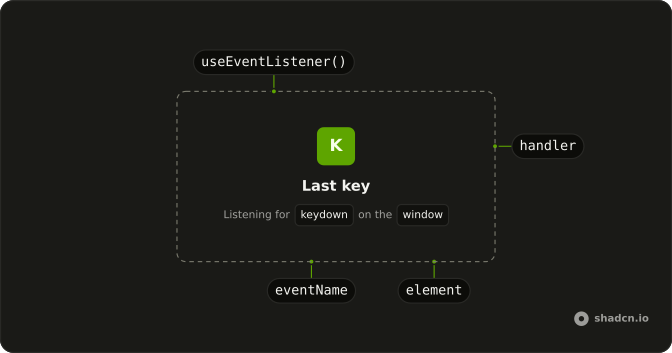
useEventListener adds a DOM listener and removes it when the component unmounts or the subscription changes.
Omit the element to listen on window. Pass a ref to listen on that node, or a document ref for document events. The handler is kept in a ref, so it reads current state. For a stable callback you can put in a dependency list, see useEventCallback. The subscription is created in an effect, so React does not touch window during server render.
Installation
Anatomy
Usage
import { useEventListener } from "@/hooks/use-event-listener";useEventListener("keydown", (event) => {
setKey(event.key);
});FAQ
How do I listen on window, an element, or document?
Omit the third argument to listen on window. Pass an element ref to use HTML element event types. Pass a ref whose current value is document to use document event types. TypeScript picks the handler event from that choice. At runtime a missing ref, or a ref whose current value is null, falls back to window, because the effect uses the current node or else window.
Can I pass capture, passive, or once?
Yes. The fourth argument goes to addEventListener and removeEventListener. Pass true or false for capture, or an object with capture, passive, and once. The effect depends on that value. A new object on every render removes the listener and adds it again. Keep one options object, or a boolean, when the subscription should stay while the parent renders.
Does the handler see the latest state?
Yes. Your handler is saved on a ref, and a layout effect on the client updates that ref when the handler changes. The function attached to the node stays the same and calls the current handler. It sees state from the latest commit even if you do not wrap the handler in useCallback. The subscription itself changes only when the event name, the ref, or the options change.
Do I need to remove the listener myself?
No. The effect returns a cleanup that calls removeEventListener with the same event name, listener, and options. React runs that on unmount, and again before the effect re-runs when the event name, the ref, or the options change. If the target has no addEventListener, the effect adds nothing. You do not write a matching remove in the component.
Is the listener attached during server render?
No. The listener is added in useEffect, so it runs on the client only. That effect is what reads window or the ref. The handler ref is updated with useLayoutEffect in the browser and with useEffect on the server. Server render does not subscribe and does not touch window. The first client commit is what attaches the listener.
Which event targets are in the types?
The overloads cover window events, HTML element events, and document events. There is no separate signature for an SVG element or a media query list. An element ref is typed as an HTMLElement ref, and the element type defaults to HTMLDivElement. For a window event such as keydown, leave the ref off. The handler then receives the window event for that event name.
API Reference
Parameters
eventNamekeyof WindowEventMap | keyof HTMLElementEventMap
The event to listen for: "resize", "keydown", "click"…
- Type
keyof WindowEventMap | keyof HTMLElementEventMap
handler(event: WindowEventMap[keyof WindowEventMap] | HTMLElementEventMap[keyof HTMLElementEventMap] | Event) => void
Called with the event, typed for the target and the event's name.
- Type
(event: WindowEventMap[keyof WindowEventMap] | HTMLElementEventMap[keyof HTMLElementEventMap] | Event) => void
element?React.RefObject<HTMLElement>
A ref to the element (or the document) to listen on. The window when left out.
- Type
React.RefObject<HTMLElement>
options?boolean | AddEventListenerOptions
addEventListener's options, or its useCapture boolean.
- Type
boolean | AddEventListenerOptions