shadcn.io is an independent project built on shadcn/ui
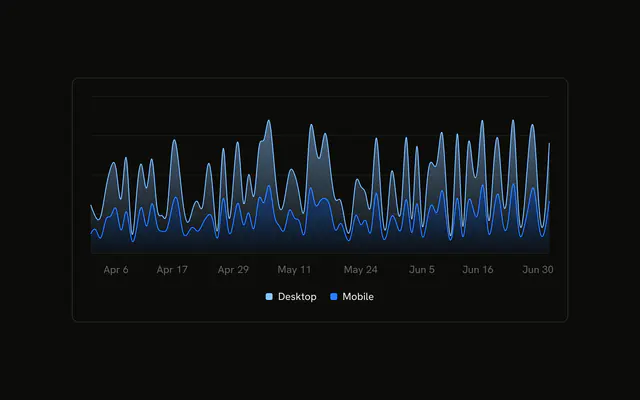
Desktop and mobile stacked as smooth areas. A legend under the chart names both colors.
Add a legend once a chart has more than one series and the colors are not obvious. Labels on the series work for a single line. A Table still wins when people need the numbers. In React, Base UI turns the two colors into variables the legend can read. You still pass the rows.
Installation
Anatomy

Usage
<div className="w-full max-w-xl rounded-md border bg-background p-4">
  <ChartContainer config={chartConfig}>
    <AreaChart
      accessibilityLayer
      data={chartData}
      margin={{
        left: 12,
        right: 12,
      }}
    >
      <CartesianGrid vertical={false} />
      <XAxis
        axisLine={false}
        dataKey="month"
        tickFormatter={formatMonth}
        tickLine={false}
        tickMargin={8}
      />
      <ChartTooltip
        content={<ChartTooltipContent indicator="line" />}
        cursor={false}
      />
      <Area
        dataKey="mobile"
        fill="var(--color-mobile)"
        fillOpacity={0.4}
        stackId="a"
        stroke="var(--color-mobile)"
        type="natural"
      />
      <Area
{/* The rest of the file is under Installation. */}
FAQ
How does the legend get Desktop and Mobile?
ChartLegend sets content to ChartLegendContent. That reads label from config for each series and draws a color swatch. These entries have no icon, and this file passes no onClick. verticalAlign stays at bottom, which adds space above the legend.
How are the areas stacked under that legend?
Both Area components set stackId="a". Mobile is first, on the baseline. Desktop is second, on top. Both use type="natural" and fillOpacity={0.4}, and they fill var(--color-mobile) and var(--color-desktop).
How do I move the legend above the chart?
Set verticalAlign="top" on ChartLegend. ChartLegendContent then uses the top spacing, pb-3, under the legend. The default bottom uses pt-3 above it. The labels still come from config.
What does the tooltip show?
ChartTooltipContent sets indicator="line". The title is the month, and the rows are Mobile and Desktop with their values. cursor={false} on ChartTooltip turns the hover cursor off.
API Reference
Chart
Sets config={chartConfig} and indicator="line". The rest is on the Chart page.