shadcn.io is an independent project built on shadcn/ui
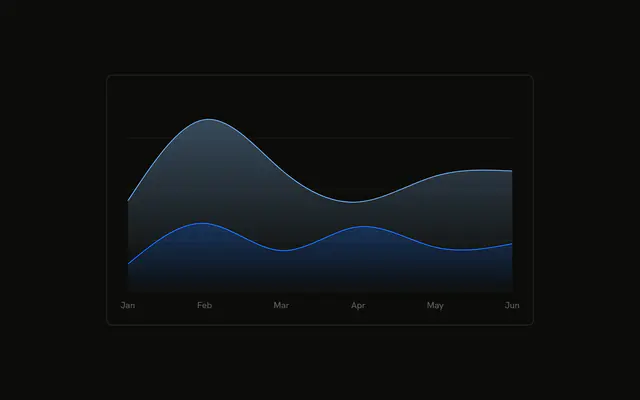
Desktop and mobile stacked as smooth areas, with a value axis on the left showing three ticks. Month names along the bottom are shortened.
Use a value axis when people should read a magnitude off the chart, not only from the tooltip. Skip it when the shape is enough. For exact rows, use a Table. In React, Base UI does not choose three ticks. You add the axis, and you pass the rows.
Installation
Anatomy

Usage
<div className="w-full max-w-xl rounded-md border bg-background p-4">
  <ChartContainer config={chartConfig}>
    <AreaChart
      accessibilityLayer
      data={chartData}
      margin={{
        left: -20,
        right: 12,
      }}
    >
      <CartesianGrid vertical={false} />
      <XAxis
        axisLine={false}
        dataKey="month"
        tickFormatter={formatMonth}
        tickLine={false}
        tickMargin={8}
      />
      <YAxis axisLine={false} tickCount={3} tickLine={false} tickMargin={8} />
      <ChartTooltip content={<ChartTooltipContent />} cursor={false} />
      <Area
        dataKey="mobile"
        fill="var(--color-mobile)"
        fillOpacity={0.4}
        stackId="a"
        stroke="var(--color-mobile)"
        type="natural"
      />
      <Area
        dataKey="desktop"
        fill="var(--color-desktop)"
{/* The rest of the file is under Installation. */}
FAQ
How many numbers does the Y axis show?
YAxis sets tickCount={3}, so Recharts aims for three ticks. axisLine and tickLine are false, and tickMargin is 8. This file doesn't set tickFormatter on YAxis, so the ticks are the raw scale numbers.
Why is the left margin negative?
AreaChart sets margin to left: -20 and right: 12. The negative left margin pulls the plot toward the frame so the YAxis labels sit in that gutter. The right margin is 12, matching the other edge's padding on the X ticks.
How do desktop and mobile stack?
Both Area components set stackId="a". Mobile is first, on the baseline. Desktop is second, on top of it. Both use type="natural" and fillOpacity={0.4}, with fill and stroke of var(--color-mobile) and var(--color-desktop).
How are the month ticks shortened?
XAxis uses dataKey="month" and tickFormatter={formatMonth}, which returns value.slice(0, 3). axisLine and tickLine are false, and tickMargin is 8. CartesianGrid sets vertical={false}, so the grid lines run across the Y scale.
API Reference
Chart
Sets config={chartConfig}. The rest is on the Chart page.