shadcn.io is an independent project built on shadcn/ui
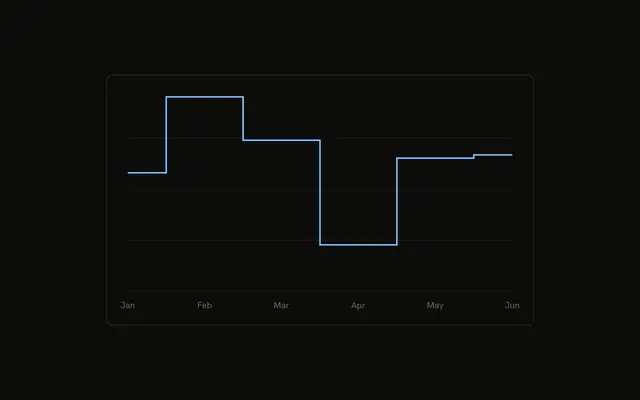
An area that stays flat through each month, then jumps. The tooltip shows the series icon from the chart config, and it does not repeat the month.
Use a step area for levels that hold until they change, such as a plan tier or a stock count. A smooth area implies a slope you may not have. List the months in a Table when the shape is not enough. In React, Ark UI does not hold the value flat. You set the step, and you pass the icon on the config.
Installation
Anatomy

Usage
<div className="w-full max-w-xl rounded-md border bg-background p-4">
  <ChartContainer config={chartConfig}>
    <AreaChart
      accessibilityLayer
      data={chartData}
      margin={{
        left: 12,
        right: 12,
      }}
    >
      <CartesianGrid vertical={false} />
      <XAxis
        axisLine={false}
        dataKey="month"
        tickFormatter={formatMonth}
        tickLine={false}
        tickMargin={8}
      />
      <ChartTooltip content={renderTooltipContent} cursor={false} />
      <Area
        dataKey="desktop"
        fill="var(--color-desktop)"
        fillOpacity={0.4}
        stroke="var(--color-desktop)"
        type="step"
      />
    </AreaChart>
  </ChartContainer>
</div>
FAQ
How do I get the stair steps?
Area sets type="step". The value stays flat and then jumps at the next month. dataKey is desktop, fill and stroke are var(--color-desktop), and fillOpacity is 0.4.
Where does the Activity icon show up?
config sets icon to ActivityIcon on desktop. This file has no ChartLegend. ChartTooltipContent draws that icon in the tooltip, in place of the color dot, next to the label Desktop.
Why is the month missing from the tooltip?
ChartTooltipContent sets hideLabel, which hides the tooltip title. XAxis already shows the month. The row is the Activity icon, Desktop, and the value. cursor={false} turns the hover cursor off.
How are the ticks shortened?
XAxis uses dataKey="month" and tickFormatter={formatMonth}, which returns value.slice(0, 3). axisLine and tickLine are false, and tickMargin is 8. CartesianGrid sets vertical={false}.
API Reference
Chart
Sets config={chartConfig}, content={renderTooltipContent} and cursor={false}. The rest is on the Chart page.