shadcn.io is an independent project built on shadcn/ui
Start Onboarding opens a muted panel with a large icon, the title Welcome aboard, and one line under it. Four dots mark the steps, and the first is filled. Skip and Next sit beside the dots. The last step replaces them with Get Started.
Use it for a short first-run tour people can skip. If a step must point at the real screen, anchor a Popover there. In React, Base UI does not remember that the tour finished.
Installation
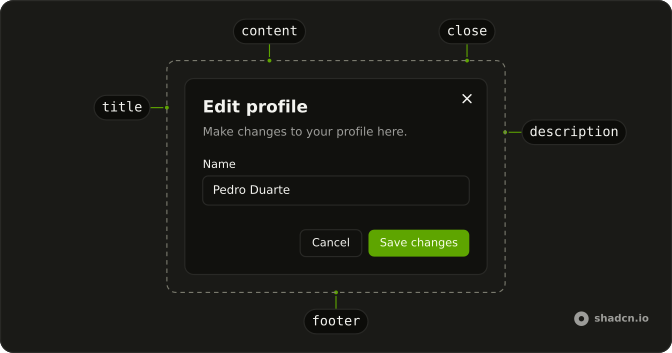
Anatomy
Usage
<Dialog onOpenChange={handleOpenChange}>
  <DialogTrigger render={<Button variant="outline" />}>
    Start Onboarding
  </DialogTrigger>
  <DialogContent className="sm:max-w-2xl">
    <div className="flex h-64 items-center justify-center rounded-lg bg-muted">
      <step.icon
        aria-hidden="true"
        className="size-24 text-muted-foreground"
      />
    </div>
    <DialogHeader className="items-center text-center sm:text-center">
      <DialogTitle className="text-2xl">{step.title}</DialogTitle>
      <DialogDescription>{step.description}</DialogDescription>
    </DialogHeader>
    <div className="flex items-center justify-between">
      <div aria-hidden="true" className="flex gap-2">
        {steps.map((item, index) => (
          <div
            className={cn(
              "size-2 rounded-full transition-colors",
              index === currentStep ? "bg-foreground" : "bg-muted"
            )}
            key={item.title}
          />
        ))}
      </div>
      <div className="flex gap-4">
        {currentStep < lastStep ? (
          <>
            <Button onClick={handleSkip} variant="ghost">
{/* The rest of the file is under Installation. */}
FAQ
How many steps should onboarding have?
Three to five, one idea each. Measure where people drop off and cut the steps nobody needs.
Should people be able to skip?
Always. Skip jumps to the last step here, and the close button and Escape close the dialog at any point.
How do the progress dots work?
They're mapped from the steps, with bg-foreground on the current one and bg-muted on the rest. They're decorative and aria-hidden; the title changes with each step.
Is each step announced?
Each step's title and text are the DialogTitle and DialogDescription, so the dialog is always labelled by the current step.
API Reference
Dialog
Sets onOpenChange={handleOpenChange}. The rest is on the Dialog page.
Button
Sets variant="outline", onClick={handleSkip}, variant="ghost" and onClick={handleNext}. The rest is on the Button page.