shadcn.io is an independent project built on shadcn/ui
Invite Team opens Invite team members. Three email fields use colleague, teammate, and partner placeholders. Send Invitations sits above a divider that reads Or share link, then a read-only invite URL and Copy.
Use it to invite people without opening settings. Copy does not write to the clipboard until you add that. A role beside each email fits a Select. In React, Base UI does not send the invites.
Installation
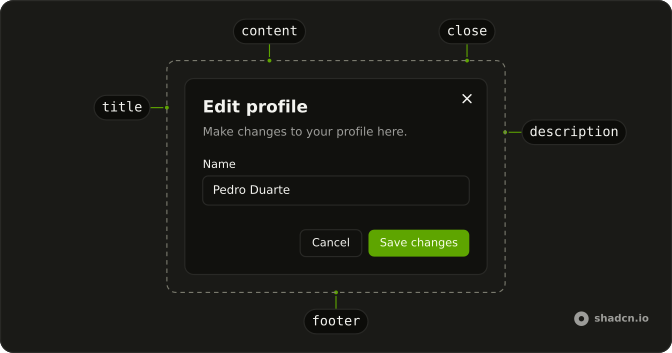
Anatomy
Usage
<Dialog>
  <DialogTrigger render={<Button variant="outline" />}>
    Invite Team
  </DialogTrigger>
  <DialogContent className="sm:max-w-lg">
    <DialogHeader>
      <DialogTitle>Invite team members</DialogTitle>
      <DialogDescription>
        Invite your team members to collaborate on this project.
      </DialogDescription>
    </DialogHeader>
    <FieldGroup>
      {invitees.map((invitee) => (
        <Field key={invitee.name}>
          <FieldLabel htmlFor={invitee.name}>Email address</FieldLabel>
          <Input
            id={invitee.name}
            name={invitee.name}
            placeholder={invitee.placeholder}
            type="email"
          />
        </Field>
      ))}
      <Button className="w-full">Send Invitations</Button>
      <FieldSeparator>Or share link</FieldSeparator>
      <Field>
        <FieldLabel className="sr-only" htmlFor="invite-link">
          Invite link
        </FieldLabel>
        <div className="flex items-center gap-2">
          <Input
{/* The rest of the file is under Installation. */}
FAQ
How do I validate the emails?
Validate each field when it loses focus and show a FieldError under the invalid ones. Empty fields are fine; disable Send Invitations until at least one address is valid.
Should invite links expire?
Yes, after a week or so, and let admins regenerate them. Say when the link expires in its FieldDescription.
How do I make Copy work?
Copy the link to the clipboard on click and confirm with a toast or a brief Copied label. The Clipboard component does this with a built-in indicator.
Can I pick a role for each invitee?
Yes: add a Select beside each email, or one default role for the whole batch.
API Reference
Dialog
No extra props in this demo. The rest is on the Dialog page.
Button
Sets variant="outline" and size="sm". The rest is on the Button page.
Field
Sets htmlFor={invitee.name} and htmlFor="invite-link". The rest is on the Field page.
Input
Sets id={invitee.name}, name={invitee.name}, placeholder={invitee.placeholder}, type="email", id="invite-link" and readOnly. The rest is on the Input page.