shadcn.io is an independent project built on shadcn/ui
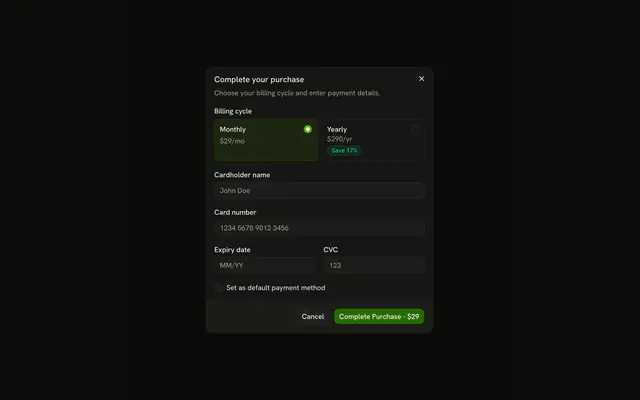
Add Payment Method opens Add card details. The fields are cardholder name, card number, expiry, and CVC, plus Set as default payment method. Cancel and Add Card sit at the bottom.
Use it to take a card without leaving the page. Send the numbers through your payment provider, not your server. A longer checkout fits a Sheet. In React, Base UI does not check the card number.
Installation
Anatomy
Usage
<Dialog>
  <DialogTrigger render={<Button variant="outline" />}>
    Add Payment Method
  </DialogTrigger>
  <DialogContent className="sm:max-w-md">
    <DialogHeader>
      <DialogTitle>Add card details</DialogTitle>
      <DialogDescription>
        Enter your card information to add a payment method.
      </DialogDescription>
    </DialogHeader>
    <FieldGroup>
      <Field>
        <FieldLabel htmlFor="card-details-card-name">
          Cardholder name
        </FieldLabel>
        <Input
          autoComplete="cc-name"
          id="card-details-card-name"
          name="card-name"
          placeholder="John Doe"
          type="text"
        />
      </Field>
      <Field>
        <FieldLabel htmlFor="card-details-card-number">
          Card number
        </FieldLabel>
        <Input
          autoComplete="cc-number"
          id="card-details-card-number"
{/* The rest of the file is under Installation. */}
FAQ
Can I send these card fields to my server?
Don't handle raw card numbers yourself. Use your payment provider's hosted fields or SDK, which return a token you store instead; this layout shows where those fields go.
How do I format the card number?
Group the digits in fours as people type, and detect the brand from the first digits. The inputs already set inputMode="numeric" and autoComplete="cc-number" so phones show a number pad and browsers can fill saved cards.
How do I validate the expiry date?
Check the MM/YY format, a month from 01 to 12 and a date that isn't in the past, and show the error in the field with a FieldError.
Should the CVC be masked?
No, it's short-lived and people need to check what they typed. Keep it visible, with autoComplete="cc-csc".
API Reference
Dialog
No extra props in this demo. The rest is on the Dialog page.
Button
Sets variant="outline". The rest is on the Button page.
Field
Sets htmlFor="card-details-card-name", htmlFor="card-details-card-number", htmlFor="card-details-card-expiry", htmlFor="card-details-card-cvc", orientation="horizontal" and htmlFor="card-details-default-method". The rest is on the Field page.
Input
Sets autoComplete="cc-name", id="card-details-card-name", name="card-name", placeholder="John Doe", type="text" and autoComplete="cc-number". The rest is on the Input page.
Checkbox
Sets id="card-details-default-method" and name="default-method". The rest is on the Checkbox page.