shadcn.io is an independent project built on shadcn/ui
A ghost icon button shows an info icon. It opens a panel whose visible text is Helpful information goes here. The title More information is there for screen readers and is not shown.
Use it beside a label whose meaning is not obvious, so the help stays out of the way. A hint that should follow the pointer belongs in a Tooltip. In React, Base UI does not supply the help text.
Installation
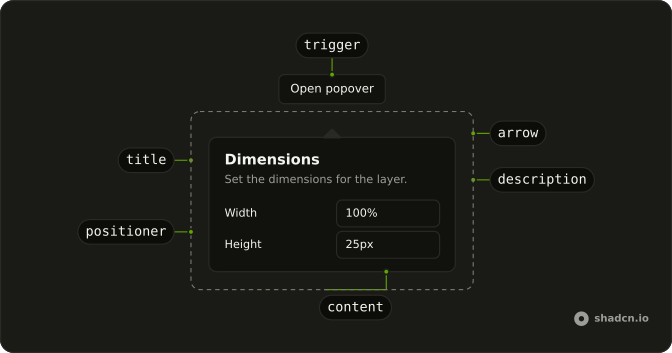
Anatomy
Usage
<Popover>
  <PopoverTrigger
    render={
      <Button aria-label="More information" size="icon-md" variant="ghost" />
    }
  >
    <InfoIcon aria-hidden="true" />
  </PopoverTrigger>
  <PopoverContent>
    <PopoverTitle className="sr-only">More information</PopoverTitle>
    <p>Helpful information goes here.</p>
  </PopoverContent>
</Popover>
FAQ
What does the info panel contain?
PopoverTitle reads More information and has className="sr-only". The visible copy is one p: Helpful information goes here. The button's aria-label is the same phrase, More information.
How does the info icon become the trigger?
The trigger is a Button with variant="ghost", size="icon-md", and aria-label="More information". InfoIcon has aria-hidden="true". Activating the button opens the panel.
Pass the button to render on PopoverTrigger, and use PopoverContent as the panel.
How is the icon button named?
The button has aria-label="More information". InfoIcon is aria-hidden="true", so the icon is decorative. PopoverTitle repeats More information for the panel and is sr-only.
How much text is in this demo?
One sentence: Helpful information goes here. It sits in PopoverContent under the hidden title. This file sets no width class, so the panel keeps w-72.
API Reference
Popover
No extra props in this demo. The rest is on the Popover page.
Button
Sets aria-label="More information", size="icon-md" and variant="ghost". The rest is on the Button page.