shadcn.io is an independent project built on shadcn/ui
Actions opens three full-width buttons: Edit, Share, and Delete. Delete uses the destructive style. Each one closes the panel. The title Actions is hidden and read by screen readers.
Use it for a few actions on one item when a menu would be more chrome than help. Delete should still confirm if it cannot be undone, in an Alert Dialog. In React, Base UI does not run Edit, Share, or Delete.
Installation
Anatomy
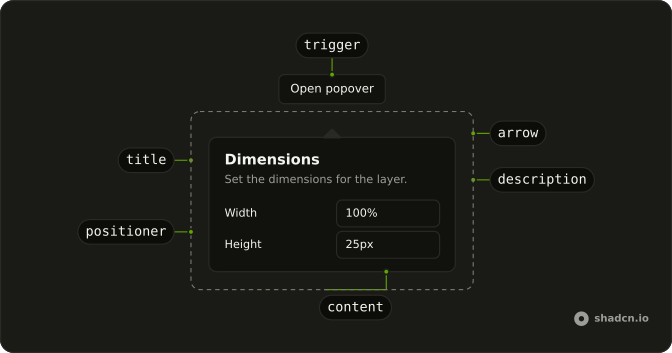
Usage
<Popover onOpenChange={setOpen} open={open}>
  <PopoverTrigger render={<Button variant="outline" />}>
    Actions
  </PopoverTrigger>
  <PopoverContent className="gap-2">
    <PopoverTitle className="sr-only">Actions</PopoverTitle>
    <Button className="w-full" onClick={handleAction}>
      Edit
    </Button>
    <Button className="w-full" onClick={handleAction} variant="outline">
      Share
    </Button>
    <Button className="w-full" onClick={handleAction} variant="destructive">
      Delete
    </Button>
  </PopoverContent>
</Popover>
FAQ
How do I close this panel from code?
Edit, Share and Delete each close the panel.
Here the panel is controlled: open and onOpenChange on Popover, and the button's handler sets the state to false. The callback gets the next open state first.
How does the Actions button become the trigger?
The trigger is a Button with variant="outline" and the label Actions. PopoverTitle reads Actions and has className="sr-only".
Pass the button to render on PopoverTrigger, and use PopoverContent as the panel.
What order are the actions in?
Edit, then Share, then Delete, which is the order of the buttons in the file. Delete is the one with variant="destructive". Share is variant="outline". All three are w-full.
API Reference
Popover
Sets onOpenChange={setOpen} and open={open}. The rest is on the Popover page.
Button
Sets variant="outline", onClick={handleAction} and variant="destructive". The rest is on the Button page.