Skip to content

shadcn.io is an independent project built on shadcn/ui

Free

Share Popover for React

A Share button that opens Facebook and Twitter buttons, a read-only link, and a copy button that switches to a check.

Share opens Share this page, with Facebook and Twitter buttons, a separator, and the line Or copy link. The link is read-only. The copy button writes it to the clipboard and shows a check.

Use it to keep sharing one click from the content. Facebook and Twitter do not post until you wire them. A share with permissions belongs in a Dialog. In React, Base UI does not post the link.

Preview

Preview width

Installation

Sign in to get your install command
Free with an account. It carries your token, so the CLI installs everything in one go.
Use email insteadNo credit card

Anatomy

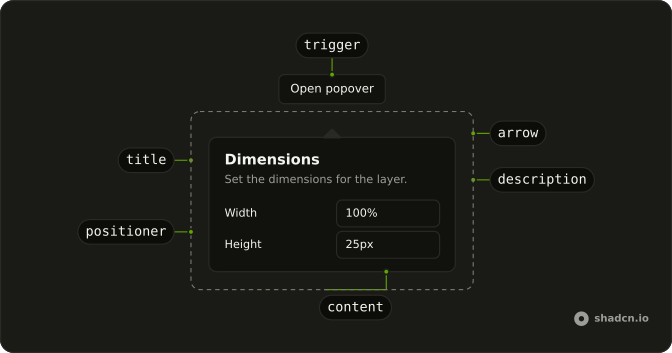
Popover anatomy: trigger, title, positioner, arrow, description, content

Usage

<Popover>
  <PopoverTrigger render={<Button variant="outline" />}>
    <Share2Icon aria-hidden="true" data-icon="inline-start" />
    Share
  </PopoverTrigger>
  <PopoverContent className="w-80 max-w-full">
    <PopoverTitle>Share this page</PopoverTitle>
    <div className="flex gap-2">
      <Button className="flex-1" variant="outline">
        <svg
          aria-hidden="true"
          data-icon="inline-start"
          fill="none"
          stroke="currentColor"
          strokeLinecap="round"
          strokeLinejoin="round"
          strokeWidth="2"
          viewBox="0 0 24 24"
        >
          <path d="M18 2h-3a5 5 0 0 0-5 5v3H7v4h3v8h4v-8h3l1-4h-4V7a1 1 0 0 1 1-1h3z" />
        </svg>
        Facebook
      </Button>
      <Button className="flex-1" variant="outline">
        <svg
          aria-hidden="true"
          data-icon="inline-start"
          fill="none"
          stroke="currentColor"
          strokeLinecap="round"
          strokeLinejoin="round"
{/* The rest of the file is under Installation. */}

FAQ

How does copy link work?

The copy button writes shareUrl, https://example.com/share, to the clipboard with navigator.clipboard.writeText, then shows a check and the label Copied for two seconds before going back to Copy link. Both icons are aria-hidden, so the aria-label names the button.

How is the link field set up?

The Input has type="url", readOnly, and aria-label="Link", and its value is shareUrl. It sits in a flex gap-2 row with the icon button, which is size="icon-md" variant="outline". The line above the field says Or copy link in text-muted-foreground text-xs.

What do the Facebook and Twitter buttons do in this file?

They are Buttons with variant="outline" and flex-1, in a flex gap-2 row. Each has an svg with aria-hidden="true" and data-icon="inline-start". This demo gives them no handler or link yet.

How does the Share button become the trigger?

The trigger is a Button with variant="outline". Share2Icon has aria-hidden="true" and data-icon="inline-start", and the label is Share. PopoverTitle reads Share this page. PopoverContent is w-80 max-w-full. Pass the button to render on PopoverTrigger, and use PopoverContent as the panel.

What is the separator between?

A Separator sits between the Facebook and Twitter row and the copy block. The copy block is the Or copy link line plus the read-only input. The title Share this page is above both.

How does this panel dismiss?

Escape closes the panel and returns focus to the trigger. A click outside closes it too. The panel sits beside the button, and the rest of the page stays usable.

API Reference

Popover

No extra props in this demo. The rest is on the Popover page.

Button

Sets variant="outline", aria-label={isCopied ? "Copied" : "Copy link"}, onClick={handleCopy} and size="icon-md". The rest is on the Button page.

Separator

No extra props in this demo. The rest is on the Separator page.

Input

Sets aria-label="Link", readOnly, type="url" and value={shareUrl}. The rest is on the Input page.